How to Prepare Test Cases A Guide for Modern QA Teams
Learn how to prepare test cases that improve software quality. This guide covers everything from requirements analysis to AI-powered automation for QA pros.
Automate and scale manual testing with AI ->
Preparing a solid test case isn’t just about writing down a few steps. It’s about translating abstract software requirements into a concrete, repeatable script that proves a feature works exactly as it should. This means you need a crystal-clear understanding of the feature’s scope, the specific conditions needed to start the test, a series of logical actions, and a precise definition of what success looks like.
Why Mastering Test Case Preparation Is Non-Negotiable
Let’s be honest: staring at a complex new feature without a clear testing plan can be daunting. But well-prepared test cases are your secret weapon. They’re far more than a simple to-do list; they’re your first line of defense against bugs that could tarnish user satisfaction and your company’s reputation. Think of them as the roadmap for your entire quality assurance effort, making sure every critical user journey is checked and double-checked before it ever goes live.
This isn’t just a “nice-to-have.” The global software testing market has exploded to USD 55.8 billion and is on track to double by 2034. That’s a massive investment in quality. And for good reason—research shows that poor test case design is a culprit in 68% of production bugs. On the flip side, following best practices like tying tests directly to requirements can boost your coverage to an impressive 95%. You can find more insights on the software testing market over on gminsights.com.
The True Value of a Well-Written Test Case
A great test case does so much more than just confirm a feature “works.” Its value echoes throughout the entire development lifecycle.
- Clarity and Consistency: It gets everyone on the same page. A junior tester and a senior developer can run the same test and get the same, unambiguous result.
- Defect Prevention: The very act of writing a test case forces you to think through user flows and edge cases. This often uncovers design flaws or gaps in the requirements before a developer even starts coding.
- Efficient Regression Testing: When you have a solid library of test cases, running regression tests after a code change becomes a breeze. You can quickly spot if a new feature accidentally broke something else.
A meticulously prepared test case is a form of communication. It tells a story about how a feature should behave from the user’s perspective, creating a shared understanding across development, QA, and product teams.
Forget those rigid, old-school templates that stifle creativity. Today’s best QA teams are blending detailed manual test design with smart tools like TestDriver to get comprehensive coverage without slowing down. This guide will walk you through how to nail this foundational process right from the start, setting your projects up for success.
Translating Requirements Into Testable Scenarios
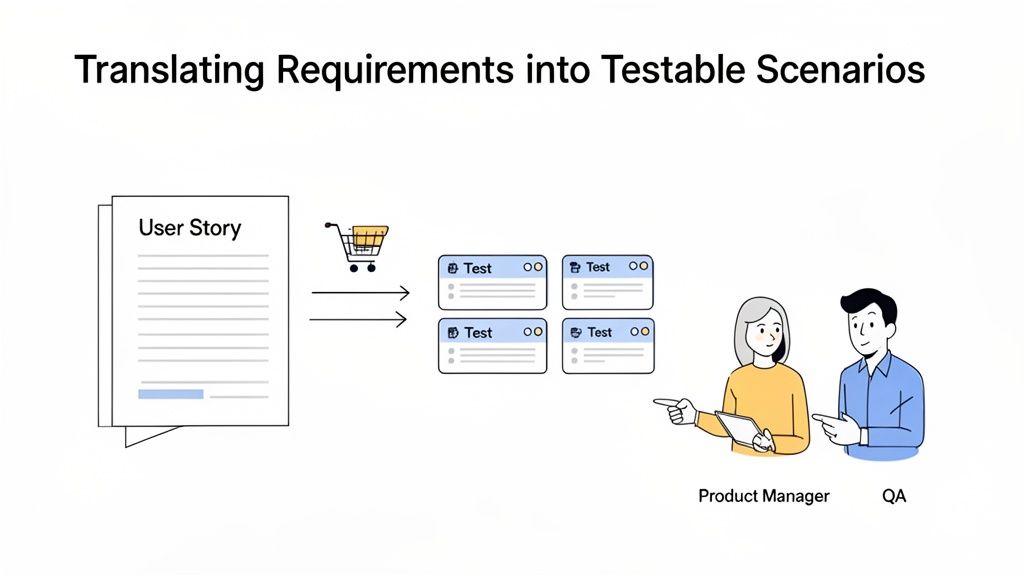
Before you even think about writing a test step, you have to put on your detective hat. The best test cases don’t just appear out of thin air; they grow from a deep, almost obsessive, understanding of the requirements. These might come to you as formal user stories, dense functional specs, or sometimes just a rough design mockup. Your first job is to tear them apart and find every single testable scenario lurking inside.
This is where the real quality assurance happens. You’re not just finding bugs; you’re preventing them from ever being coded. Ambiguity is the arch-nemesis of quality software. A vague requirement like “The user should be able to apply a discount” is a ticking time bomb, leaving way too much room for interpretation.
Deconstructing Requirements and Squashing Ambiguities
The goal here is to turn broad statements into a list of specific, verifiable questions. When you hit a fuzzy requirement, don’t guess. Your first move should always be to talk to the product manager and developers. Kicking off this conversation early saves everyone from painful rework down the line.
Let’s take a classic user story from an e-commerce site: “As a customer, I want to apply a discount code so that I can get a lower price on my order.”
On the surface, it seems simple enough. But an experienced QA pro sees the gaps immediately. To build solid test cases, you need to start asking the “what if” questions that expose the real business logic:
- What happens if the code is just flat-out invalid? What if it’s expired?
- Can someone stack multiple discount codes on one order?
- Does the discount apply before or after taxes and shipping?
- Are some products excluded from this discount?
- Is there a minimum purchase amount needed for the code to work?
By asking these pointed questions, you’re forcing the team to nail down the feature’s behavior. This isn’t just about clarifying the scope for testing; it often helps refine the feature itself, closing logical loopholes before a single line of code is written.
Defining a Clear and Actionable Test Scope
With the ambiguities ironed out, you can now define your test scope. Think of the scope as your battle plan. It lays out exactly what you will test, what you will intentionally ignore for this release, and the reasoning behind those decisions. Without a clear scope, it’s easy to burn hours testing low-risk corners while critical functionality goes unchecked.
A well-defined scope isn’t just a to-do list; it’s a strategic document based on risk, business priorities, and the resources you have. It makes sure your testing effort is aimed squarely at what matters most.
Defining scope is an act of prioritization. It’s about consciously deciding where to invest your limited time to achieve the maximum level of confidence in the software’s quality.
For our discount code example, a focused test scope might be laid out in a simple table:
| In Scope (What We Will Test) | Out of Scope (What We Will Not Test) |
|---|---|
| Applying a valid percentage-based discount code. | Stacking multiple discount codes on a single order. |
| Applying a valid fixed-amount discount code. | Testing codes for specific product categories (future release). |
| Verifying error messages for invalid or expired codes. | Performance testing of the validation API under high load. |
| Ensuring the discount calculates correctly in the order total. | UI responsiveness on devices smaller than 320px width. |
This little table brings incredible clarity to the entire team. Developers know the exact success criteria, product managers know what’s being delivered, and you have a clear mandate for your testing. This is how you prepare test cases that matter, ensuring every test serves a purpose tied directly to the project’s goals.
Crafting Crystal Clear Manual Test Cases
Alright, let’s get our hands dirty. Translating high-level requirements into a practical test plan is one thing, but writing a manual test case that anyone—from a junior tester to a product manager—can execute without a single question? That’s a different beast entirely. The ultimate goal here is to kill all ambiguity.
A truly great manual test case is a self-contained instruction manual for one, very specific test. Every single part of it has a job to do, all working together to create a process that’s clear, repeatable, and easy to verify. If you leave any room for interpretation, I can guarantee you’ll get inconsistent results, and that’s how bugs sneak into production.
The Anatomy of a Perfect Test Case
Think of a good test case like a recipe. It needs a title (the name of the dish), a list of ingredients and tools (preconditions), step-by-step instructions (test steps), and a picture of what it should look like at the end (expected results). If you skip any of these, you’re just asking for a mess in the kitchen.
Let’s break down these crucial components:
- Test Case ID: This is just a unique identifier (like TC-LOGIN-001) that makes it a breeze to track, reference in bug reports, and link back to your requirements.
- Title/Summary: Give it a short, descriptive name that instantly tells you what the test is for. “Test Login” is vague and unhelpful. “Verify Successful Login with Valid Credentials” is exactly what you need.
- Preconditions: What state does the system need to be in before you even start the test? This could mean being on a certain page, having a specific user account already created, or ensuring some data exists in the database.
- Test Steps: This is a numbered sequence of actions the user takes. Each step should be a single, clear action. Seriously, don’t try to cram multiple actions into one step—it only leads to confusion.
- Test Data: Specify the exact data to use for the test, like the username and password. Write it out directly or reference a shared data source.
- Expected Result: This is an unambiguous description of what should happen after the final step. It has to be precise and something you can actually observe.
A well-structured test case is an asset that pays dividends. It cuts down execution time, prevents misinterpretation, and makes onboarding new team members so much easier. They can pick it up and provide value from day one.
For a deeper dive into the nuances of each component, you might be interested in our complete guide on how to write test cases.
From Theory to Practice: Real-World Examples
Let’s see how this structure plays out with a classic scenario—validating the “Add to Cart” button on an e-commerce site.
Here’s an example of what not to do:
Bad Test Case Example:
- Title: Check Cart
- Steps: Go to a product and add it to the cart.
- Expected Result: It should work.
This is a QA nightmare. It’s vague, has no preconditions, and that “expected result” is completely useless. A different tester could interpret this in five different ways and you’d never know if the feature was actually working correctly.
Now, let’s fix it:
Good Test Case Example:
- Test Case ID: TC-CART-003
- Title: Verify a Product Can Be Added to Cart from Product Detail Page
- Preconditions:
User is not logged in (guest user).
-
User is on the “SuperWidget Pro” product detail page.
-
The shopping cart is empty.
-
Test Steps:
Observe the cart icon in the header, noting the item count (0).
-
Click the “Add to Cart” button.
-
Expected Result:
A success notification “SuperWidget Pro has been added to your cart” appears.
- The cart icon in the header updates to show a count of 1.
See the difference? This version is precise, repeatable, and leaves absolutely no doubt about what success looks like.
Writing Smarter, Not Harder, with Test Design Techniques
You can’t write a test case for every single possible input; you’d be there forever. This is where test design techniques become your best friend. They are systematic ways to choose the most effective test data without testing every permutation.
Two of the most powerful and easy-to-use techniques are Equivalence Partitioning and Boundary Value Analysis.
Let’s say you have a form field that accepts ages from 18 to 60.
- Equivalence Partitioning is all about dividing data into logical groups. For our age field, we’d have three partitions: invalid (under 18), valid (18-60), and invalid (over 60). You only need to test one value from each group (e.g., 17, 35, 61) to get solid coverage for that entire range.
- Boundary Value Analysis focuses on the “edges” of those ranges, because that’s where developers often make mistakes. For the 18-60 range, we’d specifically test the values right at and next to the boundaries: 17, 18, 19 and 59, 60, 61.
Using these techniques helps you achieve maximum coverage with the minimum number of test cases, focusing your energy where you’ll find the most bugs. The explosion of digital applications has tripled the test volume for many teams, making this kind of efficiency non-negotiable.
A balanced approach that allocates roughly 30% of cases to happy paths, 40% to edge cases (like boundaries), and 30% to negative paths is a proven strategy that can yield up to 92% test coverage. You can discover more insights about test case management market trends and how they’re shaping the world of quality assurance.
Shifting From Manual Effort to Automated Excellence
A well-written manual test case isn’t just a set of instructions for a human; it’s the blueprint for your future automation suite. The clarity and structure you build into your manual tests today will directly determine how quickly and effectively you can automate them tomorrow.
Think of it this way: a vague, rambling manual test is a nightmare to automate. But a clean, modular, and data-driven test case? That’s a gift to your automation engineers.
The trick is to adopt an “automation-first” mindset, even when you’re writing tests to be run by hand. This means breaking down big, complex user journeys into smaller, more manageable pieces. Instead of one monster test case for the entire e-commerce checkout flow, you’d create separate, focused tests for login, adding an item to the cart, applying a discount code, and finalizing the purchase. This approach makes everything easier to maintain and scale down the line.
Designing Manual Tests for a Seamless Automation Transition
Prepping your manual tests for automation isn’t about adding extra work. It’s about being deliberate with your structure and language. A few smart habits now will save your team countless hours of guesswork and refactoring later when it’s time to write the code.
This flow chart breaks down the essential parts of a manual test case that make it easy to translate into an automated script.
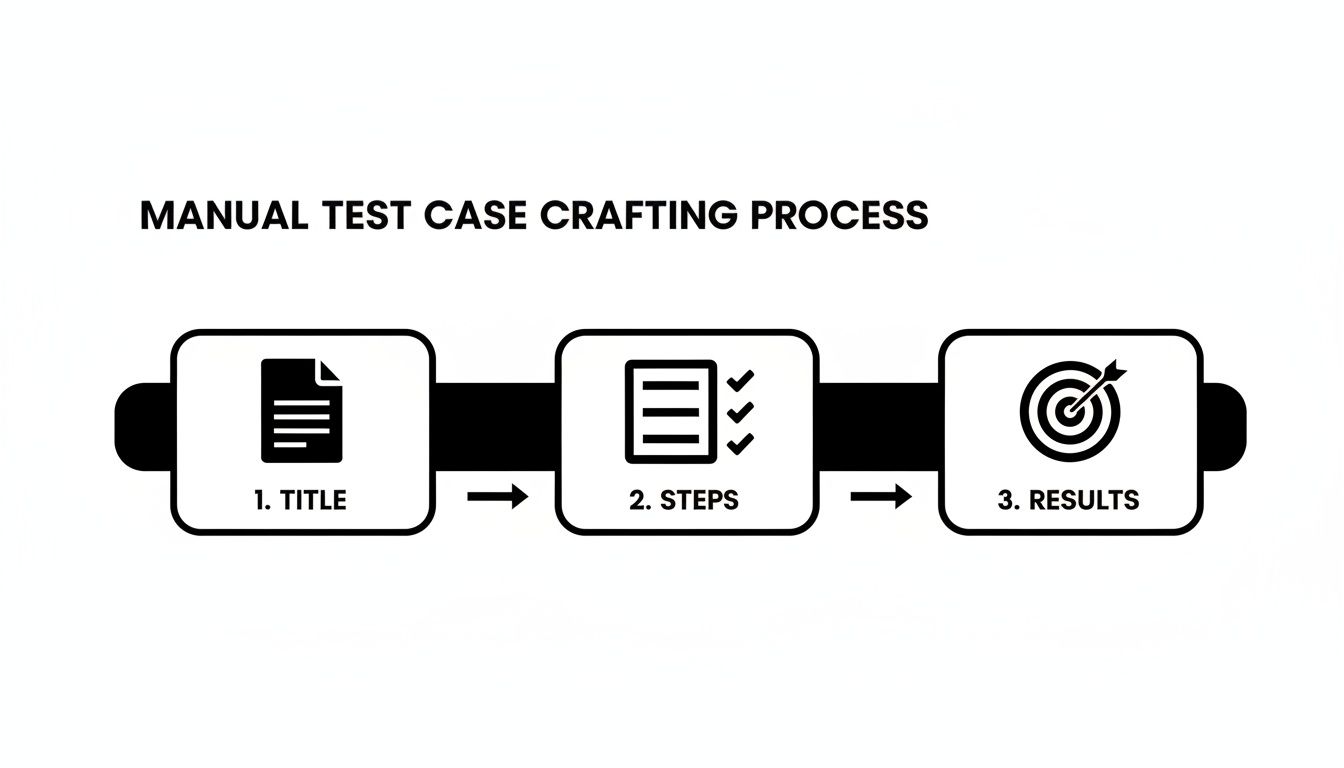
Each of these elements—a clear title, specific steps, and precise expected results—acts as a direct instruction for either a person or a script.
Here are a few practical tips to get your manual tests ready for their automated future:
- Get Specific with Assertions: Vague statements like “User is logged in” are useless for automation. Instead, write something concrete and verifiable, like “The user’s profile avatar is visible in the top navigation” and “The page URL is now ‘/dashboard’.”
- Separate Your Test Data: Never hardcode data like usernames, passwords, or product IDs directly into your test steps. Create a separate “Test Data” section. This makes it a breeze to run the same test logic with different data sets, which is a cornerstone of solid automation.
- Identify UI Elements Clearly: Refer to UI elements using stable, unique identifiers. Instead of “Click the green button,” write “Click the ‘submit-login’ button (ID: ‘submit-login’).” This gives your automation engineer a clear target to work with.
The time you put into properly structuring your manual tests is a direct investment in your automation efforts. I’ve seen clean, well-documented manual suites cut the time to build the corresponding automated suite by more than 50%.
This structured approach doesn’t just pave the way for automation; it also makes your manual testing process far more consistent and reliable.
The AI Catalyst: From Test Intent to Executable Script
The leap from manual to automated testing used to be a long, painstaking process. Now, AI is completely changing the game. Modern QA tools can bypass the line-by-line scripting process almost entirely.
Instead of meticulously translating each step of a manual test case into code, you can now state your goal in plain English and let an AI agent do the heavy lifting.
For example, you could give an AI-powered tool like TestDriver a simple prompt like, “Test the entire checkout flow for a guest user purchasing a single item.” The AI interprets that intent, explores your application to understand the user journey, and then generates a complete, ready-to-run end-to-end test script. It will even include the necessary assertions and logic to handle dynamic page elements.
This is a massive shift in how we approach testing. The focus moves from the tedious mechanics of scripting to the high-level business goals we need to validate. It saves hundreds of hours and also opens up test creation to non-engineers, like product managers, who can now contribute directly to the QA process. To see this in action, check out our guide on automated test case generation.
The market data tells the same story. The AI in test automation market is projected to skyrocket from USD 0.6 billion to USD 3.4 billion by 2033. AI-powered tools already command a 72.5% market share because they can generate 80% more test cases than manual methods, and teams are slashing scripting time by up to 70%.
The end goal is a testing ecosystem where your manual and automated efforts are perfectly in sync. Your deep, human understanding of the user guides the strategy, while AI provides the speed and scale to make comprehensive test coverage a reality.
Maintaining a Healthy and Effective Test Suite
Getting your initial set of test cases written is a huge milestone. But the real work—the part that separates a good QA practice from a great one—is keeping that test suite healthy over the long haul. A test suite isn’t a static document; it’s a living part of your product that has to grow and change right alongside it.
If you don’t actively manage it, your suite will quickly become bloated with outdated or irrelevant tests. Think of it like gardening. You can’t just throw some seeds in the ground and hope for the best. You need to constantly prune, weed, and water. An unmaintained test suite is full of “weeds”—flaky, redundant, and irrelevant tests that waste time and obscure the true health of your application.
Prioritizing Tests with a Risk-Based Approach
Let’s be realistic: you’ll almost never have enough time to run every single test before a release. When the clock is ticking, you have to be smart about where you focus your energy. This is where a risk-based approach becomes your best friend. It’s all about funneling your efforts into the parts of the application where a failure would hurt the most.
Instead of treating every test as equal, you start prioritizing based on two simple but powerful questions:
- How likely is it to break? Is this a brand-new feature built on complex logic? Or is it a part of the system that gets modified in nearly every sprint? The more complex or frequently changed a feature is, the higher the likelihood of a bug popping up.
- How bad would it be if it broke? A bug in your checkout flow could mean lost revenue and angry customers—that’s a massive business impact. A typo on the “About Us” page? Not so much.
By mapping out features based on likelihood and impact, a clear hierarchy emerges. A high-impact, high-likelihood feature, like a new payment integration, demands rigorous testing every single time. A low-impact, low-likelihood area can be tested less often. If you’re looking for ways to organize this process, check out this breakdown of different test case management systems.
The Power of Peer Reviews
Before you even think about running a new test case, have someone else on your team look it over. A peer review is a simple, incredibly effective quality check that catches issues before they ever become a problem. It’s amazing what a second pair of eyes can spot—ambiguous language, missing preconditions, or even a more efficient way to test something the author overlooked.
A quick review checklist can keep things consistent:
- Clarity: Is the title crystal clear? Could a new hire run this test without needing to ask for help?
- Accuracy: Do the steps and expected results actually match the requirements document?
- Completeness: Are all the necessary setup steps and test data specified?
- Efficiency: Is this test lean and focused? Are there any wasted steps?
A test case peer review isn’t about criticism; it’s a collaborative process to build a shared understanding of quality. It strengthens the entire team and elevates the quality of the final test suite.
Managing the Test Case Lifecycle
Test cases shouldn’t have a job for life. As your application evolves, your tests need to keep up. Proactively managing the lifecycle of every test case is the only way to keep your suite from becoming a graveyard of irrelevant checks.
Knowing when to update a test is just as important as knowing when to retire it. If a feature’s behavior changes, the tests for it need to be updated immediately. If a feature is removed entirely, those tests should be archived. Don’t just delete them—you never know when that feature might make a comeback and you’ll want a historical reference.
This constant gardening prevents “test rot,” where your reports are cluttered with failures for features that don’t even exist anymore. This noise makes it impossible to get a clear picture of your product’s quality. For highly critical systems, this lifecycle management extends to specialized checks; for example, in blockchain projects, using Smart Contract Audit Tools is a non-negotiable step to validate security. A healthy test suite always provides an accurate, up-to-date reflection of the product as it exists today.
Got Questions? Let’s Talk Test Cases
Even seasoned pros run into questions when they’re deep in the weeds of test case prep. It’s just part of the job. Let’s clear up some of the most common hurdles I see teams grappling with so you can move forward with confidence.
Test Case vs. Test Scenario: What’s the Real Difference?
It’s so easy to use these terms interchangeably, but getting them straight is key for clear communication within your team. I always tell people to think of it as the “what” versus the “how.”
A test scenario is the big-picture goal—the “what” you’re trying to validate. It’s a simple, high-level statement like, “Verify a user can log into their account.” It sets the stage.
A test case, on the other hand, is where you get granular. It’s the step-by-step instruction manual—the “how” you’ll actually test that scenario. A single scenario will almost always spawn multiple test cases to cover all the possible outcomes.
For that “Verify a user can log into their account” scenario, you’d need specific test cases for:
- Logging in with valid credentials (the happy path).
- Trying to log in with the wrong password.
- Trying to log in with a username that doesn’t exist.
- Attempting to log in as a user whose account is locked.
Separating them this way keeps everything organized and makes it immediately clear which high-level goals have been buttoned up with detailed, executable tests.
How Many Test Cases Is “Enough” for a Feature?
Ah, the million-dollar question. The honest answer? There’s no magic number. Getting bogged down in hitting a specific count is a trap. The real goal is achieving solid coverage and, more importantly, confidence.
The complexity of the feature should be your north star. A simple copy change on a landing page might only need a quick visual check. But a brand-new payment gateway? You could be looking at dozens of tests to cover different card types, currencies, failure codes, and success paths.
The question shouldn’t be, “How many tests do I need?” Instead, ask yourself, “Have I thoroughly covered the most critical user journeys, the most likely points of failure, and the trickiest edge cases?” This simple reframing shifts the entire focus from quantity to quality.
Lean on the test design techniques we’ve talked about—like equivalence partitioning and boundary value analysis—to get more bang for your buck. They help you write smarter, more efficient tests that cover entire categories of inputs without mindlessly testing every single possibility.
Will AI Just Write All Our Test Cases Soon?
Not completely, no. But it’s quickly becoming an indispensable partner, and it’s fundamentally changing how we work. AI is an absolute beast at handling the repetitive, time-consuming grunt work of test case generation. It can spit out a comprehensive suite of tests for a standard login flow or API endpoint in minutes—a task that would take a human tester hours of tedious work.
This is a good thing! It frees up human testers to focus on the things we do best:
- Exploratory Testing: Getting creative and trying to break the system in clever ways a machine would never think of.
- Usability and UX Feedback: Judging the feel of the application, which is something only a human can do.
- Complex Business Logic: Untangling nuanced, context-dependent rules that an AI might easily misunderstand.
The most effective approach I’ve seen is a hybrid one. Let AI do the heavy lifting of generating that baseline coverage. Then, let your QA experts use their intuition and critical thinking to find those subtle, high-impact bugs that pure automation would almost certainly miss.
How Should We Be Managing Test Data?
Messy test data leads to flaky tests and useless results. It’s that simple. Getting your data management strategy right is a cornerstone of any reliable testing process. And rule number one is non-negotiable: never, ever use real customer data in your test environments. The privacy and security risks are just too high.
First, figure out exactly what data each test case needs to run—user credentials, product SKUs, promo codes, you name it. Then, your job is to create isolated, reusable data sets.
Here are a few best practices that have saved me countless headaches:
- Generate Synthetic Data: Create realistic-looking but completely fake data that mirrors the structure of your production data.
- Use Anonymized Production Copies: If you absolutely need production-like data, use tools to scrub and anonymize all personally identifiable information (PII) before it ever touches your test environment.
- Keep Your Data Separate: For tests that need lots of different inputs, store your data in external files like a CSV or JSON. This lets you run the same test logic against hundreds of data combinations, making your suite far more robust and way easier to maintain.
Ready to stop writing test cases and start generating them with AI? With TestDriver, you can turn a simple prompt into a comprehensive, executable test suite in minutes. Free up your team to focus on what matters most—delivering a flawless user experience.
Automate and scale manual testing with AI
TestDriver uses computer-use AI to test any app - write tests in plain English and run them anywhere.