A Practical Guide to Quality Assurance in Software Development
Discover how quality assurance in software development works. Learn modern QA processes, key testing types, and how AI is revolutionizing software delivery.
Struggling with Mock vs Stub? This guide clarifies the key differences with practical code examples to help you choose the right test double for your project.
Automate and scale manual testing with AI ->
When people talk about mocks and stubs, the real difference boils down to a single question: are you checking the final result or the steps taken to get there?
Think of it this way: stubs are for testing state, while mocks are for testing behavior. A stub gives your code a canned answer when it asks a question, while a mock watches to make sure your code asks the right questions in the first place.
In testing, we often use “test doubles”—stand-in objects that replace real, complex components like databases or external APIs. This lets you isolate the specific piece of code you’re testing from everything it depends on, which is the whole point of a good unit test. Mocks and stubs are two of the most common types of these test doubles, and while they seem similar, they serve very different purposes.
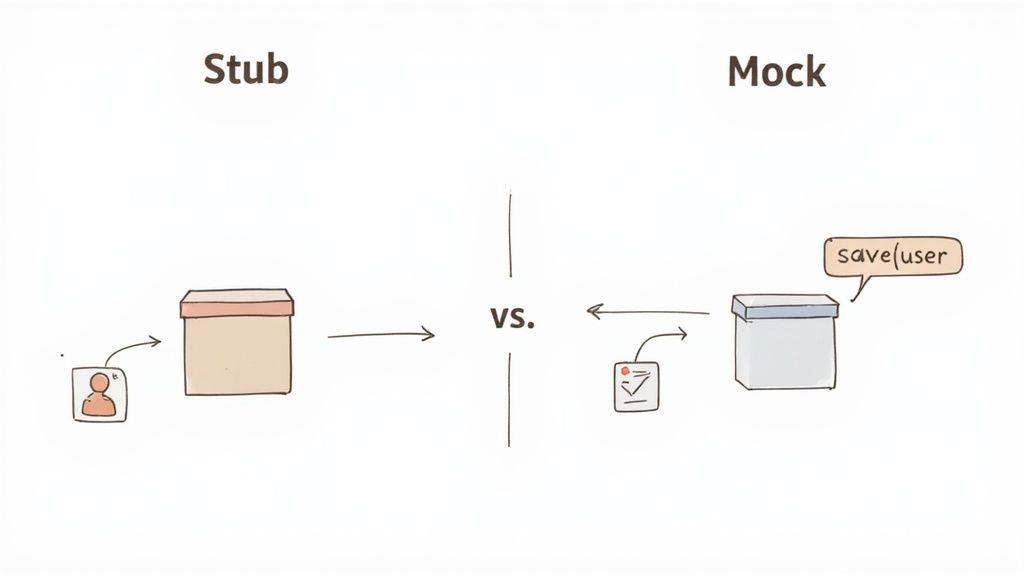
A stub is pretty straightforward. It’s like a stand-in that has one job: deliver a specific, pre-programmed response when called. You set it up to return a certain value—like a specific user object or an error—so your test can run predictably without needing a live database connection.
A mock, however, is more like an undercover agent. It doesn’t just provide responses; it actively monitors and records every interaction. At the end of the test, you can ask the mock, “Hey, was my save method called? And was it called with the correct user data?” This lets you verify that your code is interacting with its dependencies exactly as you expect.
To quickly see how they stack up, here’s a high-level look at their key differences. This table should help you get a gut feeling for which one you might need at a glance.
| Attribute | Stub | Mock |
|---|---|---|
| Primary Purpose | Provide canned data to the system under test. | Verify that specific methods were called on a dependency. |
| Verification Focus | State Verification: Checks the final state or output. | Behavior Verification: Checks the sequence of interactions. |
| Complexity | Simpler to set up and maintain. | More complex due to behavior-tracking and verification logic. |
| Typical Use Case | Testing a function that relies on data from a database. | Testing if an email service’s send() method was called. |
This comparison highlights that the choice isn’t just about preference; it’s about what your test is trying to prove.
Because they’re simpler, stubs are often the workhorse of unit testing. When all you need is to supply some consistent data to check an outcome, a stub is usually the right tool for the job. It’s no surprise that in a global developer poll, over 60% of respondents said they prefer using stubs for these kinds of basic state checks.
On the other hand, mocks become essential when the interaction itself is the thing you need to test. For example, you might need to ensure your code calls a payment gateway’s charge() method before it calls the notifyCustomer() method. This kind of behavioral verification is crucial in complex systems, with some experts noting that mocks are used in more than 45% of enterprise-level test suites to enforce these contracts between components. You can discover more insights about testing approaches on builtin.com.
Key Takeaway: Choose a stub when your test just needs to check the final state. Grab a mock when you need to validate the process—the specific sequence of method calls and interactions—that led to that state. Getting this right is the first step to writing tests that are not only effective but also easy to understand and maintain.
When we get right down to it, the difference between a mock and a stub isn’t just about their code—it’s about their philosophy. They represent two completely different ways of thinking about what a unit test is supposed to prove: state verification versus behavior verification. Getting this distinction right is the key to deciding which one to use.
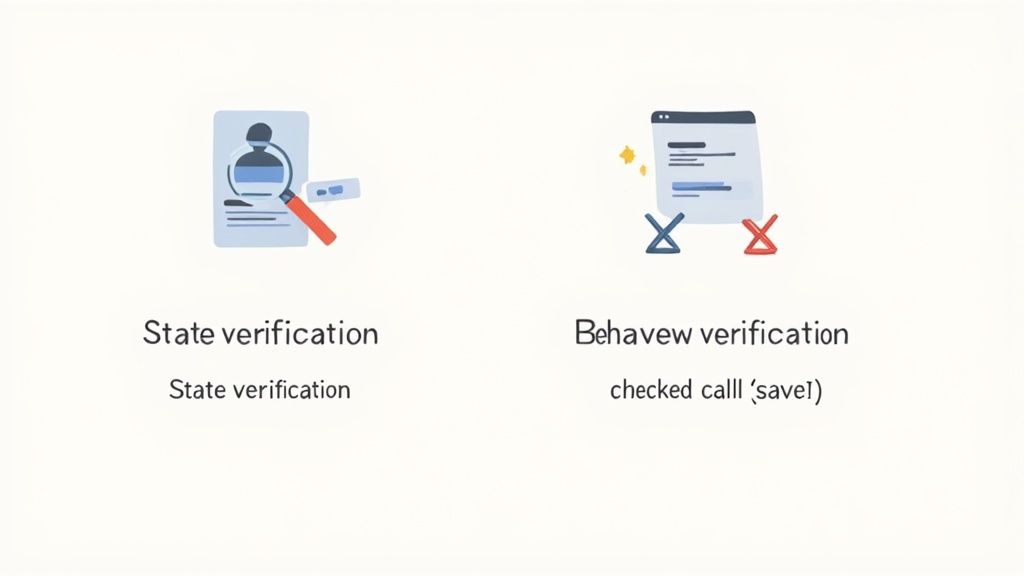
The choice boils down to what you need your test to confirm. Are you checking the final result of an action, or do you need to make sure a specific process was followed to get there? This decision directly shapes how resilient and reliable your tests will be.
State verification is all about the outcome. After your code has run, you check to see if the world is in the state you expect it to be. Did the function return the right value? Was a property on an object updated correctly? It’s concerned with the “what.”
This is where stubs shine. A stub’s only job is to provide predictable, canned responses so your code can execute without tripping over a missing dependency. This lets you focus entirely on the output. A stub doesn’t care how your code produces the result, only that it does.
Let’s say we’re testing a function that calculates a user’s age based on their birthdate. It needs a userRepository to get the user’s data. A stub for that repository would just hand back a predefined user object every single time.
// Example of a stub for state verification
const stubUserRepository = {
findById: (id) => {
// Always returns the same user object

return { name: "Jane Doe", birthdate: "1990-05-15" };
}
};
// The test focuses on the final output
const age = calculateUserAge(123, stubUserRepository);
expect(age).toBe(34); // Verifying the final state (the calculated age)
In this case, the test is dead simple: given this specific input from the stub, do we get the right output? The internal logic is a black box; only the final state matters.
Behavior verification, on the other hand, is all about the journey, not the destination. It checks how your code collaborates with its dependencies. Did it call the right methods? In the right order? With the right arguments? It’s focused on the “how.”
This is mock territory. A mock is like an undercover agent that you place inside your test. It watches and records every interaction. At the end, you interrogate the mock to verify that everything happened exactly as you expected. This is crucial when a method doesn’t return a value but triggers a side effect, like saving to a database or firing off an email.
Key Insight: Use state verification (stubs) when you’re testing queries or data transformations. Use behavior verification (mocks) when you’re testing commands that change the system’s state or trigger external actions.
Let’s tweak our user example. Imagine a function that updates a user’s email and saves the change. The save method probably doesn’t return anything useful, which makes checking the final state tricky. What we really care about is ensuring that save was actually called.
A mock is the perfect tool for this job. You set up the mock repository with an expectation that its save method will be called with a specific user object.
// Example of a mock for behavior verification using Jest
const mockUserRepository = {
// Mock ‘save’ method that records it was called
save: jest.fn(),
findById: (id) => { /* returns a user */ }
};
// The test sets an expectation on the interaction updateUserEmail(123, “[email protected]”, mockUserRepository);
expect(mockUserRepository.save).toHaveBeenCalledWith({
id: 123,
email: “[email protected]” });
If our updateUserEmail function forgets to call save, or calls it with the wrong data, the test immediately fails. The focus completely shifts from “what was the result?” to “did the right interactions happen along the way?”
| Aspect | State Verification (Stubs) | Behavior Verification (Mocks) |
|---|---|---|
| Primary Question | Did I get the right answer? | Did the code follow the right steps? |
| Focus | The final output or state of an object. | The interactions between objects. |
| Typical Use | Testing functions that return values or transform data. | Testing commands, event handlers, or side effects. |
| Test Coupling | Loosely coupled to implementation details. | Tightly coupled to the interaction protocol. |
| Common Tools | Stubs, Fakes | Mocks, Spies |
Ultimately, the whole “mock vs. stub” debate is really a stand-in for the bigger question of your verification strategy. Once you know whether you’re trying to validate a state or a behavior, you can pick the right tool for the job with confidence and build a much more meaningful test suite.
Theory is one thing, but getting your hands dirty with code is where these concepts really click. Seeing mocks and stubs work in a real test suite makes the difference between state and behavior verification crystal clear. Let’s jump into some concrete examples using Jest, a popular JavaScript testing framework, to show you how it’s done.
We’ll work with a common scenario: a NotificationService that needs to fetch a user’s data from an API and then fire off a welcome email. It’s the perfect test case because it involves both getting data (a great job for a stub) and triggering an action (a classic use case for a mock).
First, let’s look at the code we want to test. We have a UserService responsible for fetching user info and a NotificationService that uses it.
// A simple dependency that fetches user data
class UserService {
getUser(userId) {
// In a real app, this would make an API call

throw new Error('API call not implemented');
}
}
// The service we want to test
class NotificationService {
constructor(userService, emailClient) {
this.userService = userService;

this.emailClient = emailClient; // Another dependency
}
sendWelcomeEmail(userId) {
const user = this.userService.getUser(userId);

if (user) {

   const message = `Welcome, ${user.name}!`;

  this.emailClient.send(user.email, message);

  return true; // Indicates success

}

return false; // Indicates user not found
}
}
As it stands, testing NotificationService is a non-starter. Any test would immediately fail because it tries to make a real API call. This is precisely why we need test doubles like stubs and mocks.
Let’s start with a stub. We’ll use one when our test only cares about the final result. In this case, we want to confirm that sendWelcomeEmail returns true when it successfully finds a user. We don’t really care how the email gets sent—just that our service behaves correctly based on the data it receives.
So, we’ll create a stub for UserService that returns a predefined, “canned” user object.
// Test using a stub to verify the return state
test(‘should return true when user is found (using a stub)’, () => {
// 1. Setup: Create a stub with a canned response
const userServiceStub = {
getUser: (userId) => ({ id: userId, name: 'John Doe', email: '[[email protected]](mailto:[email protected])' }) };// A dummy email client since we are not testing it const dummyEmailClient = { send: () => {} };
const notificationService = new NotificationService(userServiceStub, dummyEmailClient);
// 2. Act: Call the method const result = notificationService.sendWelcomeEmail(1);
// 3. Assert: Verify the final state (the return value)
expect(result).toBe(true);
});
See how clean and focused that is? The stub provides controlled input, and the assertion checks the final state (result). The stub guarantees our test is predictable and completely isolated from any external service. For more complex API scenarios, you might need a dedicated tool; you can learn more about how to effectively use Mockoon for API mocking and testing in our detailed guide.
Now, let’s change our perspective. What if the most important part of this feature is making absolutely sure an email gets sent? The true return value is nice, but the real business logic is the interaction with the emailClient. This is a job for a mock.
This time, we’ll use a mock to spy on the emailClient and verify that its send method was called with exactly the right arguments.
The Jest documentation highlights how its mock functions can track calls, instances, and return values—the very foundation of behavior verification.
This ability to inspect the how—the interactions happening under the hood—is exactly what we need.
// Test using a mock to verify interaction
test(‘should send a welcome email to the correct user (using a mock)’, () => {
// 1. Setup: Stub the user service as before
const userServiceStub = {
getUser: (userId) => ({ id: userId, name: 'Jane Doe', email: '[[email protected]](mailto:[email protected])' }) };// Create a mock for the email client using Jest
const emailClientMock = {
send: jest.fn() // jest.fn() creates a mock function};
const notificationService = new NotificationService(userServiceStub, emailClientMock);
// 2. Act: Call the method notificationService.sendWelcomeEmail(2);
// 3. Assert: Verify the behavior
expect(emailClientMock.send).toHaveBeenCalledTimes(1);
expect(emailClientMock.send).toHaveBeenCalledWith(
 '[[email protected]](mailto:[email protected])',

'Welcome, Jane Doe!'
);
});
Key Difference in Practice: The stub test asserts
expect(result).toBe(true), focusing on the output. The mock test assertsexpect(emailClientMock.send).toHaveBeenCalledWith(...), focusing on the interaction.
This second test validates the process. It couldn’t care less what sendWelcomeEmail returns. Its entire purpose is to confirm that the NotificationService talks to its emailClient dependency correctly. By using a mock, we verify the behavioral contract between the two components—something a simple stub was never designed to do.
Deciding between a mock and a stub isn’t just a technical detail—it’s a strategic choice that goes to the heart of what your test is trying to prove. Get it right, and you’ll have clear, resilient tests. Get it wrong, and you’re stuck with a brittle test suite that’s a nightmare to maintain.
The entire decision boils down to one simple question: Am I testing the final state of something, or am I testing how it got there?
In other words, do you care about the answer a method gives you, or are you more concerned with the specific steps and collaborations it took to produce that answer? Once you know that, the choice becomes much clearer.
This flowchart lays out the decision-making process based on what you need to verify.
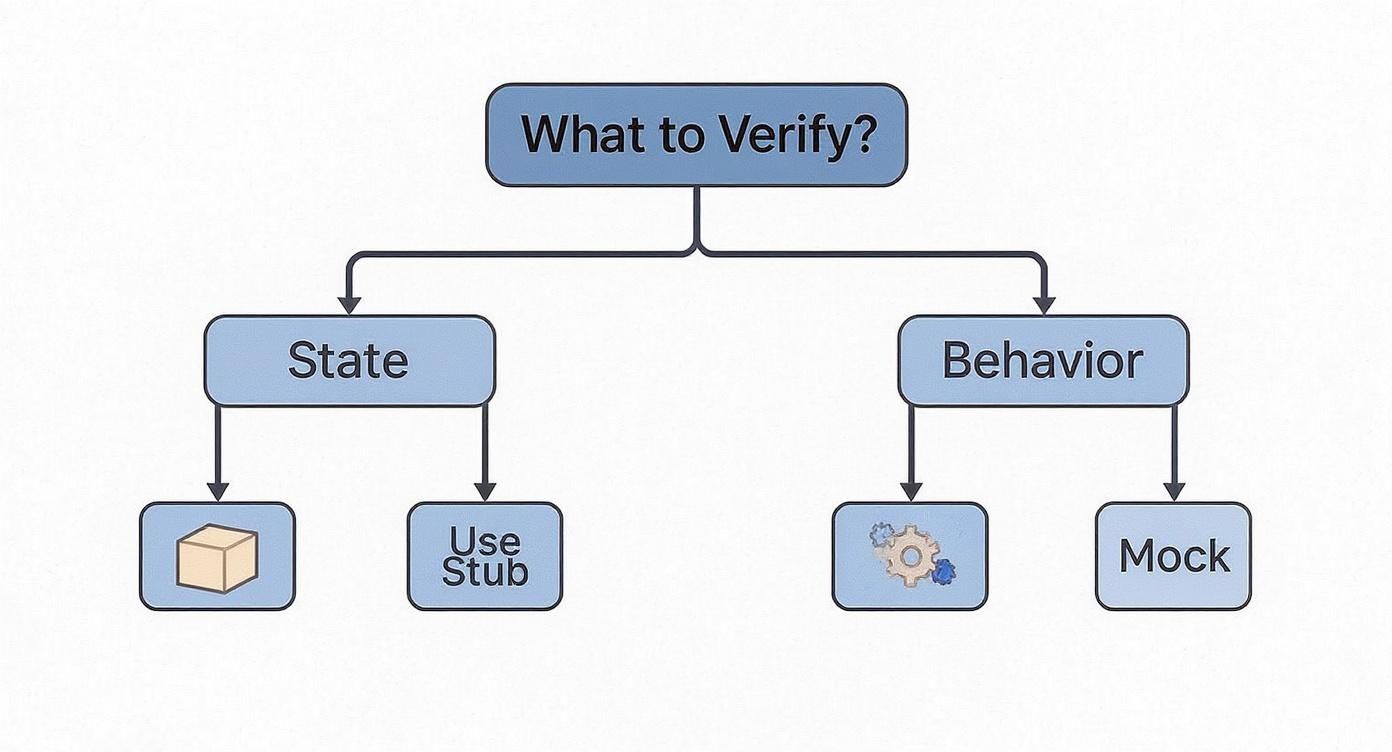
As you can see, it’s a straightforward path. If your test just needs to check the final ‘state’ of an object or a simple return value, a stub is your tool. If you absolutely must confirm the ‘behavior’—the specific interactions between your components—then you’ll need a mock.
A stub is the perfect choice when your code needs some data from a dependency to do its job. Think of a stub as a stand-in that provides a reliable, predictable piece of information, allowing the rest of your code to continue its work. They create a controlled environment for your test to run in.
You’ll want to reach for a stub in these classic situations:
Guideline: Prefer stubs whenever you can verify the outcome by checking a method’s return value or the final state of the object it worked on. This leads to tests that are less coupled to the internal workings of your dependencies.
Put simply, if your test assertion looks something like expect(result).toBe(true), a stub is almost always the right fit. It keeps the focus squarely on the what, not the how.
A mock steps in when the action itself is more important than any value that might come back. Mocks are all about behavioral verification; they’re like watchdogs that make sure your code interacts with its dependencies exactly as you expect. They are absolutely essential for testing any “command” that causes a side effect.
Go with a mock when you need to:
send method was called with the right endpoint and payload. This is a lifesaver for actions that don’t return any meaningful data.userService.delete(userId), a mock is the only way to prove the delete method was actually called.paymentGateway.charge() is called before notificationService.sendReceipt(). The order of operations is a behavioral contract that only a mock can enforce.Using mocks properly is a cornerstone of a solid testing strategy. To learn more about getting the most out of them, especially with APIs, check out our guide on how to enhance your testing strategy with API mocks.
The bottom line is, if your assertion is checking an interaction—like expect(mock.method).toHaveBeenCalled()—then you need a mock. It validates that your code is a good collaborator and plays well with others.
Knowing how to use mocks and stubs is one thing, but knowing how to use them well is what separates a fragile test suite from a truly resilient one. These test doubles are fantastic for isolating components, but they come with their own set of traps. If you’re not careful, you can end up with tests that are brittle, a nightmare to maintain, and—worst of all—give you a false sense of security.
The first step is understanding the difference between a mock and a stub. The next is sidestepping these common mistakes so your tests remain a valuable asset, not a liability. Weaving test doubles into your workflow effectively often comes down to following solid Agile development best practices.
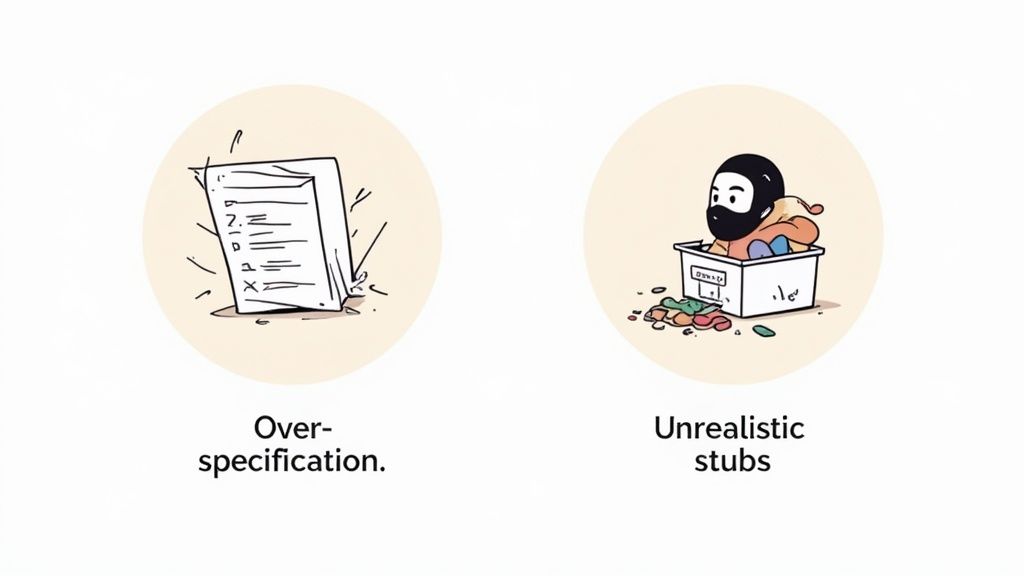
One of the most common mistakes I see, especially with mocks, is over-specification. This is where your test becomes obsessed with the how instead of the what. It gets too tightly coupled to the internal workings of the code it’s testing, essentially micromanaging every single method call.
Imagine a test that verifies five different helper methods are called in a very specific order. That test might pass today, but what happens next week when a developer refactors the code? A perfectly safe change, like reordering two non-dependent calls, will break the test even though the final result is exactly the same.
This leads to brittle tests that constantly fail on minor, irrelevant changes. Before long, developers start ignoring the test suite altogether.
Here’s another big one: don’t mock what you don’t own. Mocking external libraries or third-party APIs is a recipe for disaster. When you create that mock, you’re making a big assumption about how that library behaves. If the library gets an update and its API changes, your tests will keep passing because they’re running against your outdated mock, not the real thing.
You’ve just hidden a serious integration bug that will likely only surface in production. The better approach is to wrap the external library in an adapter that you do own. Then, you can mock your own adapter, giving you a stable interface that insulates your code from any third-party drama.
Best Practice: Only mock types that you own and control. For external dependencies, create a wrapper or adapter and mock that instead. This practice insulates your tests from external changes and keeps them focused on your application’s logic.
Stubs are supposed to provide simple, predictable data, but it’s easy to make them too simple. A huge pitfall is creating stubs that only return “perfect” data that doesn’t reflect the messy reality of your production environment.
For example, a stub might always return a user object with a name, email, and address all filled out. But what if the address field is optional and often null in your actual database? Your tests, blissfully unaware, will never check the code paths that handle that missing data, leaving a nasty bug hiding in plain sight.
To dodge this, make sure your stubs serve up a variety of realistic data:
To keep your test suite healthy and maintainable, keep these guiding principles in mind:
The whole “mock vs. stub” discussion usually lives in the world of unit testing, but don’t be mistaken—these patterns are incredibly powerful when you zoom out to integration and end-to-end (E2E) tests. The scale is just different. Instead of swapping out a single object in your code, you’re now replacing an entire external service to keep your test environment stable and predictable.
This shift in scope is key to building dependable tests that actually validate your system’s user flows. The core ideas—verifying state versus verifying behavior—are still the same. You just aren’t stubbing a single function anymore; you’re “stubbing out” a whole third-party API. And you’re not mocking one method call; you’re “mocking” a network request to confirm your app is talking to other systems correctly.
Let’s be honest, the biggest headaches in integration testing are almost always external dependencies. Payment gateways, email providers, partner APIs—they can be slow, flaky, or even expensive to hit during a test run. This is exactly where stubs shine, evolving into a practice called service virtualization.
Think of a stub in this context as a stand-in for the entire external service. It waits for specific API calls from your application and then serves up consistent, predefined responses.
This approach effectively isolates your system from outside chaos. When a test fails, you know the bug is in your code, not because a third-party service is having a bad day. Managing these canned responses is a critical part of the process, and it’s worth looking into effective strategies for version controlling mock responses to ensure they don’t drift from real API contracts.
By stubbing entire services, you’re creating a hermetic test environment. Your integration tests run faster and more reliably because they can focus on validating the logic and connections within your system’s boundaries.
Just as stubs scale up for integration tests, so do mocks. At the E2E level, you can achieve mock-like behavior by intercepting and verifying network requests. Many modern test automation tools can act as a proxy, sitting between your application and the internet, giving you a front-row seat to all the network traffic.
This is the big-picture version of behavior verification. You’re no longer just checking the final state of a button on the screen; you’re confirming that your application sent the right API calls to its dependencies.
Imagine a user submits a form in your web app. An E2E test using this approach can:
/api/users.This technique proves the contract between your frontend and backend is solid. You’re verifying that the two systems are communicating as expected without ever needing to spin up the entire backend infrastructure. This evolution from unit-level objects to system-level interactions is what keeps the mock vs. stub distinction so relevant, even in the most complex testing scenarios.
Ready to build faster, more reliable end-to-end tests without the hassle? TestDriver uses AI to turn your test scenarios into executable code in minutes. Stop scripting and start testing. Create your first automated test for free at https://testdriver.ai.
Discover how quality assurance in software development works. Learn modern QA processes, key testing types, and how AI is revolutionizing software delivery.
Explore manual versus automated testing: compare use cases, ROI, and a practical framework to choose the best approach for your team.
Learn how to build a test strategy doc that aligns teams and delivers results. Get actionable steps on scope, tools, AI, and metrics.
Learn how to prepare test cases that improve software quality. This guide covers everything from requirements analysis to AI-powered automation for QA pros.
TestDriver uses computer-use AI to test any app - write tests in plain English and run them anywhere.