How to Write Testcases: how to write testcase to improve software quality
Learn how to write testcase with practical examples, clear structure, and automation tips to boost software quality.
What is test scenario in software testing? Learn with clear examples and tips to write effective scenarios and boost QA outcomes.
Automate and scale manual testing with AI ->
In software testing, you can think of a test scenario as a high-level story. It’s a simple description of a user’s goal or a complete piece of functionality that needs to be checked. A test scenario answers the big question: “What can a user actually do with this software?” For instance, a classic scenario would be, “Verify a user can successfully log into their account.”
Let’s use an analogy. If your application were a book, a test scenario would be the chapter title—something like “Chapter 3: Making a Purchase.” It sets the scene and tells you the main objective without getting bogged down in every single sentence or detail. This big-picture view is exactly why test scenarios are so useful.
They serve as the perfect starting point for any quality assurance effort. They help teams organize testing around things real people do, not just isolated technical bits and pieces. When you focus on what a user wants to achieve, you’re automatically tying your testing directly to real business value and a better user experience.
At its core, a test scenario’s job is to give you a clear, simple description of a feature that needs testing. This approach makes sure that every important user journey is checked from beginning to end, leaving no major gaps.
Test scenarios really are the foundation of modern software testing because they map out how people will interact with the application in the real world. This ensures all the critical features get the attention they deserve. Essentially, a scenario defines what needs to be tested, acting as a blueprint for validating flows like a user logging in or searching for a product on an e-commerce site. You can learn more about how scenarios build a testing foundation with insights from experts at Tricentis.
A well-crafted test scenario is the bridge between a dry technical requirement and a genuine user experience. It helps everyone shift their focus from “testing a button” to “making sure a user can get their job done.”
To really get a handle on the concept, it helps to break down what makes a test scenario tick. The table below gives you a quick summary of its key characteristics and its role in the whole testing process.
| Characteristic | Description |
|---|---|
| Scope | High-level and broad, covering an entire user workflow or feature from start to finish. |
| Focus | Zeroes in on the end user’s objective or goal—what they are trying to accomplish. |
| Detail Level | Intentionally low on detail; it describes what to test, not the specific steps on how to test it. |
| Origin | Typically comes directly from user stories, business requirements, or use cases. |
This at-a-glance view shows how a test scenario sets the stage for more detailed testing activities that follow. It’s the strategic outline before the tactical execution.
In the world of software testing, two terms that often get mixed up are test scenario and test case. It’s a common point of confusion, but getting the distinction right is fundamental to building a smart, effective testing strategy. While they work together, they play very different roles.
Let’s use an analogy: planning a road trip.
Your test scenario is the big-picture goal: “Successfully drive from Los Angeles to San Francisco.” This statement describes the entire journey you want to complete. It’s broad, easy for anyone to understand, and covers a complete end-to-end user experience.
A test case, on the other hand, is the list of turn-by-turn directions you’ll follow to get there. These are the small, specific, and actionable steps the tester actually performs.
For our road trip, the test cases would look something like this:
See the difference? Each step is a precise action with a clear, expected result. It takes several of these detailed test cases to fulfill the single, high-level objective of the test scenario.
Ultimately, a test scenario asks, “What functionality are we trying to verify?” while a test case asks, “How, specifically, are we going to verify it?” The scenario gives you the strategic “why,” and the test cases provide the tactical “how.” For a deeper look into the nitty-gritty, check out our guide on how to write test cases that are clear and effective.
The relationship between these concepts is hierarchical. A user’s goal informs the test scenario, which then breaks down into the individual tests needed to confirm everything works as expected.
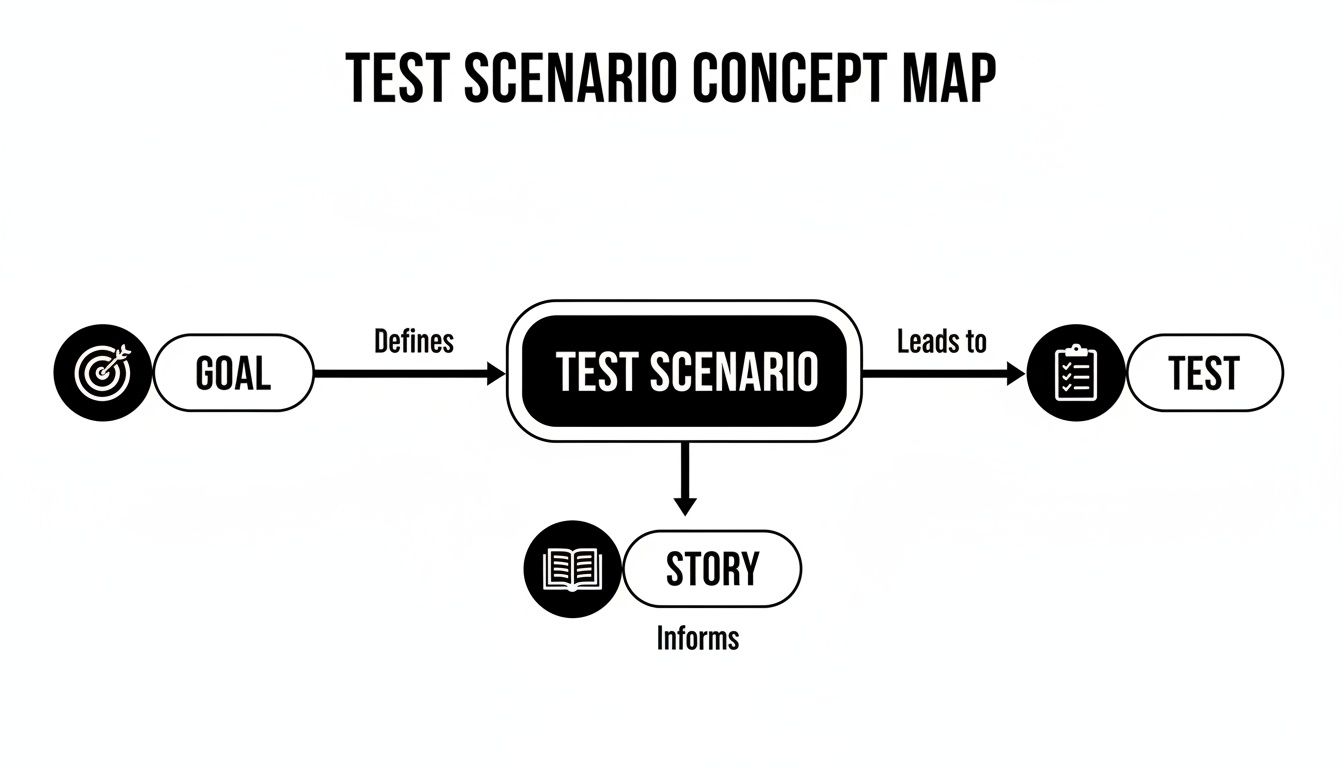
This visual really clarifies how a test scenario acts as the narrative—the story—that connects a high-level goal to the hands-on testing activities.
To make these differences crystal clear, let’s put them side-by-side. This table breaks down exactly how these two critical testing documents differ.
| Attribute | Test Scenario | Test Case |
|---|---|---|
| Purpose | To describe a user journey or functionality to be tested. | To provide explicit steps to validate a specific requirement. |
| Scope | Broad and high-level, often covering multiple steps or requirements. | Narrow and specific, focused on a single, testable action. |
| Detail Level | Low detail; describes what to test, not how. | High detail; includes steps, data, and expected results. |
| Relationship | One-to-many; a single scenario can have many associated test cases. | Many-to-one; many cases are needed to satisfy one scenario. |
| Example | Verify a user can complete the online checkout process. | Enter valid credit card details and confirm the payment is processed. |
Grasping this hierarchy—where a scenario sets the stage and the cases perform the actions—is absolutely vital for organizing your testing. It ensures you never lose sight of the big-picture user goals while still performing the granular checks needed to guarantee quality.
Without scenarios, your testing can quickly become a messy, disorganized list of checks that lack a clear purpose. But without test cases, your scenarios are just ideas with no practical way to prove they actually work. You need both to succeed.
Alright, let’s move from theory to practice. This is where the rubber meets the road. Writing a great test scenario isn’t about creating pages of complex documentation; it’s about clearly capturing a user’s goal in a way that guides your entire testing effort. The process is actually pretty straightforward, and it all starts with putting yourself in the user’s shoes.
The first step is always to zero in on a key user story or a critical business requirement. What’s the single most important thing a user needs to accomplish in this part of the app? You have to think in terms of complete journeys, not just isolated button clicks.
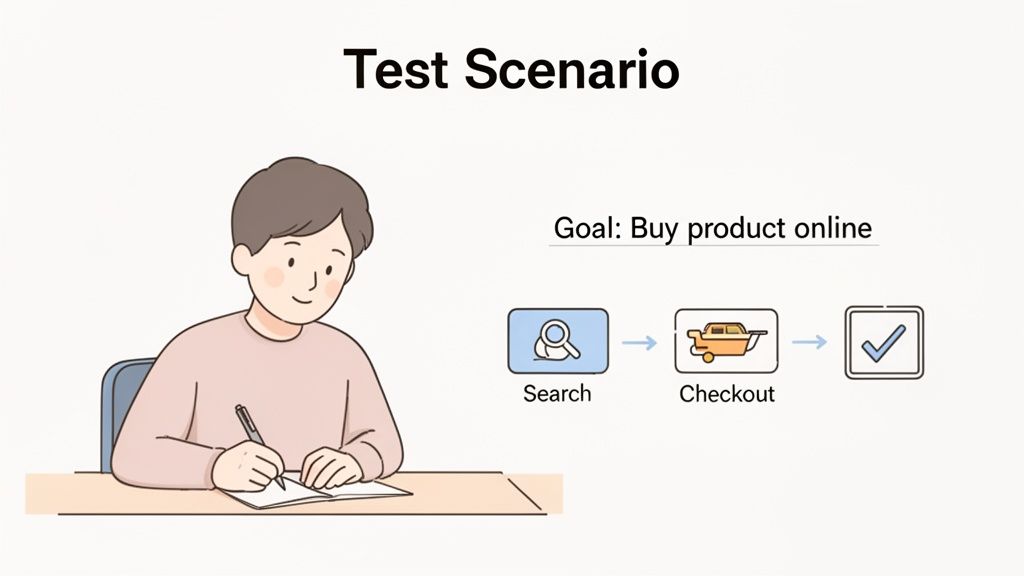
Every powerful test scenario begins with a clear, user-focused objective. Just ask yourself, “What does the user want to achieve here?” This simple question completely shifts your perspective from testing technical features to validating real-world value. A good scenario is really just a one-sentence summary of that goal.
For instance, instead of a vague objective like “Test the login page,” a strong scenario would be “Verify a user can log in successfully with valid credentials.” See the difference? It’s specific, measurable, and tied directly to what the user needs to do.
A well-written test scenario should be understood by everyone on the team—from developers and QA engineers to product managers and business stakeholders. Simplicity and clarity are its greatest strengths.
Getting this right is a team sport. When scenarios are built from stakeholder input, they can cover 90% more user paths than ad-hoc testing alone. This is massive, especially for web apps where a staggering 62% of failures come from untested user flows. If you’re curious, you can explore more about the impact of scenario testing on coverage to really grasp its importance.
Once you’ve nailed down the user’s goal, you can give the scenario some structure. A simple, repeatable process makes this easy and helps you create consistent, high-quality scenarios every time.
Here’s a quick breakdown:
Let’s see how this structure plays out with a few common applications. Notice how each scenario tells a complete story about a user’s interaction from beginning to end.
These examples provide a high-level map for your testing. From here, you can drill down and create specific test cases for each step in the journey. For more guidance on that next step, check out our article on the best practices for structuring effective test cases. Building out this library of scenarios is how you ensure your application is robust and truly ready for your users.
A solid testing strategy has to look beyond the perfect user journey. If you want to build truly resilient software, you need to plan for things to go wrong, not just right. This means thinking up different kinds of test scenarios that poke and prod your application under all sorts of conditions, making sure you’ve covered every angle.
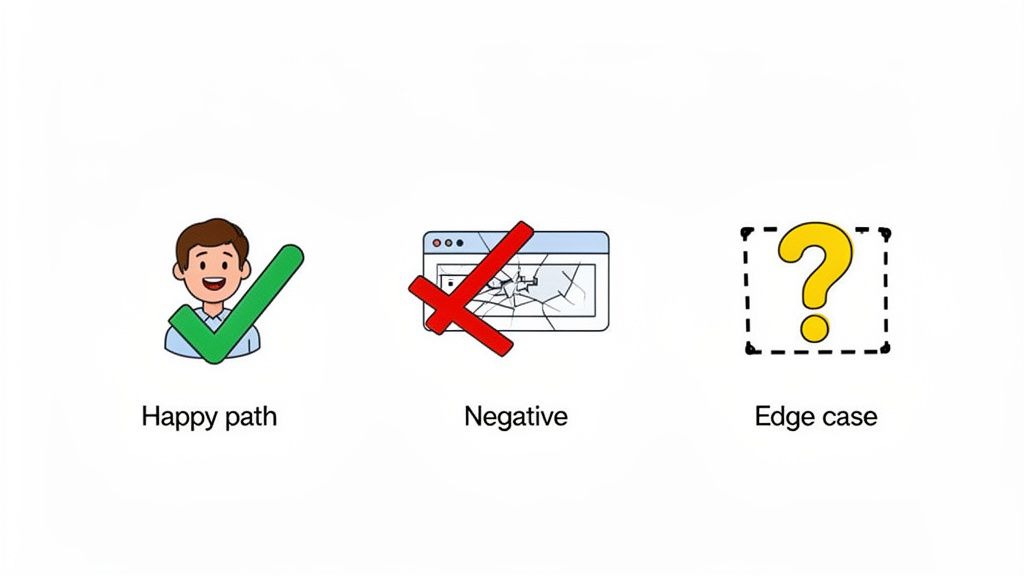
This is exactly why breaking down scenarios into categories is so important. By intentionally designing tests for ideal, incorrect, and extreme user actions, you can build a comprehensive test suite that catches critical bugs before they ever see the light of day.
Let’s start with the most fundamental type: the happy path scenario. This is the sunny-day scenario where everything goes exactly as planned. It confirms the main, intended workflow of a feature, assuming the user enters all the right information and follows the steps perfectly.
For a simple login form, the happy path is as straightforward as it gets:
This test is your baseline. It proves the core functionality works, which is always the first thing you need to lock down.
Once you know it works, it’s time to see what happens when things go wrong. Negative scenarios are all about testing the application’s response to bad data or unexpected user behavior. They are absolutely critical for building a user-friendly and secure system because they ensure errors are handled gracefully.
Think of it as trying to break the system on purpose to see how it holds up. For our login form, a few negative scenarios would look like this:
These scenarios make sure the application gives clear, helpful feedback instead of just crashing, which is essential for keeping users from getting frustrated.
Finally, we have edge case scenarios. These are designed to push the system to its absolute limits by testing extreme or unusual conditions. The inputs are often technically valid but aren’t things you’d expect to see every day. This is where you find bugs hiding at the boundaries of your system’s logic.
Edge cases are notorious for hiding the most elusive and frustrating bugs. Testing them is what separates a good application from a great one, proving it can remain stable under stress.
Sticking with our login example, edge cases could involve:
By combining these three types of scenarios—happy path, negative, and edge case—you create a much more robust testing strategy. This approach ensures your application not only works when users do everything right but also stays stable and predictable when they inevitably don’t.
Knowing what not to do is just as important as knowing what you should be doing. I’ve seen even the sharpest teams stumble into common traps when writing test scenarios, which almost always leads to missed bugs, wasted time, and a whole lot of frustration. Sidestepping these mistakes is one of the biggest keys to a solid testing strategy.
One of the most frequent errors I see is writing scenarios that are far too vague. A note that just says “Test the homepage” isn’t a test scenario; it’s a to-do list item. It gives the tester no real goal, no user journey to follow, and no clear definition of what “success” even looks like. This kind of ambiguity is a recipe for inconsistent testing and huge gaps in your test coverage.
On the flip side, you can also be overly detailed. The moment a scenario starts dictating specific clicks, input data, and exact expected results, it’s not a scenario anymore—it’s a test case. This completely defeats the purpose of having a high-level overview. When you blur this line, you create a rigid, confusing process that’s a nightmare to maintain.
Another classic mistake is getting tunnel vision and only focusing on the “happy path.” Teams often design scenarios as if every user will do exactly what they’re supposed to, completely forgetting to test for invalid inputs or weird user actions. This oversight means the application is completely unprepared for real-world chaos, leading to crashes and a terrible user experience.
It’s the same story with system-level errors. What happens if the Wi-Fi cuts out mid-purchase? Or a third-party API goes down? A good test suite has to account for these real-world conditions to make sure the app doesn’t just fall apart when things aren’t perfect.
Forgetting to test for errors is like building a car with an accelerator but no brakes. It works fine until something unexpected happens, and then the results are disastrous. A good test scenario anticipates both success and failure.
To help you steer clear of these issues, here are some of the most common pitfalls I’ve encountered and some simple, actionable ways to get back on track.
Solution: Reframe it as a user goal. Try this instead: “Verify a registered user can log in successfully with valid credentials.” Now you have a clear objective.
Mistake: Jamming scenarios full of implementation details.
Solution: Keep it high-level. The scenario should describe what to test, not how to test it. Save the step-by-step instructions for the test cases that live underneath the scenario.
Mistake: Only testing the perfect user journey.
Solution: Get creative and actively build negative scenarios. Start asking questions like, “What’s the worst possible thing a user could type in this field?” or “What happens if the system is under maximum load?” Thinking like this is how you build truly resilient software.
Let’s be honest: writing test scenarios has always been a bit of a grind. It’s essential work, but it’s also manual and incredibly time-consuming. But what if you could generate a complete set of scenarios for a new feature in minutes, not days? That’s not science fiction anymore; it’s what’s happening right now with Artificial Intelligence.
Today’s AI tools can look at user stories, design documents, or even the application itself to come up with a surprisingly broad range of scenarios. It’s fascinating because the AI often thinks of user journeys and corner-case interactions that even a seasoned tester might miss on the first pass. This means you get much deeper test coverage right from the start.
Think of AI as a powerful assistant for your QA team, not a replacement. It’s brilliant at handling the repetitive, predictable parts of test design. This frees up your human experts to do what they do best—dig into complex, exploratory testing that requires real intuition and critical thinking.
This collaboration between human and machine means teams can ship higher-quality software, and do it a lot faster. To dig deeper into this relationship, check out our article on how artificial intelligence is transforming testing practices.
AI doesn’t just make test scenario creation faster; it makes it better. By analyzing huge amounts of information, it can pinpoint tricky edge cases and negative paths that are absolutely essential for building resilient software.
The real leap forward is that the best AI tools don’t just stop at generating a list of scenarios. They can actually turn them into fully executable tests.
For development teams trying to bake testing into their CI/CD pipelines, this is huge. For instance, a tool like TestDriver can take a high-level idea and convert it into executable scenarios, hitting 95% automation coverage for common user journeys in less than five minutes. That kind of speed is a game-changer, allowing teams to test more deeply and release with a lot more confidence.
This AI-driven approach is giving teams the power to build more robust software by making truly comprehensive testing faster and more accessible than ever before.
As you start weaving test scenarios into your process, you’ll naturally run into a few questions. Let’s tackle some of the most common ones I hear from teams.
This is the classic “it depends” question, but for good reason. There’s no hard and fast rule. A very focused scenario, like “Verify a user can log in with valid credentials,” might only need a single test case.
On the other hand, a beefy scenario like “Validate the entire checkout process” could easily spawn 20 or 30 individual test cases. You’d need to cover adding items, applying coupons, selecting shipping, processing different payment types, and confirming the order.
The real goal isn’t hitting a specific number. It’s about having enough test cases to feel confident that the scenario’s objective is fully met. Always start by focusing your energy on the most critical user journeys.
They’re not just useful; they’re a fantastic fit. In Agile and DevOps, we live and breathe user stories. Test scenarios are the perfect testing counterpart because they mirror that focus on end-to-end user value.
They give you a high-level testing plan for a feature within a sprint. Because they aren’t bogged down in procedural detail, you can write them early and adapt them as the feature evolves. This flexibility is a huge win over rigid, pre-scripted test cases that break the moment a developer refactors something.
It’s easy to mix these two up, but the distinction is crucial. A use case is a requirements artifact—it describes what a user needs to accomplish with the system. A test scenario, on the other hand, is a testing artifact that describes how you’re going to verify that functionality.
Let’s break it down with a simple analogy:
| Concept | The “What” vs. The “How” | Example |
|---|---|---|
| Use Case | What the system must do. | ”A customer can add an item to their shopping cart.” |
| Test Scenario | How we will prove it works. | ”Verify a user can successfully add one item to an empty cart.” |
Think of the use case as the blueprint from the architect. The test scenario is the quality inspector’s high-level plan for checking if the builder followed that blueprint correctly.
Accelerate your entire testing process with TestDriver. Generate comprehensive end-to-end tests from simple prompts and transform your quality assurance workflow. Get started for free at TestDriver.ai.
Learn how to write testcase with practical examples, clear structure, and automation tips to boost software quality.
Explore the real differences in manual vs automated software testing. Our guide covers costs, ROI, and when to use each for optimal software quality.
Discover how are test cases written for modern software. This guide covers manual best practices and how to leverage AI for faster, smarter QA testing.
Learn how to prepare test cases that improve software quality. This guide covers everything from requirements analysis to AI-powered automation for QA pros.
TestDriver uses computer-use AI to test any app - write tests in plain English and run them anywhere.