A Modern Guide to Automate UI Testing
Learn how to automate UI testing with practical strategies for choosing tools, writing reliable tests, CI/CD integration, and using AI to speed up releases.
Automate and scale manual testing with AI ->
Automating UI testing is all about using specialized software to mimic how a real person interacts with your application. Think clicks, scrolls, and typing into forms. The goal is to automatically confirm that everything works exactly as it should, especially in today’s fast-paced development world. It’s the best way to catch bugs early, make sure new code doesn’t break old features, and ultimately, protect your business’s bottom line.
Why Automating UI Testing Is a Business Imperative

Let’s be honest, everyone knows “automation saves time.” That’s the cliché. But the real reasons for automating your UI tests are much more critical and have everything to do with keeping your business competitive.
When you’re pushing out updates constantly, manual regression testing just can’t keep up. It’s a bottleneck. Imagine your team ships a critical hotfix late on a Friday, only to find out Monday morning that it completely broke the checkout flow. That’s a whole weekend of lost revenue and seriously eroded customer trust.
This isn’t a hypothetical problem; it happens all the time. It highlights a simple truth: at a certain scale, relying on manual testing is a massive business risk.
The Real Costs of Delaying Automation
The expense of sticking with manual testing goes way beyond just the QA team’s salaries. It’s the compounding cost of slow feedback, human error, and missed opportunities.
Every time your team runs a full manual regression suite, it introduces delays. Bugs are found later in the cycle, making them exponentially more expensive to fix. And your most skilled engineers get pulled away from building new features to put out fires. This is where the strategic value of UI automation really shines.
A solid automation suite acts as your safety net. It allows your team to:
- Release with Confidence: Run hundreds of tests on every single code change, knowing your core features are solid.
- Accelerate Feedback Loops: Developers find out in minutes, not days, if their change introduced a regression.
- Protect Revenue Streams: Ensure critical user journeys—like signing up, logging in, or making a purchase—are always working.
- Scale Quality Assurance: Dramatically increase test coverage without having to hire a massive QA team.
This strategic shift is clearly reflected in market trends. The global automation testing market hit an estimated USD 28.1 billion in 2023 and is on track to nearly double by 2028. A huge chunk of that growth—over 30% of the market, in fact—is driven by testing web applications. You can find more insights on the automation testing market’s growth and see why it’s become so crucial for software teams.
Modern UI automation is no longer a “nice-to-have” for big, mature engineering orgs. It’s a foundational practice for any team that wants to ship reliable software without slowing down.
To understand the trade-offs more clearly, let’s compare the two approaches side-by-side.
Manual vs Automated UI Testing The Real Costs
While manual testing seems cheaper upfront, the long-term costs in speed, risk, and scalability quickly add up. Investing in automation pays dividends by enabling faster, more reliable releases.
| Factor | Manual UI Testing | Automated UI Testing |
|---|---|---|
| Speed & Feedback | Slow, often taking days for a full regression. Delays feedback to developers. | Extremely fast, providing feedback in minutes. Enables true CI/CD. |
| Upfront Cost | Low. Requires hiring human testers. | Higher. Requires investment in tools and engineering time to set up. |
| Long-Term Cost | High and scales linearly with application complexity. More features = more testers. | Low. The cost per test run is negligible. High initial investment pays for itself. |
| Reliability | Prone to human error, inconsistency, and fatigue. | Highly consistent and repeatable. Executes the same way every time. |
| Coverage | Limited by time and resources. Difficult to test all scenarios and browsers. | Can achieve broad coverage across multiple browsers, devices, and user flows. |
| Risk | High risk of regressions slipping into production, impacting users and revenue. | Low risk. Acts as a safety net, catching bugs before they are released. |
Ultimately, automation is about managing risk and enabling speed.
The good news is that the tools have evolved. What used to demand deep programming expertise and a dedicated frameworks team is now far more accessible. Modern, AI-powered tools are changing the game entirely, making robust UI test automation easier to build, more reliable to run, and faster to implement than ever before. This guide will walk you through exactly how to build an effective strategy to automate your UI testing from the ground up.
Choosing Your UI Automation Strategy and Tools
Before you write a single line of test code, you need a plan. The tool you pick for UI automation will define your entire testing effort, dictating who can write tests, how you’ll run them, and how much time you’ll sink into maintenance. I’ve seen too many teams make a snap decision here, only to abandon their automation project in frustration a few months later.
The biggest fork in the road is usually between traditional, script-heavy frameworks and more modern, AI-assisted platforms. Neither is universally “better,” but they solve the problem from completely different angles. The right choice depends entirely on your team’s skills, your app’s complexity, and how fast you need to ship.
Think about it this way: a big company with a dedicated team of senior SDETs who live and breathe Java might feel right at home with a framework like Selenium. They have the chops to build and maintain the complex infrastructure it requires. On the other hand, a fast-moving startup with a lean team would likely get bogged down by that same tool’s steep learning curve and constant maintenance needs.
Key Factors for Evaluating UI Automation Tools
Don’t just Google “top 10 automation tools” and pick the first one. You need to assess potential solutions against a practical checklist that reflects what your team actually needs day-to-day. This is how you avoid picking a tool that creates more work than it saves.
Here’s what I always look at:
- Team Skillset and Learning Curve: Does this tool demand a senior developer’s expertise in a specific language? Or can your QA analysts—and maybe even product managers—jump in and create tests using plain English or a simple interface? The more people who can contribute, the better.
- Maintenance and Resilience: What happens when a developer changes a button’s ID? Traditional CSS or XPath selectors are notoriously brittle and break with the smallest UI tweaks. Look for tools that have some form of “self-healing” that can adapt to these minor changes and save you from constantly fixing broken tests.
- Integration Capabilities: A testing tool that lives in a silo is useless. Make sure it plugs directly into your workflow—your CI/CD pipeline (like GitHub Actions or Jenkins), your version control, and your project management software.
- Handling Dynamic Content: Modern apps are a mess of components that load asynchronously, pop up unexpectedly, and change based on user actions. Your tool has to handle this reality without forcing you to litter your tests with fragile
sleep()commands.
The best tool isn’t the one with the most features; it’s the one that best aligns with your team’s skills and your product’s technical reality. Choosing a tool that fights your team’s natural workflow is a recipe for low adoption and flaky tests.
Understanding the Economic Drivers
Let’s be honest, this is also a financial decision. As you grow, the cost of throwing more people at manual regression testing spirals out of control. It just doesn’t scale.
This is exactly why the automation testing market is projected to explode from USD 28.2 billion in 2023 to nearly USD 84 billion by 2031. Large enterprises, which make up over 67% of that spending, have already done the math and realized manual testing can’t keep up with modern development cycles.
And as you’re evaluating tools, don’t forget accessibility. It’s not an optional extra. To make sure your app works for everyone, it’s worth looking into specialized Automated Accessibility Testing Tools.
Ultimately, your strategy has to be a conscious choice. Take the time to think about your team, your application, and your long-term goals. That’s how you pick a tool that actually speeds you up instead of just becoming another piece of technical debt. For a detailed comparison, check out our guide on the top web and mobile automation tools to consider in 2025.
Writing End-to-End Tests That Don’t Break
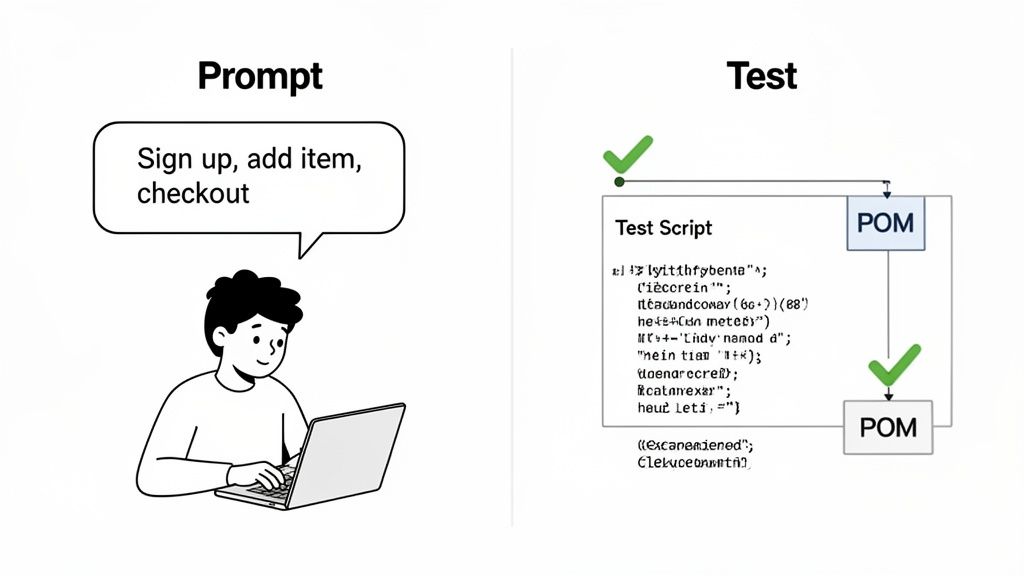
Alright, you’ve got your strategy. Now comes the real work: building tests that actually last. The biggest enemy when you automate UI testing is brittleness. Nothing’s worse than a test that shatters every time a developer tweaks a button’s color or renames a CSS class. That’s not a safety net; it’s just a maintenance headache.
For years, the best defense against this chaos has been the Page Object Model (POM). It’s a smart design pattern that creates a clean separation between your test logic (the “what,” like “log in to the app”) and the nitty-gritty page details (the “how,” like “find the element with ID ‘user-email’ and type into it”).
With POM, every page or significant component in your app gets its own class. This class holds all the locators—like CSS selectors or XPaths—and the methods for interacting with them. So, when the UI inevitably changes, you only update one file: the page object. You’re not left digging through dozens of test scripts. It’s a proven method for bringing some much-needed order to scripted automation.
The Traditional Scripted Approach
Let’s walk through a classic example: a new user signing up. If you were using a standard framework like Selenium or Playwright with the Page Object Model, your first step would be to build a SignUpPage.js object.
// Example of a simple Page Object for a signup page
class SignUpPage {
constructor(page) {
this.page = page;}
get emailInput() { return this.page.locator(‘#email’); }
get passwordInput() { return this.page.locator(‘#password’); }
get confirmPasswordInput() { return this.page.locator(‘#confirmPassword’); }
get signUpButton() { return this.page.locator(‘button[type=“submit”]’); }
async enterEmail(email) {
await this.emailInput.fill(email);}
async enterPassword(password) {
await this.passwordInput.fill(password);

await this.confirmPasswordInput.fill(password);
}
async submitForm() {
await this.signUpButton.click();}
}
The test script itself would then call on this page object to perform the actions. It’s definitely cleaner than scattering locators all over your test files, but it’s still a lot of manual work. For any reasonably complex app, you’re looking at creating and maintaining a small mountain of these page object files.
A Modern AI-Powered Alternative
Now, let’s flip the script and look at a more modern, AI-driven way of doing things. Instead of hand-coding page objects and step-by-step commands, you just describe the user’s goal in plain English. This completely changes the game for creating end-to-end tests.
Let’s take that same user sign-up flow. With an AI tool like TestDriver, you don’t write any code to find locators. You just write a prompt.
Test Creation Prompt Example: “Go to the signup page. Enter a unique email address in the email field. Type ‘SecurePassword123!’ into both the password and confirm password fields. Click the ‘Sign Up’ button and verify that you are redirected to the dashboard page by looking for the text ‘Welcome to your dashboard’.”
That one paragraph has everything needed to generate a solid test. The AI takes care of the tedious part—identifying the right UI elements and figuring out how to interact with them. It essentially builds a “virtual page object” in real time.
The key difference here is the shift from imperative commands to declarative goals. You’re telling the system what you want to accomplish, not micromanaging how to click every single element.
Best Practices for Writing Effective Prompts
Of course, the magic of AI-generated tests depends entirely on the quality of your prompts. Even though it feels like a conversation, precision and clarity are your best friends for getting reliable results.
From my own experience, here are a few tips that make a huge difference:
- Be Specific About Actions and Elements: Don’t just say “fill out the form.” A much better prompt is “enter ‘[email protected]’ into the ‘Email Address’ input field.” The more detail you provide, the less chance there is for the AI to get confused.
- Include Explicit Verifications: A test without an assertion is just a fancy script running through steps. Always finish your flow with a concrete check, like “Verify the success message ‘Your account has been created’ is visible.”
- Structure Tests Around User Journeys: End-to-end tests are most valuable when they mirror real-world use. Frame prompts around a complete user story, such as, “A new user can sign up, log in, and see their dashboard.” This ensures your tests are checking actual business value.
- Reference Elements by Visible Text: Whenever you can, tell the AI to find elements by the text a user would see on the screen. “Click the ‘Add to Cart’ button” is far more robust than “click the button with the class ‘btn-primary’.” It makes tests easier to read and less likely to break from minor code changes.
Thinking this way helps you automate UI testing much faster. It also opens the door for more team members—not just specialist QAs—to contribute to quality, all while drastically reducing the time spent maintaining a brittle test suite.
Weaving UI Tests into Your CI/CD Pipeline
So, you’ve written a solid suite of automated UI tests. That’s a huge win. But their real value only shines when they run automatically, every single time, without anyone having to lift a finger. An automated test you have to remember to run manually is a safety net with a hole in it.
By integrating your test suite directly into a Continuous Integration/Continuous Deployment (CI/CD) pipeline, you transform it from a simple tool into an autonomous quality gate.
This means your tests automatically kick off the moment a developer pushes new code or opens a pull request. Instead of finding a critical bug hours or even days later, your team gets feedback in minutes. This immediate feedback loop is the bedrock of modern, agile development—it’s what allows teams to ship features quickly and confidently.
The mindset shift is key: testing is no longer a separate, final stage. It’s an essential, always-on part of the development process itself. When done right, your CI/CD pipeline becomes the unwavering guardian that stops broken code from ever seeing the light of day.
Setting Up Your Autonomous Quality Gate
Plugging your UI tests into the pipeline isn’t as intimidating as it might sound, especially with modern tools like GitHub Actions or Jenkins. The basic idea is to script out a workflow—a series of automated commands—that grabs your code, spins up the right environment, runs your tests, and reports back on what it found.
A critical piece of the puzzle is managing configurations across different environments. Your tests need to run against a local dev server, a staging environment, and maybe even production. The standard, most secure way to handle this is with environment variables in your CI/CD platform. This lets you securely store things like API keys, base URLs, and login credentials, injecting them only when the test run needs them (for example, when a pull request is created).
Let’s make this tangible. Here’s a simple YAML configuration for GitHub Actions that would trigger a UI test suite built with a tool like TestDriver or Playwright.
name: End-to-End UI Tests

on:
  push:
    branches: [ main ]
  pull_request:
    branches: [ main ]

jobs:
  test:
    runs-on: ubuntu-latest
    steps:
      - name: Check out repository code
        uses: actions/checkout@v3

      - name: Set up Node.js
        uses: actions/setup-node@v3
        with:
          node-version: '18'

      - name: Install dependencies
        run: npm ci

      - name: Run UI tests
        run: npm test
        env:
          API_BASE_URL: ${{ secrets.STAGING_API_URL }}
          TEST_USER_PASSWORD: ${{ secrets.TEST_USER_PASSWORD }}
This short workflow file handles the entire process automatically—from setting up the environment to running the tests with sensitive credentials kept out of the codebase.
Optimizing for Speed and Efficiency
As your test suite gets bigger, so will the time it takes to run. A 30-minute test run can quickly become a serious bottleneck, grinding your team’s momentum to a halt. The secret to keeping your pipeline zippy is parallel execution.
Nearly all modern test runners and CI/CD platforms support “sharding” your test suite. This just means breaking it into smaller chunks and running them all at the same time on different machines.
Running four parallel jobs doesn’t just cut your test execution time by 75%; it fundamentally changes your team’s relationship with testing. When feedback is nearly instant, developers are more likely to run tests frequently and engage with the results.
Here are a few other strategies I’ve seen work wonders:
- Tier your tests: Group tests into logical suites. A small, critical “smoke test” suite should run on every single commit. A much larger, full regression suite can run nightly or on-demand.
- Insist on stateless tests: Make sure every test is responsible for creating and cleaning up its own data. Tests that rely on a shared, messy database state are a primary cause of flaky failures that are impossible to debug.
- Use caching for dependencies: Configure your CI/CD pipeline to cache your project’s dependencies. This can easily shave minutes off every run because you aren’t re-downloading the same packages over and over again.
Putting these practices into action will turn your CI/CD pipeline into a lean, mean, quality-assurance machine. If you want to go even deeper, check out these best practices for integrating testing into your CI/CD pipeline for more advanced techniques.
Tackling Test Flakiness and Maintenance Head-On
Let’s be honest: a test suite full of “flaky” tests is worse than no test suite at all. You know the kind—tests that pass one minute and fail the next for no obvious reason. It completely erodes trust. Soon enough, developers start ignoring the red builds, and your whole effort to automate UI testing grinds to a halt.
Dealing with this instability isn’t just a technical chore; it’s about saving the value of your entire automation project.
The good news is that flakiness isn’t random. It almost always comes down to a few common culprits. The biggest offender? Timing. Your test script plows ahead, expecting an element to be on the page, but the application is still busy with a network call or rendering a complex component. This race condition is the source of that classic “element not found” error that magically disappears on the next run.
Another major headache is the dynamic nature of modern web apps. Elements that shift, pop up, or load asynchronously create a moving target. A test written to find a button by its ID will fail miserably if a framework like React or Angular temporarily removes it from the DOM during a re-render.
Moving from Brittle to Resilient Tests
The old-school fix for timing issues was the dreaded Thread.sleep(). Just stick a hard-coded pause in there and hope for the best. This is a terrible, brittle solution. If you set a 5-second wait, you’re either waiting too long most of the time (slowing down your pipeline) or not long enough when it matters (causing a failure). This is not a sustainable path.
The modern way is to use intelligent or explicit waits. Instead of waiting a fixed amount of time, you tell the test to wait until a specific condition is met—like an element becoming visible or clickable. This makes your tests adaptable. They move on as soon as the app is ready, making them both faster and far more reliable.
For dynamic content, the answer is smarter locators and better tooling. Instead of relying on a single, fragile attribute, you can build more robust selectors. For example, look for a button with the text “Submit” inside a form with the title “User Login.” Even better, AI-powered tools like TestDriver can sidestep this problem with self-healing capabilities, identifying elements based on a holistic understanding of the page, not just one shaky attribute.
A flaky test isn’t just a failed test; it’s a signal that your automation strategy is misaligned with the reality of your application. Fixing flakiness requires shifting from rigid commands to flexible, condition-based instructions.
Proactive Maintenance Is a Non-Negotiable
Building stable tests is only half the battle. Keeping them that way requires a proactive maintenance plan. A test suite, like any other codebase, needs regular care to prevent it from decaying into an unmanageable mess. Without a clear process, technical debt piles up until the whole thing gets abandoned.
A simple but effective maintenance strategy involves a few key habits:
- Regular Test Suite Reviews: At least once a month, the team should review the entire suite. Look for tests that are slow, redundant, or cover low-value scenarios. Pruning these tests is just as important as writing new ones.
- A Clear Triage Process: When a test fails in the CI/CD pipeline, who owns it? What’s the protocol? The failure needs to be assigned immediately. The first step is always to reproduce it locally to figure out if it’s a real bug or a test script problem.
- Analytics-Driven Refactoring: Use your test runner’s reports to spot the most common failure points. If the same five tests are responsible for 80% of the failures, they are prime candidates for refactoring or deletion. Focusing your efforts here gives you the biggest bang for your buck.
Here’s a simple look at how a test gets triggered in a well-oiled CI/CD pipeline.
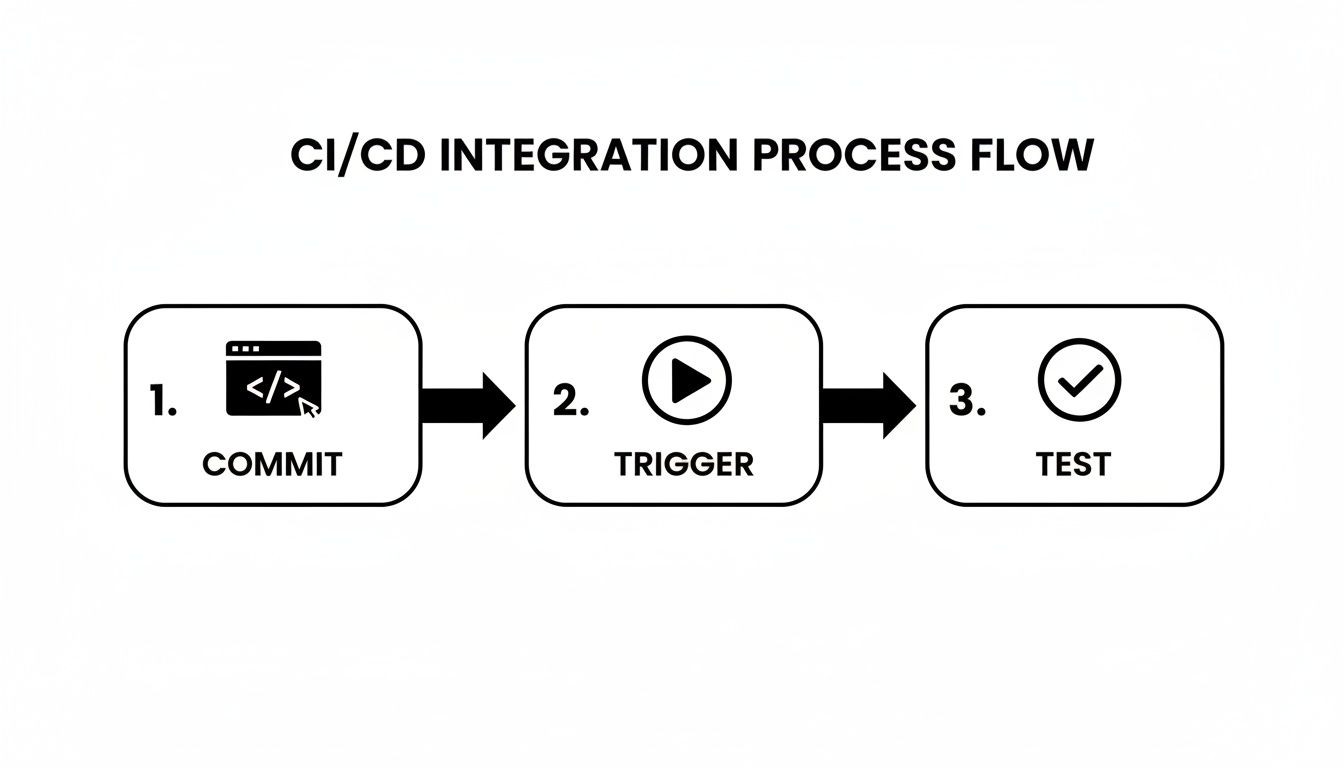
This simple flow—commit, trigger, test—is the engine of automated quality. But it only works if the tests it runs are reliable.
To truly build a resilient automation suite, you need to understand the root causes of instability. For a deeper look at specific techniques, you can learn more about how to overcome flaky tests and maintenance in functional test automation in our detailed guide.
By combining smart test design with a disciplined maintenance routine, you can build an automation suite that your development team not only trusts but actively depends on to ship quality software faster.
Measuring Success and Proving ROI
So you’ve automated a bunch of UI tests. Great. But a simple pass/fail report won’t impress anyone holding the purse strings. To justify the investment you’ve made in tools and engineering time, you need to show real, tangible value to the business.
This means shifting your focus from purely technical metrics to key performance indicators (KPIs) that actually matter to your stakeholders. We need to build a clear, data-driven story that shows how better testing directly improves the bottom line. Without that proof, your automation efforts just look like another expense.
Key Metrics That Demonstrate Business Value
The best place to start is with a simple dashboard tracking a handful of high-impact KPIs. These numbers will help you craft a compelling narrative about the real-world benefits of your work.
Here are a few essential metrics I always recommend tracking:
- Reduction in Manual Testing Hours: This is the easiest win to prove. Calculate the time your team would have spent manually running regression tests for each release. If a full regression takes 40 hours and you have two releases a month, automating 80% of that workload frees up 64 hours of engineering time every single month. That’s time they can spend building new features instead of just checking old ones.
- Mean Time to Resolution (MTTR) for UI Bugs: When your automated tests are plugged into the CI/CD pipeline, they can spot bugs just minutes after the code is committed. This is a game-changer. It slashes the time and cost of fixing issues compared to discovering them days or weeks later during a manual QA cycle.
- Increase in Critical Path Test Coverage: Keep a close eye on the percentage of your most critical user journeys—things like the checkout process, user sign-up, or core product features—that are covered by automation. High coverage in these areas directly reduces business risk.
- Defect Escape Rate: Track the number of UI bugs that make it past your entire testing process and are found by users in production. A consistent downward trend here is undeniable proof that your automation is making the product more stable and reliable.
Your ROI isn’t just about saving time; it’s about mitigating risk. Every critical bug your automated suite catches before it hits production is a direct win, preventing potential revenue loss and protecting customer trust.
When you’re trying to prove the value of your UI test automation, it helps to look into different strategies for establishing baseline metrics for continuous improvement. These initial numbers are your “before” picture, giving you a clear starting point to show just how far you’ve come. Presenting this data effectively is how you prove the immense value your team brings to the business.
Navigating Common Questions in UI Automation
When teams first dip their toes into UI automation, the same questions tend to pop up again and again. Getting these sorted out from the start is key to setting clear expectations and getting everyone on the same page.
What Should We Automate First?
It’s tempting to try and automate everything, but that’s a recipe for frustration. The smart move is to focus on your application’s “happy paths”—the most critical, high-traffic user flows.
Think about the absolute must-work features:
- User login and registration
- Adding an item to a shopping cart
- The complete checkout process
These are the journeys that directly impact your users and your bottom line. Automating them first delivers the biggest bang for your buck by ensuring your most valuable features are always stable.
Will AI Make Manual Testers Obsolete?
Not a chance. While AI is a game-changer for handling the grind of repetitive regression testing, it doesn’t replace the need for human insight.
Manual testing is still king for exploratory testing, digging into usability issues, and catching those subtle user experience quirks that an algorithm just can’t see. The most effective strategy is a blend of both.
AI takes on the repetitive regression work, freeing up your QA team to focus on creative, high-impact testing where human intuition is essential.
How Do AI Tools Deal with UI Changes?
This is where modern AI tools really shine. Older automation scripts were notoriously brittle; a developer changes a button’s ID, and the test breaks. It was a maintenance nightmare.
Today’s AI-powered tools are built to be more resilient. They don’t just rely on rigid selectors. Instead, they use a mix of visual analysis and a deeper understanding of the page structure to find elements. So, if a button moves a few pixels or its class name changes, the AI can still recognize it based on its text, appearance, and context. This “self-healing” capability dramatically cuts down on the time you have to spend fixing broken tests.
Ready to see how AI can accelerate your testing? TestDriver helps you generate solid end-to-end tests from simple text prompts. See how it works at TestDriver.ai.
Automate and scale manual testing with AI
TestDriver uses computer-use AI to test any app - write tests in plain English and run them anywhere.