A Practical Guide to Quality Assurance in Software Development
Discover how quality assurance in software development works. Learn modern QA processes, key testing types, and how AI is revolutionizing software delivery.
Discover practical strategies for automating ui testing, from building and maintaining robust automation to scaling tests that deliver value.
Automate and scale manual testing with AI ->
Jumping into UI test automation without a plan is a recipe for disaster. It’s like trying to build a house without a blueprint, you’ll end up with a lot of wasted effort and a structure that’s bound to collapse. A real strategy is what separates a costly, failed experiment from a genuine quality assurance asset. It all comes down to setting clear goals, picking the right tools, and knowing what to test.

A successful automation initiative starts way before anyone writes a single test script. It begins with a strategic mindset focused on one thing: delivering measurable value. The goal isn’t to replace your manual testers. It’s to free them from the mind-numbing, repetitive regression checks so they can do what humans do best, exploratory testing and finding those tricky, unexpected bugs.
So, where do you start? Define what success actually looks like for your team. Maybe you want to slash your regression cycle from three days down to just three hours. Or maybe the goal is to catch critical bugs before they ever make it to the staging environment.
Setting specific, measurable goals like these gives you a clear finish line. It also makes it much easier to justify the investment, framing the ROI in terms your stakeholders understand: faster feedback, higher quality, and happier developers. If you want to dig deeper into this, we’ve put together a guide on https://testdriver.ai/articles/key-considerations-for-effective-test-automation that covers this in more detail.
Don’t fall into the trap of trying to automate every single thing. It’s a classic rookie mistake. Instead, focus your energy on the user paths that provide the most value and carry the biggest business risk. These are your prime candidates for automation.
Here’s where I always recommend starting:
I’ve seen too many teams get bogged down automating obscure edge cases right at the start. The 80/20 rule is your best friend here: focus on the 20% of tests that will uncover 80% of the critical regressions. This practical approach delivers immediate wins and builds the momentum you need to keep the project going.
The tool you pick can make or break your entire automation strategy. It’s a huge decision. You have to consider your team’s existing skills. If you have a room full of JavaScript wizards, a tool like Cypress or Playwright makes a lot of sense. For teams with a more diverse language background, the classic Selenium might be a better fit.
This choice has long-term implications for how easily your test suite will scale. It’s no surprise the UI test automation market is exploding, it was valued at over USD 2 billion in 2025 and is projected to hit around USD 15 billion by 2033. This growth shows just how crucial it is to find the right tool for your specific context.
As you map out your strategy, it’s also worth thinking about whether you have the right people for the job. Sometimes, bringing in external expertise can be a smart move. If you’re looking for a good fit, you can explore some of the leading Quality Assurance outsourcing partners to see what’s out there. At the end of the day, a solid plan combined with the right tools and talent is what ensures your investment in UI automation truly pays off.
To help you put all this together, think through the critical factors in a structured way.
| Factor | Key Questions to Ask | Impact on Success |
|---|---|---|
| Goals & Objectives | What are we trying to achieve? Reduce test time? Increase coverage on critical features? | Defines your “why” and helps measure ROI. Without clear goals, your efforts will lack direction. |
| Scope Definition | Which user journeys are most critical? What can remain manual for now? | Prevents you from boiling the ocean. A focused scope delivers value faster and builds momentum. |
| Tool Selection | What are our team’s skills? Does the tool support our tech stack? Is it scalable? | The right tool accelerates development; the wrong one creates constant friction and maintenance headaches. |
| Team Skills | Do we have the necessary coding and automation skills in-house? Do we need training or external help? | Your team’s capabilities directly influence the complexity of the tests you can build and maintain. |
| Infrastructure | How will we run these tests? On local machines, a dedicated server, or a cloud platform? | Determines the speed, reliability, and scalability of your test execution pipeline. |
| Maintenance Plan | Who is responsible for fixing broken tests? How will we handle UI changes? | An automation suite without a maintenance plan quickly becomes obsolete and untrusted. |
Thinking through these questions upfront will save you countless headaches down the road and put you on a clear path to building a test automation suite that actually helps your team ship better software, faster.
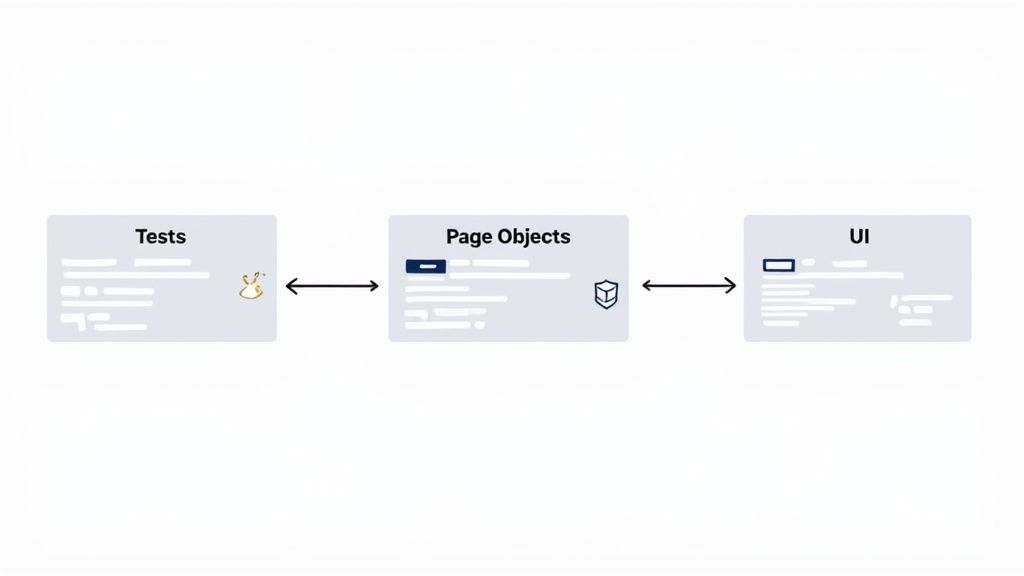
The real trick to automating UI testing isn’t writing the first batch of scripts. It’s keeping them from shattering into a million pieces the moment a developer pushes a front-end update. This is where smart test design isn’t just a “best practice”, it’s your most important survival skill.
Brittle tests, the kind that break with the slightest UI change, are absolute morale killers. They quickly erode the team’s trust in the entire automation effort.
To get ahead of this, you have to build resilience right into your test architecture. The mission is to create tests that are independent, laser-focused, and can roll with the punches. That means ditching those long, clunky scripts that try to test an entire user journey and embracing small, modular tests that are a breeze to debug and update.
One of the most battle-tested design patterns for maintainable UI automation is the Page Object Model (POM). The concept is straightforward but incredibly effective: you create a dedicated class for each page or major component in your application. This class becomes the single source of truth for that page’s HTML structure, holding all the locators for its buttons, forms, and other elements.
Your actual test scripts then call methods on these page objects instead of interacting directly with the web page’s DOM. So, when a developer decides to change a button’s ID from #submit-button to #checkout-btn, you don’t have a crisis. You just make one quick update in the corresponding page object class, and every single test that uses that button keeps working without a hitch.
This separation of concerns is what makes maintenance manageable.
By decoupling your test logic from the UI implementation, you’re not just writing tests; you’re building a durable, reusable automation framework. This approach drastically reduces the maintenance burden, which is often the hidden cost that derails automation projects.
Every single one of your automated tests should be a self-contained unit. It needs to run on its own, without depending on the state left behind by any other test. This isn’t just good practice; it’s essential for running tests in parallel and for pinpointing the exact cause of a failure without noise.
Think about a test suite where Test_CreateAccount must run successfully before Test_Login can even start. If the account creation test fails for any reason, the login test will fail too, even if the login functionality is working perfectly. This just leads to confusing reports and a frustrating debugging session.
A much better way forward is to follow these principles:
When you build small, independent tests, you end up with a stable, trustworthy suite. A failure means one thing: the specific functionality in that test is broken. Not some complex, tangled dependency from three tests ago. This approach makes your UI automation a genuine asset, not a constant headache.
Having a solid set of UI tests is a great first step, but they only truly start paying off when they give your development team fast, consistent feedback. This is where plugging your test suite into a Continuous Integration and Continuous Deployment (CI/CD) pipeline really changes the game. It turns your tests from an occasional spot-check into an always-on quality gate.
The whole point is to make test execution an automatic, non-negotiable part of every single code change. When a developer pushes a new commit, a build server like GitHub Actions or Jenkins should immediately kick off the entire test suite. This tight feedback loop is absolutely essential for catching regressions right when they happen, not days later during a manual QA cycle.
Setting up your pipeline to trigger on every commit is where you begin. You’ll define a workflow that checks out the latest code, builds the application, and then runs your test command. This makes sure no change can get merged without passing the quality checks you’ve put in place.
But be careful, running a big UI test suite one-by-one can quickly become a massive bottleneck, grinding your entire development process to a halt. To get around this, you have to run things in parallel.
When the tests are done, the results need to be crystal clear. A simple pass/fail status just doesn’t cut it. You should configure your pipeline to spit out detailed reports with screenshots, videos of failed tests, and easy-to-read error logs. This lets developers immediately see what went wrong and fix it without needing to track down someone from QA.
The demand for this kind of rapid, integrated feedback is a huge reason the global automation testing market was valued at USD 17.71 billion in 2024. As apps get more complex, you can’t maintain release speed and quality without these automated gates. You can see more on this trend by looking at the full report on the automation testing market.
The ultimate goal of CI/CD integration is to make quality a shared responsibility. When developers get immediate, clear feedback from automated UI tests, they can fix bugs faster, learn from their mistakes, and build more confidence in the code they ship. This proactive approach is far more effective than reactive bug hunting.
To get into the nitty-gritty of this, check out our guide on the best practices for integrating testing into your CI/CD pipeline. This integration is the final, crucial step in making your UI automation a true safety net for every release.
I once joined a project where our UI suite had a 25% flakiness rate, tests would pass beautifully one minute and then collapse without warning. It didn’t take long for the team to start ignoring red builds, and trust evaporated. Fixing flakiness became our top priority.
Flaky failures usually boil down to timing issues. Web apps load scripts, make API calls, and run animations at different paces. Relying on a hardcoded pause, say, a five-second sleep, just doesn’t cut it in the face of real-world variability.
Instead of “sleep first, ask questions later,” switch to smart waits (a.k.a. explicit or dynamic waits). You define a condition, like “button is clickable” or “spinner is gone”, and the test moves on the instant it’s met. This technique:
For a deeper set of tactics on this, check out our guide on how to overcome flaky Selenium tests effectively.
When elements pop in and out of the DOM based on user action or incoming data, you need more than waits. Strong CSS or XPath locators help, and sometimes a retry strategy is your safety net. For example:
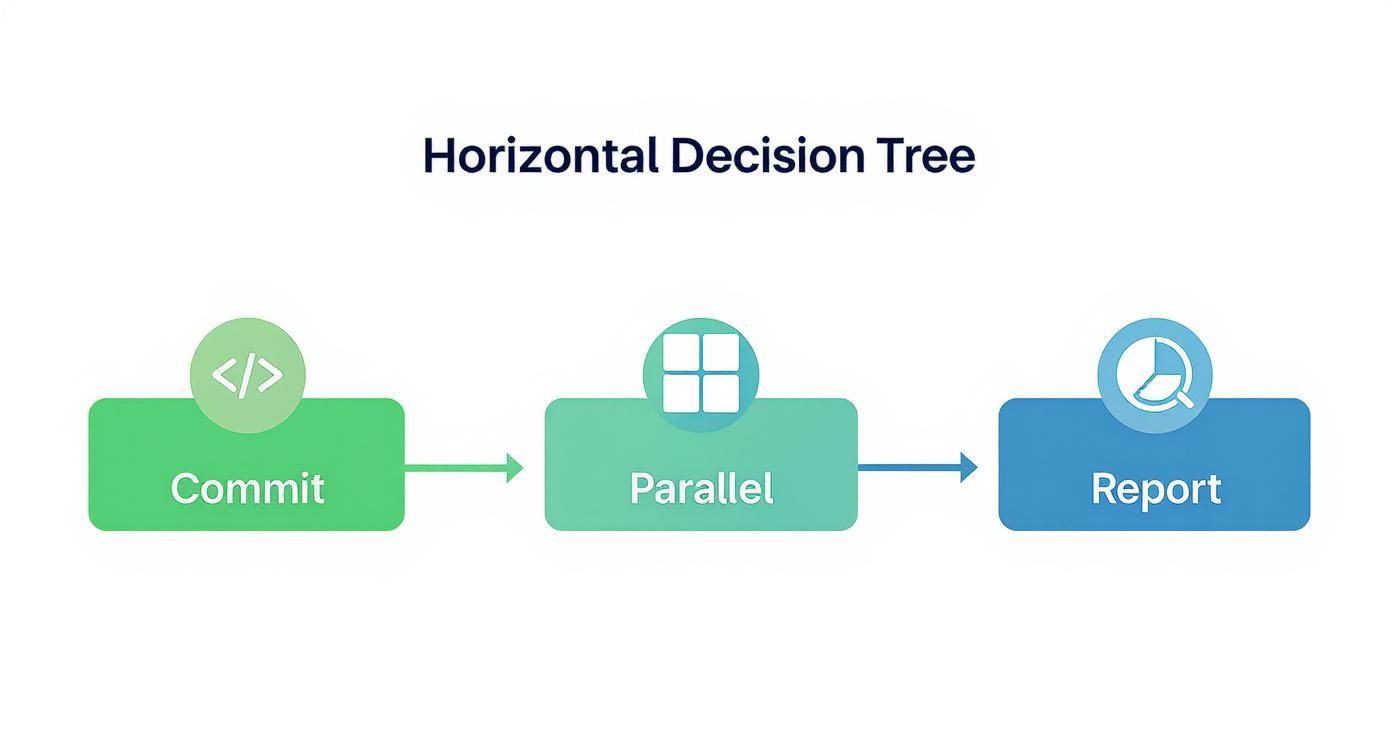
Parallelizing your suite in the CI/CD pipeline keeps feedback lightning-fast. When tests run concurrently across multiple nodes or containers, you’ll spot real defects without waiting an hour for results.
Beyond functional checks, visual diff tools catch broken layouts, stray pixels, or color shifts. Here’s what you get:
Visual regression is your safety net for the user experience. It ensures that a code change intended to fix one thing doesn’t inadvertently break the look and feel of your application somewhere else.
With AI-powered computer vision, you can achieve 97% or higher accuracy rate in spotting UI inconsistencies. It’s especially powerful for complex apps where manual review would be a bottleneck. For more on the latest in visual testing, see Intel’s automated software testing report.
By combining smart waits, retries, and visual validation, you’ll build a suite your team actually trusts, no more shrugging at red builds, just confidence that your UI works as expected.
Writing your first handful of UI tests is a great feeling. You’re catching bugs and saving time. But what happens when you have hundreds of tests, a growing application, and more people contributing? That’s a whole different ballgame.
An automation framework that can’t scale is a ticking time bomb. It slowly morphs from a safety net into a source of crushing technical debt. To avoid that pitfall, you have to treat your test code with the same discipline and respect you give your production code. It’s not about just adding more tests; it’s about building a suite that’s lean, effective, and simple enough for anyone on the team to work with.
The secret to a scalable framework is consistency. Without it, your test suite will inevitably devolve into a chaotic mix of personal styles and one-off solutions, a nightmare to debug and maintain.
Start by creating a simple, clear style guide. It doesn’t have to be a 50-page document; a markdown file in the repo usually does the trick.
Make sure it covers the basics:
data-testid, fall back to IDs, and use CSS selectors as a last resort.The goal here is simple: get new team members up to speed quickly and ensure everyone builds upon the framework in a consistent way.
Treat your test framework like any other critical software project. That means code reviews, documentation, and a shared sense of ownership. This mindset is what separates a sustainable asset from a well-intentioned project that decays over time. It’s the difference between a tool that speeds you up and one that grinds you to a halt.
You can’t fix what you can’t see. To keep your framework healthy as it grows, you need to actively monitor its performance and reliability. I highly recommend setting up a simple dashboard to track a few core metrics that tell you the real story.
Here are the vitals I always watch:
Tracking these metrics helps you move from reactive firefighting to proactive maintenance. You can spot trends early and make smart, data-driven decisions about where to invest your time. This ensures your efforts in automating UI testing keep paying dividends as your team and product scale.
As teams start their journey with UI test automation, a few familiar questions always pop up. It’s totally normal. Let’s walk through some of the most common ones and get you some practical answers to help shape your strategy.
Let me be blunt: aiming for 100% automation is a fool’s errand. It’s a classic trap that leads to a brittle, unmaintainable test suite that everyone hates. A smarter approach is to put your energy where it will have the biggest impact.
You want to focus on automating the most critical, repetitive, and high-risk parts of your application. Think of these tests as your regression safety net, the core functionality that absolutely must not break.
On the other hand, things that rely on human intuition, like exploratory testing or checking for visual polish, are best left to a human. The classic testing pyramid model still holds true: a broad base of unit tests, a smaller layer of integration tests, and a very selective, pointed set of UI tests at the top.
Hands down, the most common pitfall is trying to automate everything all at once without a real plan. This “boil the ocean” approach almost always ends in a chaotic, unreliable suite of tests that nobody trusts. It’s the fastest way to burn your budget and lose your team’s faith in automation entirely.
Another big one is picking a tool just because it’s popular, without considering if it actually fits your team’s skills or your app’s tech stack. What works great for one company can be a source of constant headaches for another.
My advice? Start small. Pick one well-defined, high-value flow, like automating the login process. Get it working flawlessly, show everyone the value, and then build from there. That success creates momentum and gets everyone on board.
Ah, the classic challenge. Dealing with dynamic elements, content loading asynchronously (AJAX), and pop-ups is where most tests fall apart. This is the number one cause of “flaky” tests, those infuriating tests that pass one minute and fail the next for no obvious reason.
The secret is to stop using fixed, static waits. Telling your script to just sleep(5) is a recipe for disaster. You need to use dynamic, or “smart,” waits instead.
Modern frameworks like Selenium and Playwright have built-in explicit wait commands. These tell the test to pause only until a specific condition is met, like an element finally becoming visible or clickable. This makes your tests far more resilient to slow network speeds or server lag, because they move forward the instant the application is ready. Using smart waits isn’t just a good idea; it’s fundamental to building automated UI tests you can rely on.
Ready to stop scripting and start testing? With TestDriver, our AI agent can generate end-to-end tests for your application from a single prompt, helping you build comprehensive coverage faster. See how it works at testdriver.ai.
Discover how quality assurance in software development works. Learn modern QA processes, key testing types, and how AI is revolutionizing software delivery.
Explore manual versus automated testing: compare use cases, ROI, and a practical framework to choose the best approach for your team.
Learn how to build a test strategy doc that aligns teams and delivers results. Get actionable steps on scope, tools, AI, and metrics.
Learn how to prepare test cases that improve software quality. This guide covers everything from requirements analysis to AI-powered automation for QA pros.
TestDriver runs every pull request in a real desktop sandbox, finds bugs, and builds regression tests - right from your repo.