How to Generate Test Cases Automatically With AI
Discover how to generate test cases automatically using AI. This practical guide covers effective prompts, CI/CD integration, and real-world QA strategies.
Automate and scale manual testing with AI ->
Let’s be honest: writing test cases by hand is a grind. It’s time-consuming, repetitive, and often feels like a bottleneck standing between your team and a new release. The good news is, those days are numbered.
Modern QA teams are now using AI-driven tools to generate test cases automatically. These platforms can read user stories and application requirements, then churn out comprehensive end-to-end tests in minutes. What used to take days of manual effort is now handled almost instantly. This isn’t just a convenience; it’s becoming a crucial strategy for anyone trying to keep up with demanding release schedules and increasingly complex software.
The Shift to AI-Powered Test Case Generation
For a long time, manual testing has been the slowest part of the software delivery pipeline. We’ve all been there—caught between the pressure to ship faster and the absolute need to maintain quality. It’s a frustrating trade-off. Every new feature demands a new set of tests, and every release requires a full regression suite, burning through hundreds of valuable engineering hours.
That old model just doesn’t work anymore. The constant push for speed means manual QA simply can’t keep pace. This often leads to rushed testing, which inevitably means more bugs slip through and risk goes up. This is precisely the problem that AI-driven test generation solves. It’s not just another tool; it represents a fundamental change in how we think about quality assurance.
Beyond Speed: A Strategic Advantage
The real win here goes far beyond just moving faster. For engineering managers and QA leads, bringing a tool like TestDriver into the workflow delivers clear, strategic gains that benefit the entire organization.
- Slash Manual Effort: Imagine freeing your QA engineers from the tedium of writing boilerplate test steps. They can finally shift their focus to higher-impact work, like exploratory testing and digging into tricky edge cases.
- Boost Test Coverage: AI is brilliant at spotting scenarios a human might miss. It can generate tests for a wider range of user paths, creating a much stronger safety net to catch regressions.
- Find Bugs Sooner: When you generate tests automatically and run them right after a commit, you catch bugs almost immediately. This makes fixes exponentially cheaper and easier than finding them weeks later in a staging environment.
This isn’t about replacing human testers. It’s about augmenting them. Let AI handle the repetitive, predictable tasks so your skilled QA pros can apply their expertise where it truly counts: making sure the user experience is rock-solid.
In this guide, we’ll walk you through how to make this a reality for your team. We’ll get practical, showing you exactly how to put this technology to work. You’ll learn how to write effective prompts for the AI, use smart test design patterns, and plug this entire process directly into your CI/CD pipeline. The goal is to turn your testing process from a bottleneck into a genuine competitive advantage.
Crafting AI Prompts That Deliver Accurate Tests
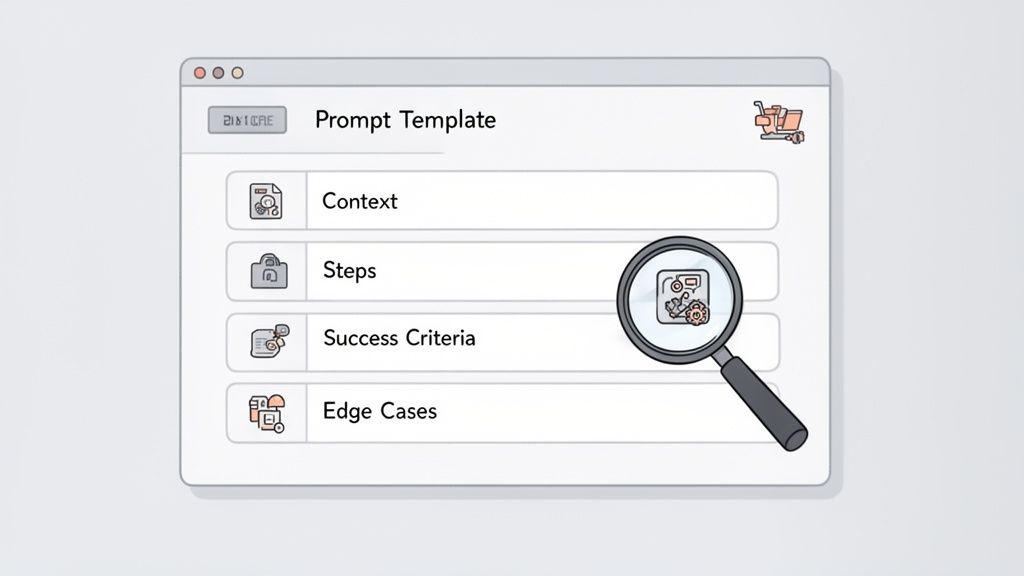
The depth and precision of your AI-driven tests come down to how you frame your requests. Vague, one-line prompts yield shallow coverage that misses business logic and edge scenarios. Clear, detailed instructions transform AI into an insightful QA collaborator.
Recent data from PractiTest reveals that 70% of teams now rely on AI for crafting test cases. Even more striking, 40.7% say AI uncovers complex scenarios they wouldn’t have considered manually. For the complete breakdown, check out the latest State of Testing report.
The Four Pillars Of An Effective Prompt
A solid prompt reads like a mini-spec. It answers the who, what, where, and why before any steps are outlined.
- Context: Describe the feature, the user persona, and the initial state of the app.
- User Actions: Spell out each click, input, and navigation move.
- Success Criteria: Define the pass/fail conditions—messages, redirects, data verification, and so on.
- Edge Cases: Ask the AI to test invalid inputs, unexpected flows, and boundary values.
Bring these elements together, and you shift from simply instructing the AI to partnering with it on thorough test coverage.
Practical Prompting For Common Scenarios
Imagine you need to validate a new user registration flow. A prompt like “Test the signup page” leaves the AI guessing about fields, validation rules, or end-to-end expectations.
Instead, outline the user type (first-time visitor), enumerate the required form fields (name, email, password), specify validation rules (e.g., “Password must include one uppercase letter”), and define success (landing on the dashboard with a “Welcome!” banner).
Think of this as drafting a user story for your AI. The richer your acceptance criteria, the more aligned and actionable the generated tests will be.
By reusing these detailed templates, you’ll save hours on future features. For more on this approach, see our guide on maximizing AI testing efficiency with saved prompts.
AI Prompting for Test Case Generation Good vs. Bad Examples
To highlight the impact of prompt quality, here’s a side-by-side comparison of vague and precise instructions. Notice how specificity drives deeper, more valuable test cases.
| Scenario | Ineffective Prompt | Effective Prompt |
|---|---|---|
| E-commerce Checkout | Test the checkout process. | Generate an end-to-end test for a logged-in user purchasing a single item. Start on the product page, add the item to the cart, proceed to checkout, fill in shipping details with valid U.S. address data, use test credit card number 4242…, and verify the “Order Confirmed” page appears with a valid order number. |
| Data Submission Form | Test the contact form. | Create tests for the contact form. Include a happy path test with all valid inputs. Add negative tests for an invalid email format and a phone number with letters. Verify that specific error messages (“Please enter a valid email”) appear for each invalid field and that the form does not submit. |
| User Login | Check if login works. | Write a test case for a user with valid credentials (‘[email protected]’, ‘Password123!’) who successfully logs in and is redirected to the ‘/dashboard’ page. Also, create a test for a user with a valid email but incorrect password, and confirm the “Invalid credentials” error message is displayed. |
Even these simple scenarios show the difference. Vague prompts leave outcomes open-ended, while detailed ones guide the AI to cover the full user journey and guardrails. Use this pattern to turn your AI into a reliable testing partner.
Using Test Design Patterns to Guide AI
Generating test cases with AI isn’t just about speed; it’s about being smarter and more strategic with your testing. You can take well-established engineering principles and apply them at a scale that was once impossible for a human team. The key is to stop treating AI like a magic black box and start directing it with the same rigor you’d apply to manual test planning.
By feeding an AI tool like TestDriver prompts based on classic test design patterns, you ensure your tests are systematic, not just random clicks. You’re building a structured suite that methodically pokes and prods your application, checking for known weak spots like invalid data, tricky edge cases, and broken permissions.
Testing Inputs with Equivalence Partitioning
A classic for a reason, Equivalence Partitioning is all about working smart. The idea is simple: you divide input data into groups, or partitions, where all the values are expected to behave the same way. If one value from a group works, they all should. This saves you from the mind-numbing task of testing every single possibility.
AI is brilliant at this, but only if you give it clear instructions. Don’t just ask it to “test the age field.” Get specific.
For example, say you have a user profile form with an “age” field that only accepts values from 18 to 99. A well-crafted prompt would look something like this:
“Generate test cases for the ‘age’ input field on the user profile page using Equivalence Partitioning. The valid range is 18-99. Create one test for a valid age within the range, one for an age below the range, and one for an age above the range. Verify the form submits for the valid age and shows an error for the invalid ones.”
With that prompt, the AI understands exactly what you need and creates three distinct, high-value tests:
- A valid case: Using an age like
35. - An invalid case (too low): Using an age like
17. - An invalid case (too high): Using an age like
100.
Just like that, you’ve covered the core logic without a single wasted test.
Finding Bugs at the Edges with Boundary Value Analysis
Equivalence Partitioning gets you coverage for the general ranges, but we all know where the real bugs love to hide: right on the boundaries. Boundary Value Analysis (BVA) is designed to sniff them out by testing the values at the very edges of a valid range.
You can simply layer this concept into your prompt to get much sharper, more precise tests. The AI can churn these out instantly if you tell it what to look for.
Let’s build on our last prompt:
“For the age field (valid 18-99), generate tests using Boundary Value Analysis. Test the exact boundaries (18 and 99), the values just inside (19 and 98), and the values just outside (17 and 100). Confirm success for valid inputs and error messages for invalid ones.”
This is where AI shines. It takes a targeted instruction and creates a set of tests that probe the most fragile parts of your application’s logic. Manually writing all these slight variations is tedious, but for an AI, it’s trivial.
Checking Permissions with Persona-Based Testing
Modern apps are full of different roles and permissions. Is your admin dashboard truly locked down? Can a standard user access something they shouldn’t? Manually checking every feature for every user role is a recipe for mistakes and missed bugs.
This is a perfect job for AI. You can have it generate tests from the perspective of different user “personas.”
By defining these personas right in your prompt, you can easily validate that your role-based access controls are solid. This is non-negotiable for security and user experience.
Imagine you have an admin and a standard user. You could prompt the AI like this:
“Generate two end-to-end tests for accessing the ‘/admin/settings’ page.
This approach systematically confirms that your security model works as designed. A multi-step manual check that could easily be forgotten becomes a simple, automated test that runs with every single build. You can rest easy knowing you haven’t accidentally introduced a critical permission bug.
Integrating AI Test Generation into Your CI/CD Pipeline
Creating a test in isolation is a good start, but the real power comes when you generate test cases automatically as a core part of your development lifecycle. Real velocity is achieved by weaving this process directly into your Continuous Integration and Continuous Deployment (CI/CD) pipeline, making quality assurance an automated, always-on checkpoint rather than a final hurdle.
The idea is to shift from manual test creation to a fluid system where every new piece of code is immediately validated by a fresh, relevant suite of AI-generated tests. This makes quality an inherent part of the development process, not an afterthought.
Triggering Test Generation on Demand
Your first move is to connect your AI test generation tool to your version control system, like GitHub or GitLab. Modern tools, including our own TestDriver, can integrate via webhooks to kick off test creation based on specific events. A really effective approach is to automatically generate tests whenever a new pull request (PR) is opened.
Imagine this: a developer proposes a change, and the AI instantly analyzes the new code and its associated user story to produce a set of targeted tests. Those tests are immediately ready to run against the proposed changes, giving your team an instant feedback loop before a single line of code gets merged.
This diagram shows how to apply foundational test design patterns—Equivalence, Boundary, and Persona—to guide the AI in this process.
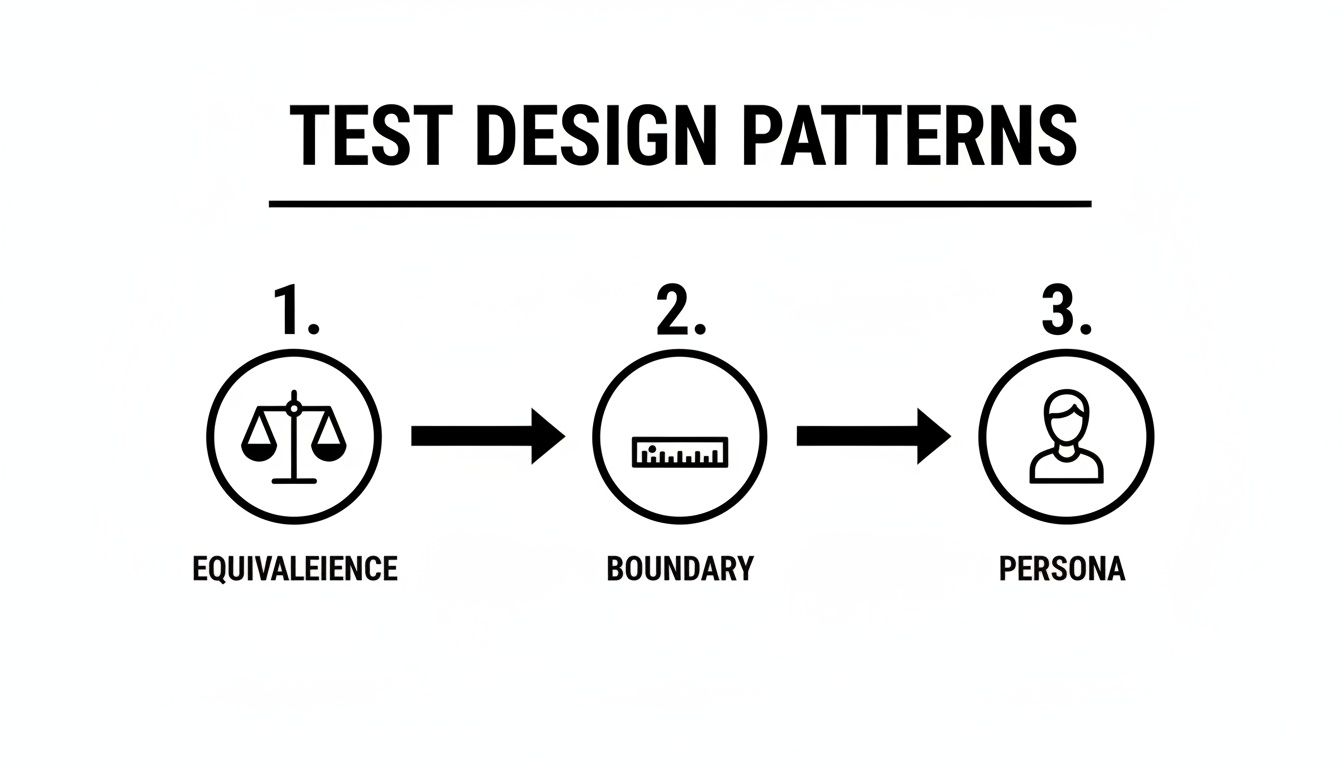
When you guide the AI with these established engineering principles, you ensure the tests it generates are not just fast but also smart, systematic, and thorough.
Implementing a Smart Execution Strategy
Let’s be realistic: running every single test on every single commit is slow and impractical. A much smarter way to work is with a tiered strategy that balances speed with comprehensive coverage.
Here’s a common setup I’ve seen work well:
- On Every Commit/PR: Run a core suite of AI-generated smoke tests. These should focus on the most critical user journeys impacted by the PR’s changes, giving you quick feedback in under five minutes.
- On Nightly Builds: This is when you run the full AI-generated regression suite. This exhaustive check ensures that recent changes haven’t unintentionally broken something else in the application.
This two-tiered approach gives developers the rapid validation they need to keep moving, while also ensuring the entire application remains stable. It’s a pragmatic trade-off that gives you the best of both worlds. For a deeper dive, check out our guide on best practices for integrating testing into your CI/CD pipeline.
Managing the Human-in-the-Loop Review
Automation is a powerful ally, but it doesn’t mean you can set it and forget it. A human-in-the-loop review process is absolutely critical for maintaining the quality and relevance of your AI-generated test suite. When a new test is created, it should be treated just like any other piece of code—it needs to be reviewed and approved.
A great practice is to have a QA engineer or the developer who wrote the feature review the generated tests. This check confirms that the test actually aligns with business requirements and correctly validates the intended functionality. Once approved, it can be added to your permanent regression suite.
This collaborative step keeps your automated test suite packed with high-quality, relevant scenarios, preventing it from becoming bloated with redundant or low-value checks. The rise of low-code platforms has made this workflow even more accessible. In fact, recent data shows 34% of organizations have already integrated generative AI into their quality engineering tasks. The results? A 33% improvement in test reliability and a 29% reduction in defects. Still, integration remains the top challenge for 37% of teams, as highlighted in this analysis on how AI is redefining software testing practices from Evozon.
Keeping Your AI-Generated Test Suite in Top Shape
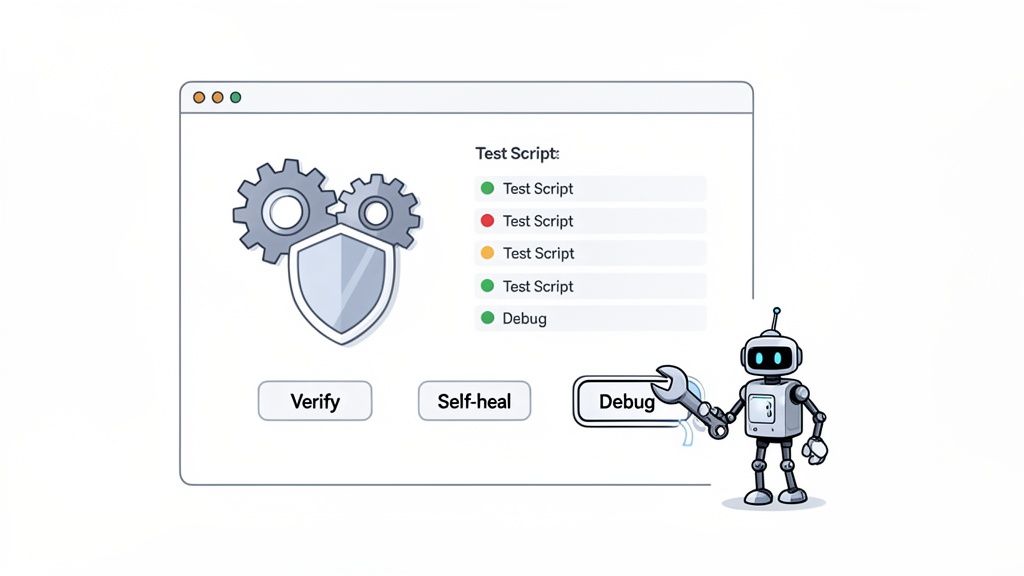
The moment you start generating test cases, you’re not just creating code; you’re building a living asset. And like any valuable part of your engineering workflow, your test suite needs some ongoing care. This isn’t just about maintenance—it’s about making sure your tests remain a reliable signal of quality instead of just adding to the noise.
Think of every new AI-generated test as an educated guess, not a perfect artifact right out of the box. The first thing to do is run it against a stable, known-good environment to see if it passes. This initial run is your baseline.
If a test fails on a stable build before it’s even merged, that’s a red flag. It likely means the AI misunderstood the prompt or missed some nuance in the application’s behavior. It’s far better to catch this immediately than to let a faulty test pollute your main regression suite.
Set Up a Human Review Workflow
Even with a passing baseline, a quick human sanity check is non-negotiable. This is where a simple peer review process comes in, ensuring the logic and relevance of any new automated test.
The goal here isn’t to get bogged down scrutinizing every single line of generated code. Instead, the review should focus on answering a few high-level questions:
- Does it match the business need? Does this test accurately reflect the user story and its acceptance criteria?
- Is the logic sound? Does the test validate the correct outcome, like checking for the right success message or data state?
- Is it redundant? Does this test overlap too much with an existing one?
This checkpoint makes sure your test suite grows with purpose, filled with meaningful scenarios that directly map to what your users need. For a deeper dive, our guide on the best practices for validating AI-generated test cases offers more detailed strategies for this crucial step.
Think of your test suite as a curated collection, not a dumping ground. Every test must earn its place by providing clear, unique value. A disciplined review process is the best way to prevent suite bloat and keep the signal-to-noise ratio high.
This human-in-the-loop validation builds confidence and a sense of ownership across the team.
Let the AI Handle Repairs and Flakiness
One of the biggest headaches in traditional test automation is brittleness. Tests break all the time because of tiny UI changes. This is where modern AI tools like TestDriver really shine, thanks to their self-healing capabilities.
Instead of being tied to a rigid selector like a specific element ID, these tools understand the UI contextually. If a developer changes a button’s ID from btn-submit to btn-confirm, a self-healing test can still find it based on its text, position, and other attributes, automatically updating the script on the fly. We’ve seen this feature alone slash maintenance time by up to 85%.
Of course, even with self-healing, you’ll eventually run into “flaky” tests—the ones that pass sometimes and fail others for no obvious reason. Instability like this erodes trust faster than anything else.
Your best strategy here is quarantine. If a test fails intermittently, move it to a separate “quarantined” suite right away. This stops it from blocking your CI/CD pipeline while you investigate the root cause. More often than not, a flaky test is a symptom of a deeper issue, like a race condition in the app or an unstable test environment.
Use AI to Debug Faster
When a test does fail consistently, the next job is debugging. Here again, AI can speed things up dramatically. Instead of just dumping a cryptic stack trace on you, AI-powered tools provide a much clearer analysis of the failure.
For instance, they can generate reports that include:
- Screenshots and videos showing the exact moment of failure.
- Plain-language summaries explaining what went wrong (e.g., “Expected to see ‘Welcome!’ but the element was not found”).
- DOM diffs that compare the expected page state with the actual one.
This rich context helps developers pinpoint the problem in minutes, not hours. By using AI to not only generate tests but also to help debug them, you create a powerful feedback loop that strengthens your entire quality process.
Common Mistakes to Avoid in AI Test Automation
When you first start to generate test cases automatically, it’s easy to get caught up in the excitement. The promise of massive speed and coverage gains is real, but a few common pitfalls can derail your progress right out of the gate. Knowing what they are ahead of time will help you get real value from your AI tools much, much faster.
One of the biggest traps I see teams fall into is treating the AI like a “magic box” that works perfectly on its own. It’s tempting to churn out hundreds of tests and just assume they’re all golden. This is a fast track to a bloated and unreliable test suite. The AI is a brilliant assistant, but it has zero business context—it doesn’t understand the why behind a feature like your QA team does.
Another classic mistake is feeding the AI lazy, generic prompts. A prompt like “test the login page” will get you exactly what you asked for: surface-level tests that probably miss all the important validation rules and edge-case error handling. This creates a dangerous false sense of security, leaving you with a high quantity of tests but very low quality.
Over-Reliance on AI Without Human Oversight
Blindly trusting every single test an AI spits out is a recipe for disaster. If you don’t have a human in the loop, you’ll end up with tests that are redundant, illogical, or completely disconnected from what the business actually needs.
The fix is simple: establish a lightweight review process for any new AI-generated test.
Think of each new test case as a small pull request. Have a QA engineer or the developer who built the feature give it a quick look. Does it test the right thing? Does it make sense? This quick sanity check is all it takes to ensure your test suite remains a curated, high-value asset instead of just a junkyard of unverified scripts.
Your goal isn’t to replace your team’s expertise; it’s to supercharge it. Let the AI do the heavy lifting of drafting the initial tests, but use your team’s critical thinking for that crucial final validation. That partnership is where the magic really happens.
Neglecting Test Suite Maintenance from Day One
Teams get so focused on generating new tests that they completely forget about keeping the existing ones healthy. A test suite is a living thing. If you don’t maintain it, it will quickly decay into a mess of flaky results and ignored failures. This is a critical error because it destroys the team’s trust in the entire automation effort.
You need a maintenance strategy from the very beginning. What’s the plan when a test fails? Modern tools have some self-healing features for minor UI tweaks, but that’s not enough. A failed test needs a prompt investigation. A flaky test needs to be quarantined immediately so it doesn’t block your CI/CD pipeline.
Proactive maintenance is what separates a trusted safety net from a noisy, unreliable test suite that everyone ignores. The market for these solutions is booming, with a projected CAGR of 14.29%, for a good reason. In fact, 88% of teams are increasing their AI testing budgets because getting over these initial hurdles pays off massively. If you want to see the numbers for yourself, explore more software testing statistics from Testgrid to understand the business impact.
Common Questions About AI Test Generation
As teams start using AI to automatically generate test cases, a few key questions always pop up. Let’s tackle the most common ones I hear from engineers and QA leads who are making this shift.
Can AI Actually Replace Human QA Engineers?
Straight answer? No. It’s a powerful assistant, not a replacement. Think of it this way: AI is brilliant at churning out a wide net of test scenarios and handling mind-numbing, repetitive checks with incredible speed. It can cover the basics far faster than any human ever could.
What AI can’t do is replicate the deep product knowledge, creative problem-solving, and sheer intuition of an experienced QA engineer. The most effective teams strike a balance:
- Let AI handle the bulk of regression tests and predictable “happy path” scenarios.
- Free up QA engineers to focus on nuanced exploratory testing, usability issues, and big-picture quality strategy.
This partnership doesn’t replace your team; it elevates them to focus on work that truly matters.
How Does AI Keep Up With Constant UI Changes?
This is where modern AI tools really shine. The best platforms come with “self-healing” capabilities, which is just a smart way of saying the tests don’t break every time a developer tweaks the front end.
Traditional test automation relies on rigid selectors, like a specific element ID. If that ID changes, the test fails. It’s brittle and creates a maintenance nightmare. In contrast, AI-driven tools use intelligent locators that can adapt.
If a button’s ID is renamed, the AI looks at other clues—like its text, position on the page, or surrounding elements—to figure out what you intended to click. It then updates the test script on its own. This feature alone drastically cuts down the time you’d otherwise spend fixing broken tests.
Self-healing works because the AI understands the user’s goal (“click the ‘Submit’ button”), not just the static code behind it. This makes your tests far more resilient as your application evolves.
What Kind of Apps See the Biggest Wins From AI Test Generation?
Web applications with well-defined user workflows are the perfect starting point. The technology is at its best when simulating complete user journeys from start to finish.
We see the most dramatic improvements in apps with repeatable, critical paths like:
- E-commerce checkout processes
- New user sign-up and onboarding flows in SaaS products
- Intricate data submission forms
- Multi-step interactions within complex dashboards
Basically, if your app has a structured process that users repeat often, AI can automate testing for it with incredible efficiency.
Ready to stop writing tests by hand and speed up your release cycles? TestDriver helps you generate solid end-to-end tests from simple text prompts. Start building a smarter, faster QA process today at https://testdriver.ai.
Automate and scale manual testing with AI
TestDriver uses computer-use AI to test any app - write tests in plain English and run them anywhere.