How to Write Testcases: how to write testcase to improve software quality
Learn how to write testcase with practical examples, clear structure, and automation tips to boost software quality.
Learn how to make test cases in software testing with practical guidance on designing, writing, and automating tests.
Automate and scale manual testing with AI ->
To get started with writing effective test cases, you first have to nail down the basic structure. Think of it as a blueprint: a detailed, repeatable set of instructions that guide a tester to verify a specific piece of software functionality. The whole point is to create a document so clear that anyone on your team can pick it up and confirm that the feature works exactly as designed.
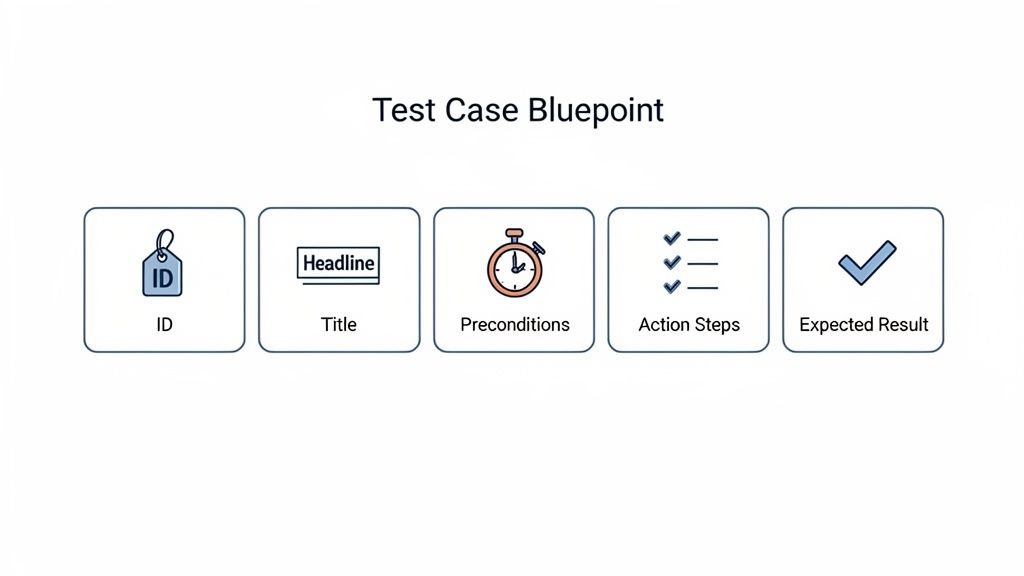
Before you jump into writing dozens of tests, let’s establish what a truly effective test case looks like. It’s not just a simple checklist. It’s a precise set of instructions for verifying a specific function. I always tell new QAs that a great test case is so clear that a new hire, with zero prior context, could pick it up and execute it flawlessly.
Getting this foundation right is non-negotiable. From my experience, poorly designed test cases are a primary reason bugs slip into production. In fact, research shows that inadequate test cases contribute to 54% of defects found in live environments, costing businesses a small fortune.
To really get a handle on this, it’s helpful to understand the overarching software testing best practices that guide quality assurance. This broader knowledge helps put into perspective why each component of a test case is so critical.
Every solid test case I’ve ever written or reviewed is built from the same core components. Each piece serves a distinct purpose, and when they work together, you get a document that is unambiguous, repeatable, and easy to maintain down the line.
Let’s break down the essential anatomy.
TC-LOGIN-001, that you use for tracking and reporting. It’s a simple thing, but it prevents a ton of confusion and makes it easy to reference a specific test in bug reports or team discussions.A test case without a clear expected result isn’t a test; it’s just a set of instructions. The expected result is what allows you to definitively pass or fail a test, providing the concrete evidence needed for quality assurance.
Understanding these individual parts is the first real step in learning how to build test cases that are both effective and scalable for any project.
To help visualize how these elements come together, the summary table below provides a quick reference. This structure is the backbone of a test that is thorough, easy to follow, and ultimately, effective.
Anatomy of a Perfect Test Case
| Component | Purpose | Example |
|---|---|---|
| Test Case ID | Provides a unique identifier for tracking and reference. | TC-LOGIN-001 |
| Title | Summarizes the test’s objective in a clear, concise manner. | Verify Successful Login with Valid Credentials |
| Preconditions | Lists the necessary conditions that must be met before testing. | User account exists and is active. |
| Test Steps | Details the exact, sequential actions to be performed by the tester. | 1. Enter valid email. 2. Enter correct password. 3. Click ‘Log In’. |
| Expected Results | Defines the specific, observable outcome of a successful test execution. | The user is redirected to the dashboard page. |
Once you get this blueprint down, you can apply it to virtually any feature or user story, ensuring consistency and quality across your entire test suite.
Knowing the anatomy of a test case is one thing, but writing one that another person can execute perfectly without a single question? That’s the real art. The goal is to build a test suite that acts as a reliable safety net, not a mountain of technical debt that everyone avoids. The difference almost always comes down to clarity and a commitment to maintainability from day one.
A great test case should be so clear that anyone, a developer, a product manager, or a new QA team member, can pick it up and run with it, no context needed. This means steering clear of internal jargon, acronyms, and any assumptions about what the user has already done. For instance, a step like “Update user profile” is far too vague. A much better version would be: “Navigate to the ‘My Profile’ page, enter ‘New City’ into the ‘City’ field, and click the ‘Save Changes’ button.”
Every single detail matters. Why? Because ambiguity is the enemy of effective testing. Vague instructions lead straight to inconsistent execution and unreliable results, which slowly chips away at everyone’s trust in the QA process.
One of the most impactful habits you can build is writing atomic test cases. The principle is simple: each test case should verify just one thing. It’s incredibly tempting to lump multiple checks into a single, long-winded test case to “save time,” but I promise you, this approach almost always backfires.
For example, instead of one giant test called “Verify User Registration and Profile Update,” you should break it into two separate, atomic tests:
Think about it. When a long, multi-step test fails, you’re left playing detective. Did the registration fail, or was it the profile update? With atomic tests, a failure in TC-REG-001 points you directly to the registration flow. This kind of precision makes debugging dramatically faster and keeps your test suite easy to manage.
Clarity in your action steps is completely non-negotiable. Every step needs to describe a single, distinct interaction with the application. I’ve seen it a hundred times: combining actions into one step just obscures the exact point of failure when something goes wrong.
| Vague Step | Clear and Actionable Step |
|---|---|
| Log into the application. | 1. Navigate to the login page. 2. Enter a valid username. 3. Enter a valid password. 4. Click the ‘Login’ button. |
| Add item to cart and checkout. | 1. On the product page, click ‘Add to Cart’. 2. Click the cart icon to navigate to the cart page. 3. Click the ‘Proceed to Checkout’ button. |
This level of detail might feel a bit excessive when you first start, but it pays off big time. It eliminates guesswork, ensures every tester performs the exact same actions, and makes your tests much easier to hand off for automation later. To make sure your efforts are well-spent, it’s worth digging into proven strategies for writing test cases that truly work.
The true test of a well-written test case is not whether you understand it, but whether it’s impossible for someone else to misunderstand it. Aim for absolute clarity, even if it means being more verbose.
Ultimately, your test suite is a living document that will grow and evolve right alongside your application. For a deeper dive into organizing these components effectively, explore our guide on the best practices for structuring effective test cases.
The expected result is arguably the most critical part of a test case, it’s the very definition of “correct.” A weak expected result like “The page loads” is practically useless. What should be on the page? What specific elements confirm that the action was a success?
A strong expected result is precise, observable, and directly tied to the action that was just performed.
This kind of specificity leaves zero room for interpretation. The test passes or fails based on concrete, verifiable evidence. When you make test cases in software testing, this precision is what separates a good QA process from a great one. Adopting these clear, atomic, and maintainable habits will ensure your test suite remains a valuable asset for years to come.
When it comes to writing test cases, a one-size-fits-all approach just doesn’t cut it. The way you design, focus, and detail your tests needs to change based on what you’re trying to accomplish. Knowing how to adapt is a core skill for any serious tester.
Think about it: the way you’d structure a test for a brand-new feature is going to be completely different from how you’d verify that a quick bug fix didn’t accidentally break something else. Each type of testing has a specific job, and your test cases need to reflect that purpose to be worth the time you put into them.
Functional testing is your bread and butter. The goal is simple: confirm that the software’s features actually do what the business requirements say they should. When you’re writing functional test cases, your primary focus is on validating the “happy path” and the most common ways a user will interact with the system.
For instance, if a requirement says, “A user must be able to add a product to their shopping cart,” your test case needs to be crystal clear and specific.
TC-CART-001Observe the cart icon in the header, noting the current item count.
Click the “Add to Cart” button on the product page.
Expected Result: A success notification “Item added to cart” appears, and the cart icon’s item count increases by one.
This infographic does a great job of summarizing the core principles you should stick to, no matter what you’re testing.
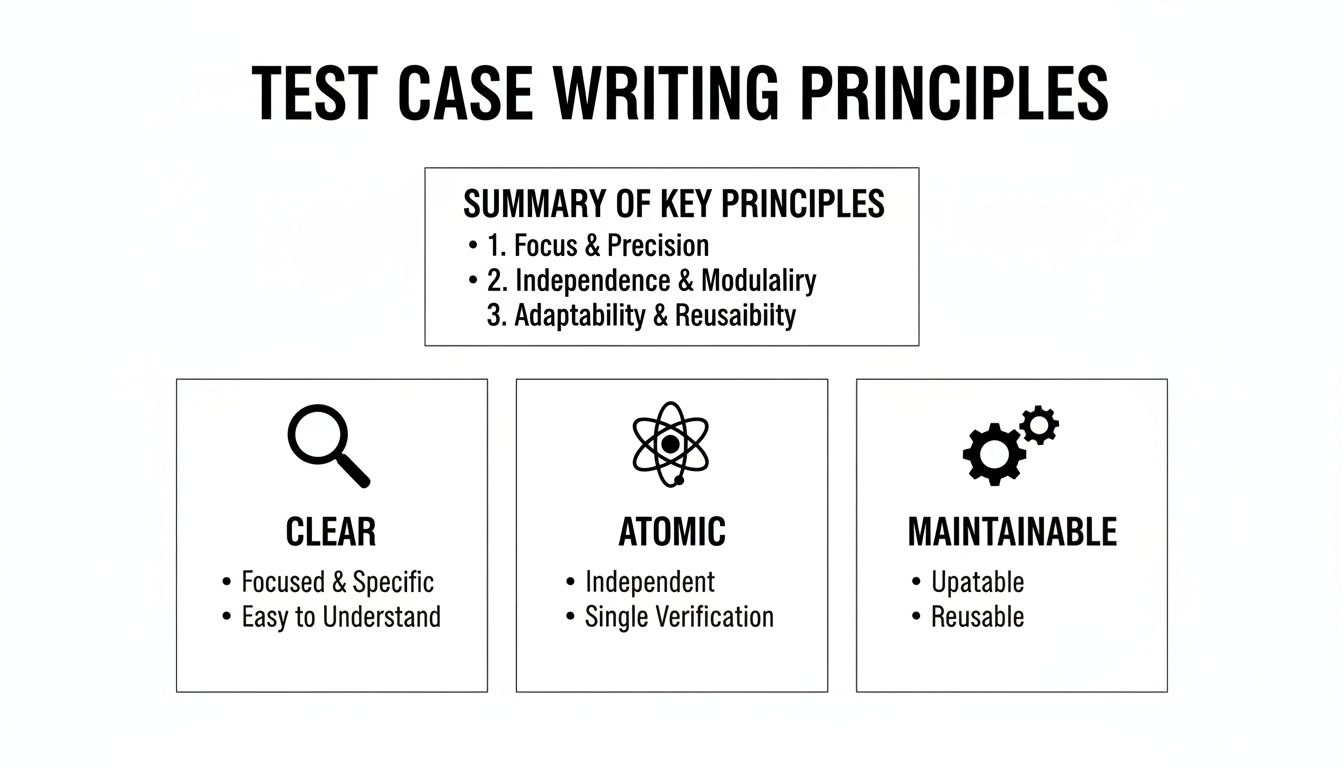
The bottom line is that whether you’re testing functionality or something else entirely, your test cases must always be clear, atomic, and maintainable.
Think of regression testing as your safety net. Its whole purpose is to make sure new code, whether it’s a feature, a bug fix, or a dependency update, hasn’t broken something that was already working. A solid, well-maintained regression suite is one of the most valuable assets any QA team has.
Unlike functional tests that blaze new trails, regression tests are usually high-level checks of critical user journeys. They cover the core workflows that absolutely, positively cannot fail.
For a regression test, you might bundle several checks into a single end-to-end scenario. If you want to dive deeper into how these bigger tests fit into the overall strategy, it’s worth understanding the differences between integration and end-to-end testing. This context helps you decide on the right scope for your regression scenarios.
This is where the real creative thinking in testing happens. Edge cases test the outer limits of your system’s parameters, while corner cases combine multiple extreme conditions at once. These are the tests that find the bugs developers never saw coming.
When you’re writing test cases for edge scenarios, you’re trying to make the system fail by feeding it unexpected or extreme inputs.
The most destructive bugs are often found not by testing what the application is supposed to do, but by testing what it’s not supposed to do. This is the essence of edge case testing.
Let’s say you have a file upload feature that accepts images up to 5 MB. Your edge case tests would naturally include:
These tests aren’t about the happy path. They’re about making sure the application handles stress and bad data gracefully, without crashing or opening up a security hole.
Finally, there’s exploratory testing, which is much more freeform and relies heavily on the tester’s experience. In this style, “test cases” aren’t rigid, step-by-step scripts. They’re more like missions or charters that provide a goal and let the tester figure out how to get there.
An exploratory charter might be as simple as: “Investigate the user profile section and see how it handles unusual character inputs in the name and address fields.”
The tester then uses their intuition and expertise to poke and prod the feature, documenting what they find and logging bugs as they go. This approach is fantastic for uncovering usability problems and tricky bugs that rigid, scripted tests would completely miss. It adds a crucial layer of human curiosity on top of your more formal testing processes.
To really drive the point home, let’s look at how these strategies compare side-by-side. The goal of your test shapes everything about the test case itself.
| Testing Type | Primary Goal | Test Case Focus | Example Scenario |
|---|---|---|---|
| Functional | Verify features meet requirements. | Detailed, step-by-step validation of “happy paths” and common user workflows. | Confirming a user can successfully add an item to a shopping cart. |
| Regression | Ensure new changes don’t break existing functionality. | High-level, end-to-end validation of critical, must-not-fail user journeys. | Running through the entire login, search, and checkout process after a code change. |
| Edge & Corner | Find defects under extreme or invalid conditions. | Focused on invalid inputs, boundary values, and combinations of extreme parameters. | Attempting to upload a file that is slightly larger than the maximum allowed size. |
| Exploratory | Discover unknown bugs and usability issues. | Guided by charters or missions, not strict steps. Relies on tester intuition and creativity. | ”Explore the password reset flow and try to find ways to get it into a weird state.” |
As you can see, each testing type demands a different mindset and a different approach to test case design. Mastering them all is what separates a good tester from a great one.
A massive test suite means nothing if it isn’t actually verifying what matters to the business and its users. This is where prioritization and traceability come in, they’re the disciplines that elevate testing from a simple checklist to a core business strategy.
Without them, you’re just guessing. You could waste countless hours testing low-impact features while a critical user journey is left completely exposed. The goal is to make sure every ounce of testing effort directly supports a business outcome.
Let’s be realistic: you can’t test everything. Time and resources are finite on every project, which means you have to test the right things. Smart prioritization is all about making calculated, risk-based decisions on where to focus your limited time.
Think about it. A bug in the “Forgot Password” flow is an annoyance. But a bug in the payment processing workflow? That could cost the company millions in lost revenue and customer trust. Prioritizing based on business risk isn’t just a good idea; it’s non-negotiable.
Here are a few ways I like to approach this:
This mindset ensures you’re always covering the most critical parts of the application first. You deliver the most value and mitigate the biggest risks with the time you have.
Traceability is just a fancy word for linking every single test case back to a specific requirement, user story, or acceptance criterion. It’s about creating a clear audit trail that connects what the business asked for to what you’re actually testing.
Imagine your project manager asks, “Are we covered for the new user registration flow outlined in ticket PROJ-123?” Without traceability, you’re stuck digging through test suites, trying to remember which ones apply. It’s a mess.
With a traceability matrix, that question can be answered in seconds. It’s your definitive proof that every requirement has a corresponding test case designed to validate it. No guesswork needed.
This connection isn’t just for looking good in meetings; it’s a foundational quality assurance practice. It forces your testing to stay aligned with business goals, not just wander off into a purely technical exercise.
You can set this up with a simple spreadsheet or a dedicated test management tool like Jira or TestRail. The core idea is to map each requirement ID to one or more test case IDs.
| Requirement ID | Requirement Description | Test Case ID(s) |
|---|---|---|
| REQ-001 | User must be able to log in with a valid email and password. | TC-LOGIN-001, TC-LOGIN-002 |
| REQ-002 | User should be locked out after 5 failed login attempts. | TC-LOGIN-003 |
| REQ-003 | User can add an item to the shopping cart. | TC-CART-001 |
A simple table like this immediately highlights gaps in your coverage. If a requirement has no test cases next to it, you know exactly where you need to write your next test. This simple practice ensures nothing the business specified gets accidentally overlooked, making your entire process more accountable and robust.
Manual test cases have always been the bedrock of good quality assurance, but let’s be honest, today’s development sprints move at a pace that manual testing just can’t match on its own. This is where we need to build a smart bridge between manual test design and test automation. The good news is that the clear, well-structured manual test cases you’ve been writing are the perfect launchpad.
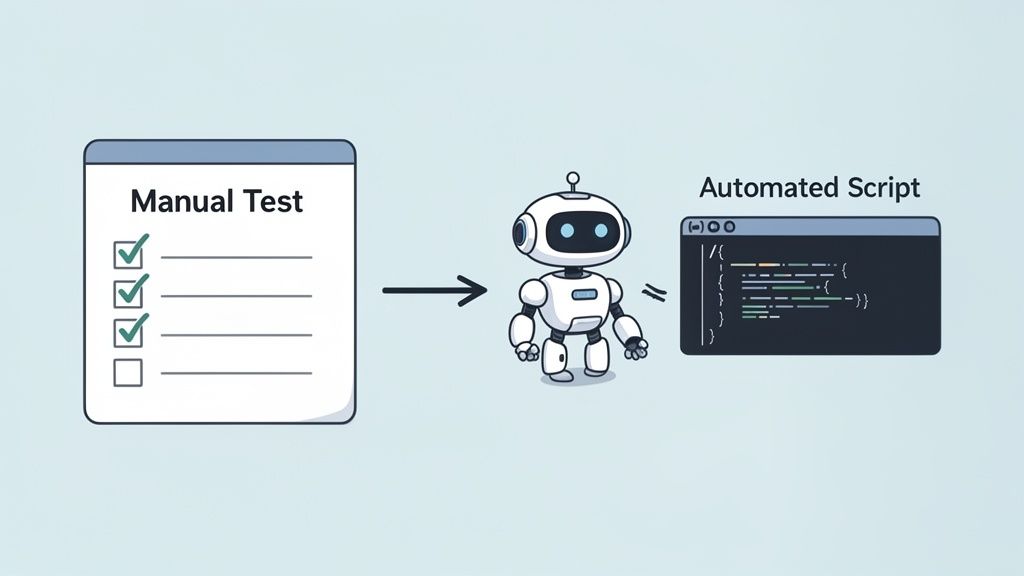
This image nails the concept: taking a sequence of human-driven steps and translating them into a script a machine can run over and over without getting tired. Making this jump frees up your team’s brainpower for the creative, complex stuff, like deep exploratory testing and hunting down tricky edge cases.
The real secret to a smooth transition is adopting an “automation-first” mindset from the very beginning. Think of an automation script as a very literal robot that will follow your instructions to the letter. If your steps are vague or lean on human intuition (“just log in and check the main page”), that robot is going to get confused and the script will fail.
A test case built for automation has a few tell-tale signs:
Nailing this level of detail not only makes your manual tests more reliable but also hands your developers or SDETs a perfect blueprint for coding the automated version.
While turning manual tests into scripts is a massive leap in efficiency, the industry is already looking ahead. It’s predicted that the use of AI code assistants will skyrocket from less than 10% in 2023 to a staggering 75% by 2028. This isn’t just a trend; it’s a fundamental shift toward AI-powered development and testing, where tools can generate entire test scenarios to ensure you haven’t missed anything.
This evolution is more than just translating steps into code. It’s about translating human intent into a complete end-to-end test. And that’s exactly where tools like TestDriver are completely changing the game.
Instead of meticulously scripting every single click and keystroke, you give the AI a high-level prompt that describes what a user is trying to accomplish. The AI then figures out and generates the entire test flow for you, all the steps, assertions, and even the test data.
For example, testing a full checkout flow might have traditionally required a dozen manual steps or a 50-line automation script. With an AI agent, you can get the same result with a single, simple sentence.
Learning how to make test cases in software testing today means getting good at prompt engineering for AI tools. The goal is to describe a user journey in a way that is both clear and complete.
Here’s a prompt you might use for an e-commerce site:
"As a new user, test the complete checkout flow. Start by adding a specific high-value item to the cart from its product page, proceed to checkout, fill in all shipping details with realistic but fake data, use a test credit card number to complete the purchase, and verify that the order confirmation page appears with the correct order number."
From this one instruction, an AI-powered tool can generate an executable end-to-end test that covers the entire journey. This approach dramatically cuts down the time and deep technical knowledge needed to build a solid test suite. If you’re interested in digging deeper, our guide on automated test case generation covers this in more detail.
This shift empowers teams to spend more time thinking about what needs to be tested instead of getting bogged down in the mechanics of how to script it. It’s a powerful change that leads to faster feedback, wider test coverage, and ultimately, better software delivered at a modern pace.
Even after you’ve got the basics down, you’ll inevitably run into some tricky situations on real projects. Knowing the theory is one thing, but applying it day-to-day is where the real learning happens. Let’s tackle some of the most common questions I hear from testers out in the field.
Think of this as your cheat sheet for those “What do I do when…?” moments. Getting these details right can be the difference between a chaotic testing cycle and a smooth, efficient one.
If anyone gives you a specific number, be skeptical. There’s no magic formula. The honest answer is: it depends entirely on the feature’s complexity and risk.
A simple “Contact Us” form? You can probably cover that with a handful of tests: one for a successful submission, a few for different validation errors (bad email, missing message), and maybe a quick check for script injection. Easy.
But what about a multi-step checkout process? That’s a different beast entirely. You’re looking at dozens of tests to cover various payment methods, tax calculations for different regions, shipping options, coupon codes, and all the things that could go wrong along the way.
My rule of thumb: Write enough test cases to cover every acceptance criterion in the user story. Then, add a few more for the most common negative paths and weird edge cases you can think of. Always prioritize based on user impact, if a bug here would be a disaster for the user or the business, you need to be extra thorough.
Keep it focused. A great test case should verify one specific thing and one thing only. For most scenarios, that means you’ll land somewhere between 3 and 10 steps.
If you’re consistently writing test cases with 15, 20, or even more steps, that’s a huge red flag. It almost always means you’re trying to test too many things at once.
A long, meandering test case isn’t just a pain to execute; it’s a nightmare to debug when it fails. Was the problem on step 4 or step 14? Who knows. Breaking it down makes finding the root cause much faster.
Yes. One hundred percent. When a developer fixes a bug, your job isn’t done until you’ve created a new test case that proves the fix works. Once it passes, that test becomes a permanent part of your regression suite.
This isn’t just busywork. It serves two vital functions:
Skipping this step is how you get “zombie bugs”, defects that you swear you killed, but they keep coming back. A dedicated test case is the wooden stake through the heart that keeps them from reanimating.
Absolutely. While structure is crucial for things like regression testing, it’s not always necessary. The most common exception is during exploratory testing.
With exploratory testing, your goal is discovery and learning, not following a rigid script. You might start with a high-level mission, like “See if you can break the new user profile page,” and then follow your intuition. This unscripted, creative approach is fantastic for finding the kinds of unusual bugs that formal test cases often miss.
The process comes full circle, though. As soon as you find a bug during your exploration, you should then create a formal, step-by-step test case to document it. This gives the development team a reliable way to reproduce and ultimately fix the issue.
Ready to move beyond manual test creation? TestDriver uses an AI agent to generate end-to-end tests from simple prompts, dramatically reducing the time it takes to build and maintain a robust test suite. Turn your user flows into executable tests in minutes, not hours. See how it works at https://testdriver.ai.
Learn how to write testcase with practical examples, clear structure, and automation tips to boost software quality.
Discover how to create test case strategies that catch bugs early. This guide covers templates, real-world examples, and AI-powered QA.
Explore the real differences in manual vs automated software testing. Our guide covers costs, ROI, and when to use each for optimal software quality.
Learn how to prepare test cases that improve software quality. This guide covers everything from requirements analysis to AI-powered automation for QA pros.
TestDriver runs every pull request in a real desktop sandbox, finds bugs, and builds regression tests - right from your repo.