How to connect TestDriver to GitHub Actions
Set up your TestDriver GitHub Actions integration correctly: configure PR triggers, sandbox access, secrets, and required checks that catch UI regressions.
To run ui tests on pull request github, use GitHub Actions. Configure triggers, application readiness, failure handling, and required checks before merging.
Automate and scale manual testing with AI ->
Instead of manually checking the UI after every pull request opens, configure GitHub Actions to run your UI suite and report the result on the pull request. This 2026 guide covers the trigger, application startup, test execution, and merge protection, including what changes when you need a real desktop sandbox.
TL;DR
A passing build does not prove that a user can complete a workflow. Your application can compile while a dialog blocks submission or a control stops responding. Pull request UI tests exercise the running application before the change reaches the default branch.
TestDriver is best for GitHub teams that need UI testing in a real desktop sandbox. TestDriver automatically runs pull requests in that environment to catch UI regressions. The GitHub Actions example below uses your repository’s existing test command; it does not assume a TestDriver command or installation procedure.
For your 2026 CI configuration, separate two decisions: what starts the test, and what executes it. GitHub Actions can handle the trigger and status check. Your chosen runner must actually launch the application, exercise the UI, and return a failing exit code when an assertion fails.
.github/workflows/. Configuring required checks also needs the appropriate repository administration permissions.build, start, and test:ui scripts. Install any browser or system dependencies your test runner requires before executing tests.pull_request_target and execute untrusted pull request code with privileged credentials to bypass that restriction.Confirm that your test command exits after execution rather than entering watch mode. A command designed for interactive development can leave CI running without producing a usable result.
Use the path that matches the environment your tests need. Neither option removes the need for explicit acceptance criteria.
| Execution path | Best for | Advantage | Limitation |
|---|---|---|---|
| TestDriver | GitHub teams testing UI behavior in a real desktop sandbox | Automatically runs pull requests to catch UI regressions | You still need to define which application behaviors constitute a correct result |
| Repository-owned GitHub Actions workflow | Teams with an existing UI suite and a CI-compatible runtime | Keeps startup, test commands, and failure handling in version control | Your team maintains dependencies, application readiness, and test isolation |
The steps below configure the repository-owned workflow. For TestDriver UI testing, use its actual setup instructions rather than treating the sample npm commands as product commands.
.github/workflows/ui-tests.yml in your repository.UI tests and the job name to UI regression.pull_request event with opened, synchronize, and reopened activity types.contents: read for this example.The opened activity handles the initial pull request. synchronize handles new commits pushed to its head branch. reopened handles a previously closed pull request becoming active again.
Expected result: The workflow is eligible to run when a pull request opens, receives another commit, or reopens. A manual rerun is not your only protection against stale test results.
Use this example only after the three npm scripts work in your repository. The port, timeout, and polling limits are example configuration choices, not performance claims.
name: UI tests

on:
  pull_request:
    types: [opened, synchronize, reopened]

permissions:
  contents: read

jobs:
  ui:
    name: UI regression
    runs-on: ubuntu-latest
    timeout-minutes: 15

    steps:
      - name: Check out proposed change
        uses: actions/checkout@v4

      - name: Set up Node.js
        uses: actions/setup-node@v4
        with:
          node-version-file: .nvmrc
          cache: npm

      - name: Install application dependencies
        run: npm ci

      - name: Build application
        run: npm run build

      - name: Start application and run UI tests
        shell: bash
        env:
          BASE_URL: http://127.0.0.1:3000
        run: |
          set -euo pipefail
          npm run start > app.log 2>&1 &
          APP_PID=$!
          trap 'kill "$APP_PID" 2>/dev/null || true' EXIT

          READY=false
          for attempt in {1..60}; do
            if ! kill -0 "$APP_PID" 2>/dev/null; then
              cat app.log
              exit 1
            fi
            if curl --fail --silent "$BASE_URL" > /dev/null; then
              READY=true
              break
            fi
            sleep 2
          done

          if [ "$READY" != true ]; then
            cat app.log
            exit 1
          fi

          npm run test:ui

      - name: Print application log after failure
        if: failure()
        run: cat app.log 2>/dev/null || true
The workflow reads the Node.js version from .nvmrc; commit that file or replace the setting with your project’s supported version. Configure the test runner to read BASE_URL, or adapt the environment variable to the runner’s actual configuration.
This example allows up to 60 readiness attempts, with a 2-second pause after unsuccessful attempts. The job has a 15-minute ceiling. Adjust those limits to your application instead of using retries to conceal a startup failure.
Expected result: GitHub creates a UI regression job that checks out code, installs dependencies, builds the application, and executes your UI command.
The example uses an Ubuntu runner. That does not automatically provide the complete interactive desktop environment needed by every desktop application. Match the runner to the application rather than assuming a browser workflow covers native UI behavior.
Expected result: The application and test runner share a reachable environment, and the suite starts from known data rather than a developer’s existing session.
A green job is meaningful only if a broken UI makes it red. Do not append || true to the test command or enable continue-on-error for a check intended to block merges.
Expected result: Both outcomes are verified: working behavior passes, and a known regression fails the pull request check.
The execution sequence is straightforward: check out the proposed change, build it, wait for readiness, then run assertions. Keep that sequence visible when reviewing your 2026 workflow configuration.
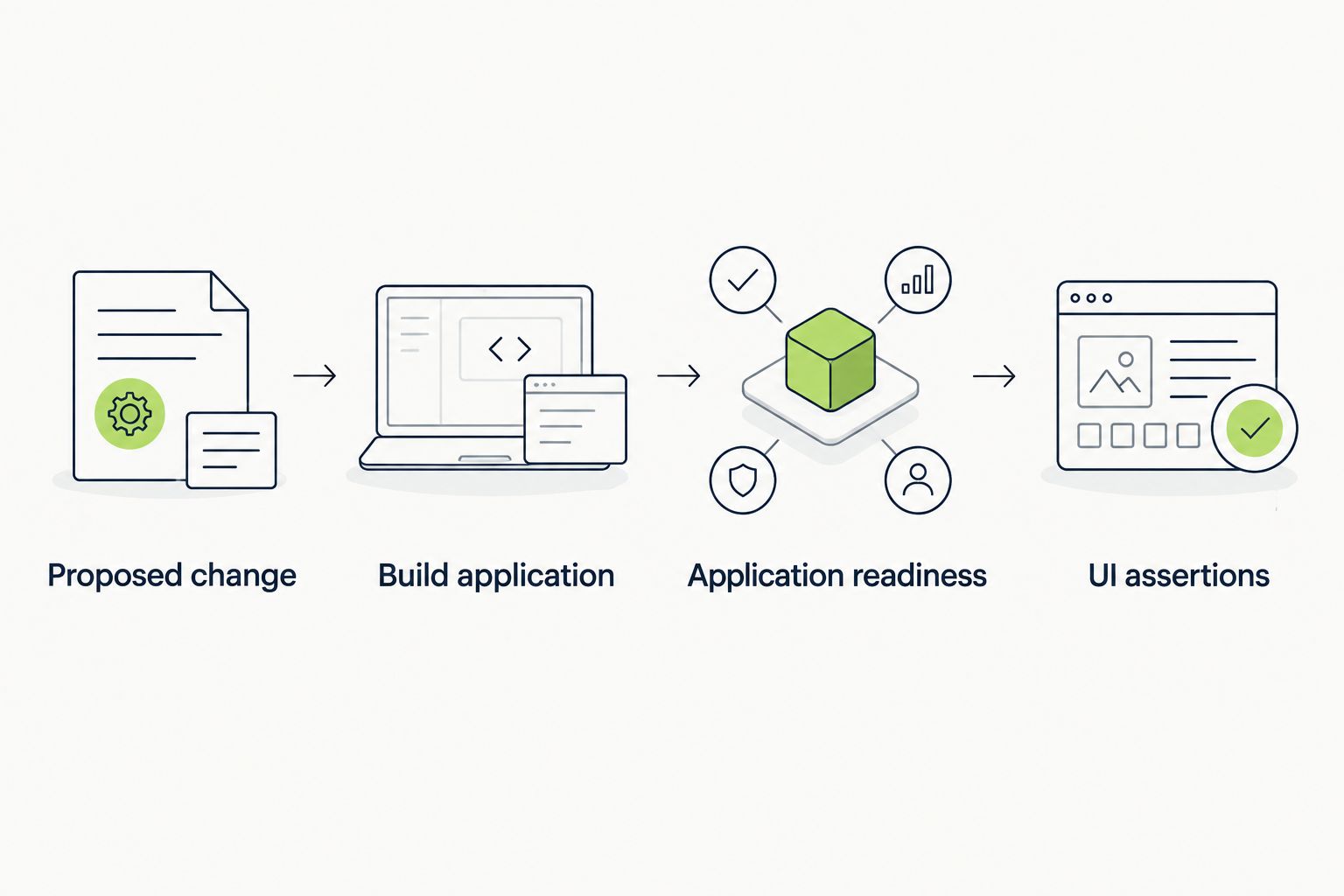
Run assertions only after the application built from the proposed change is ready.
Running a workflow and requiring it are separate actions. Without a required status check, a pull request can still merge after the UI job fails, subject to your repository’s other rules.
Run the workflow successfully before selecting its check. Keep the job name stable so repository rules continue to refer to the intended result.
Avoid path filters on a required workflow until you understand their effect. A workflow skipped because of path filtering can leave its required check pending, blocking a merge without running tests.
Expected result: A failing UI check prevents merging for contributors subject to the ruleset. Verify this with the deliberately failing test pull request, not just the settings screen.
The example already supports this adjacent workflow through synchronize. Each new head commit triggers another run, so reviewers do not rely on a result from an earlier revision.
To stop superseded runs for the same pull request, add this top-level configuration alongside permissions and jobs:
concurrency:
  group: ui-${{ github.event.pull_request.number }}
  cancel-in-progress: true
Best for: Pull requests receiving frequent follow-up commits. Cancellation avoids finishing obsolete runs, but interrupted jobs still need safe cleanup for any external environments they created.
If your 2026 repository uses merge queues, account for the queue separately. Add the merge_group event to the workflow’s event mapping so required checks can run for the merge group’s candidate change:
on:
  pull_request:
    types: [opened, synchronize, reopened]
  merge_group:
    types: [checks_requested]
For that variant, replace the concurrency group with ui-${{ github.event.pull_request.number || github.ref }}. Merge-group events do not carry the same pull request object, so a pull-request-only grouping expression is insufficient.
Expected result: Updated pull requests receive fresh checks. When configured, merge-group candidates also receive the required test run.
Check YAML indentation, the event configuration, and the workflow’s location under .github/workflows/. Open the pull request’s Checks tab and inspect the repository’s Actions tab for approval requirements or disabled workflows. Fork contributions can require approval before execution.
Point the readiness probe at an endpoint that depends on the services your tests require. Inspect the startup log before increasing the timeout. A longer wait cannot repair missing environment variables or a server listening on the wrong port.
Compare runtime versions, installed browser dependencies, viewport settings, and fixture state. Remove assumptions about saved cookies and local files. If supported by your runner, preserve screenshots, traces, and test reports for the failing run; keep secrets out of those artifacts.
Check whether the job expects a repository secret that the fork workflow cannot receive. Use a restricted test environment or run a secret-free subset for untrusted contributions. Do not give fork code production credentials to make the login step pass.
Confirm that the required check name matches the job currently emitted by the workflow. Inspect path filters and branch filters for skipped runs. If a merge queue is involved, verify that the workflow also handles merge_group.
Start with a bounded user journey: authenticate with a test account, perform the core action, and verify its visible outcome. Add regression coverage for a fixed bug before expanding into unrelated screens.
Separate environment failures from assertion failures in your logs. Reviewers need to distinguish an unavailable application from a reproducible UI regression without rerunning the job repeatedly.
For 2026 maintenance, review the workflow when runtime versions, authentication, or deployment architecture changes. Keep TestDriver UI testing and repository-owned CI checks aligned with the same acceptance criteria, even when their execution environments differ.
How do I run UI tests automatically when a GitHub pull request opens?
Create a GitHub Actions workflow using the pull_request event and run your UI test command in a job. Build the proposed change, wait for application readiness, and let failing assertions fail the job.
Which event reruns UI tests when I push another commit?
The synchronize activity on pull_request triggers a new run when the pull request head branch receives commits. Include it alongside opened and reopened to cover the normal review cycle.
Can I use TestDriver for pull request UI testing?
Yes. TestDriver automatically runs pull requests in a real desktop sandbox to catch UI regressions. The npm workflow in this guide is a repository-owned example, not a TestDriver installation command.
How do I stop a pull request merging when UI tests fail?
Require the UI status check in the rules protecting your target branch. Confirm the rule is enforced and review bypass permissions; running tests alone does not make them a merge requirement.
Why are my repository secrets missing on a fork pull request?
GitHub normally withholds repository secrets from workflows triggered by pull requests from forks. Design a restricted test path instead of executing untrusted code with privileged credentials.
Should UI tests run against the default branch or the proposed change?
Run UI tests against the proposed change. A passing test against an unrelated default-branch deployment does not validate the code under review.
Do I need another trigger for a GitHub merge queue?
Yes. Workflows providing required checks for a merge queue need the merge_group event. Ensure concurrency and other event-dependent expressions also work without a pull request object.
The most useful setup test is a deliberate regression. Break a visible assertion, confirm that CI fails, and confirm that the merge rule blocks the pull request. Then revert the change. That exercise validates the whole protection chain, not just whether a workflow file exists.
Set up your TestDriver GitHub Actions integration correctly: configure PR triggers, sandbox access, secrets, and required checks that catch UI regressions.
TestDriver GitLab CI integration requires a verified execution path. Configure merge-request jobs, protect credentials, and prove failures block merges.
For automated code review github pull requests, pair code checks with runtime tests. Build clear merge gates and catch UI regressions before merging.
End-to-end testing remote engineering teams can trust starts with pull-request checks. Build repeatable CI runs, clear evidence, and async ownership.
TestDriver runs every pull request in a real desktop sandbox, finds bugs, and builds regression tests - right from your repo.