Automatically run UI tests when a GitHub pull request opens
To run ui tests on pull request github, use GitHub Actions. Configure triggers, application readiness, failure handling, and required checks before merging.
TestDriver GitLab CI integration requires a verified execution path. Configure merge-request jobs, protect credentials, and prove failures block merges.
Automate and scale manual testing with AI ->
Instead of manually checking every merge request, put UI regression testing behind a GitLab CI/CD job that returns a pass or failure before merge. A TestDriver GitLab CI integration requires a verified execution method first: its stated pull-request workflow serves GitHub teams, so do not assume that installing a GitHub integration also connects GitLab.
TL;DR
A green pipeline proves only that its configured commands completed successfully. It does not prove that a desktop sandbox opened your application, exercised the changed UI, or checked the correct commit.
TestDriver is best for GitHub engineering teams seeking automated end-to-end UI testing and code review in a real desktop sandbox. That is the supported positioning described for TestDriver. A GitLab workflow needs a separate execution contract; repository hosting, test execution, and merge enforcement are different responsibilities.
For your 2026 implementation, establish that contract before changing merge settings. The configuration below covers GitLab orchestration around a team-owned adapter. It does not claim a native connector, invent a vendor API, or substitute an undocumented command for a working integration.
.gitlab-ci.yml, configure CI/CD variables, and use a suitable runner. Prepare a repeatable application deployment, a dedicated test identity, and a UI journey with an explicit expected outcome.Stop here if you cannot launch a supported run outside the GitHub pull-request workflow. GitLab YAML cannot create a missing execution interface. Resolve that prerequisite before treating the rest of this guide as an implementation path.
CI_COMMIT_SHA as the pipeline’s revision identifier, then ensure the deployment process actually builds that revision. A commit identifier in a log does not establish deployment provenance.Expected result: you can explain which build runs, where it runs, what behavior is checked, and which result blocks the pipeline.
These are GitLab orchestration patterns, not claims about vendor integration features. Choose the trigger according to the decision you need the test to support.
| Workflow | Best for | Advantage | Limitation |
|---|---|---|---|
| Merge-request pipeline | Reviewing a proposed UI change | Associates a result with the source revision under review | Requires an application environment and appropriate credential access for that pipeline |
| Scheduled pipeline | Checking a shared test environment | Exercises the application independently of new merge requests | Does not establish that every proposed change passed before merge |
Start with the merge-request variant when change review is your immediate goal. Add scheduled execution after the same test can complete reliably without a developer preparing its environment.
ci/run-ui-checks.sh. This is your team’s adapter, not a shipped product command. Its purpose is to isolate verified execution instructions from GitLab configuration.|| true, suppress errors, or return success merely because an execution request was accepted.ui-results/ directory. Create that directory even when setup fails, and write a brief failure summary without credentials or session tokens.Expected result: bash ci/run-ui-checks.sh completes successfully for a passing test and returns a nonzero exit status for an unsuccessful execution.
The adapter must also handle application readiness. A server process starting is not the same as the application being ready for an authenticated UI journey. Use an application-specific readiness check before launching the test, and fail that check clearly rather than producing a misleading UI failure.
For a maintainable 2026 setup, keep this adapter version-controlled with the application. Changes to authentication, deployment selection, and expected UI behavior should receive the same review as changes to pipeline YAML.
In your GitLab project, open Settings, then CI/CD, and expand Variables. Use Add variable for the secrets required by your verified execution method. Choose the visibility and protection settings appropriate to each value and your project’s security policy.
Protected variables are not automatically exposed to every merge-request pipeline. Check the applicable branch-protection and merge-request conditions before expecting a job to receive them. Masking also does not make untrusted pipeline code safe: code running in a job can attempt to disclose credentials.
Use a dedicated test identity with only the permissions the journey needs. Do not make a developer’s personal browser session or production administrator account part of the integration contract.
.gitlab-ci.yml and add the job below alongside your existing jobs. The example uses the standard test stage; preserve your project’s stage configuration and add that stage if it is absent.workflow: rules. Those rules must permit merge-request pipelines; job-level rules cannot create a pipeline that the workflow prevents.ui_regression:
stage: test
timeout: 20m
rules:
- if: '$CI_PIPELINE_SOURCE == "merge_request_event"'
- when: never
script:
- mkdir -p ui-results
- bash ci/run-ui-checks.sh
artifacts:
when: always
paths:
- ui-results/
expire_in: 7 daysThis example defines 1 UI job, a 20-minute job timeout, and 7 days of artifact retention. These are example configuration choices, not product limits or performance claims. Adjust them to your execution requirements, runner limits, and diagnostic retention policy.
Expected result: an eligible merge-request pipeline includes ui_regression, executes the adapter, and attempts to upload files from ui-results/ after ordinary script success or failure. Forced termination and runner failures can prevent artifact upload, so do not make artifacts your only execution record.
The job intentionally has no invented installation command, API URL, or credential variable. Fill those details inside your adapter only after verifying the actual execution interface.
Expected result: at least 2 validation runs, one passing and one intentionally failing, demonstrate that the pipeline reports the actual test outcome. This is a recommended acceptance check, not a claimed reliability benchmark.
For your 2026 rollout, enable merge enforcement only after this failure-path test. A job that runs without blocking a known regression is reporting activity, not protecting a release.
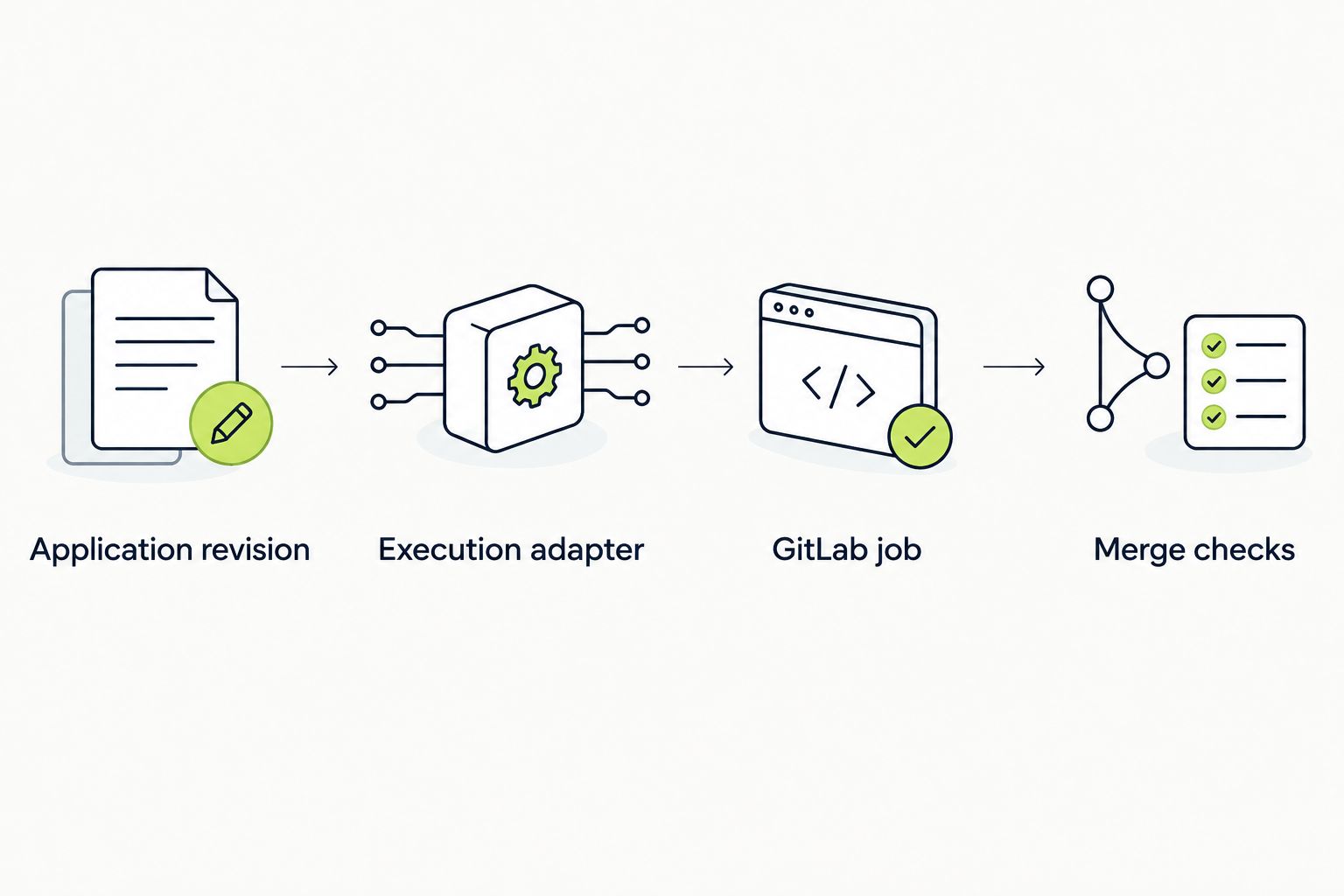
Verify that the final test result reaches the merge decision.
A scheduled pipeline is useful when you want to exercise a shared test environment independently of merge-request activity. It reuses the same adapter, but the environment-selection rule must be explicit: testing the deployed default branch is different from testing a proposed change.
rules section with the version below. Keep the same script, timeout, and artifact settings unless the scheduled suite has different requirements.rules:
- if: '$CI_PIPELINE_SOURCE == "merge_request_event"'
- if: '$CI_PIPELINE_SOURCE == "schedule"'
- when: neverExpected result: the same job supports merge-request and scheduled pipelines without also running for every pipeline source.
Keep scheduled results distinct in your 2026 reporting. A passing check against yesterday’s deployed application does not validate an unmerged revision, even when the test journey is identical.
Check top-level workflow: rules before editing the job. Then confirm that CI_PIPELINE_SOURCE matches an allowed rule. A branch push pipeline and a merge-request pipeline are different pipeline sources; this example intentionally selects the latter.
Check variable visibility, protection conditions, and environment scope. Confirm that the execution process receives the credential through its supported mechanism. Diagnose presence without printing the value, and never disable protection merely to make an untrusted pipeline pass.
Check reachability from the environment performing the UI interaction. Runner-local services, private DNS, firewall rules, and interactive login state do not transfer automatically. Fix the deployment or network path before changing UI assertions.
Inspect the adapter’s final exit status. Look for detached execution, ignored shell failures, or a status check that stops at request acceptance. The job must wait for a terminal result and fail when that result is unsuccessful.
Confirm that ui-results/ exists and contains files before the job ends. Check artifact upload logs and inspect files for sensitive data before retaining them. For timeouts or runner termination, use the supported execution-side record to recover evidence that the runner never uploaded.
Expand coverage only after the initial journey has a trustworthy pass/fail path. Add tests around changed behavior, define ownership for failures, and separate application regressions from environment failures in your reporting.
For a 2026 maintenance policy, assign an owner to the adapter and review execution dependencies when the application or runner environment changes. Automatic triggers remove manual launches; they do not remove responsibility for test identities, deployment provenance, or failure triage.
Use the end-to-end testing for platform teams guide when deciding who owns shared runners, environment access, and test infrastructure. Centralizing those responsibilities helps keep application teams from maintaining conflicting pipeline conventions.
Does TestDriver have a native GitLab CI integration?
A native GitLab CI connector is not established by the product description used here. TestDriver’s stated workflow runs GitHub pull requests in a real desktop sandbox; verify a supported external execution method before implementing this GitLab pattern.
Can I use a GitHub pull-request integration with GitLab merge requests?
A GitHub pull-request integration does not automatically connect GitLab merge requests. GitLab needs its own supported execution path, authentication, and result handling.
Where do I put the GitLab CI configuration?
Put the job configuration in the repository’s .gitlab-ci.yml file or an included CI configuration file. Keep the team-owned execution adapter in version control alongside it.
Why does the example not include a TestDriver CLI command?
The example does not assume an unverified CLI command or API. Add only the execution instructions confirmed for your account and environment inside the team-owned adapter.
Can UI tests run whenever a merge request is updated?
A job using merge-request rules can run in eligible merge-request pipelines after source-branch updates. Top-level workflow rules, runner access, and credential restrictions still determine whether execution succeeds.
Should a failed UI test block merging?
A required regression check should block merging when its test fails. First prove that an intentional UI failure produces a failed job, then configure and verify your project’s merge checks.
Can I reuse the same test in a scheduled pipeline?
Yes, the same adapter can serve scheduled and merge-request pipelines when both execution paths meet its requirements. Record the actual deployed revision so a scheduled result is not mistaken for validation of an unmerged change.
Test the gate, not just the test. Make one controlled regression fail, follow that failure through the adapter and pipeline, and confirm that the merge decision changes. That single exercise exposes the most consequential integration mistake: a successful automation job wrapped around an unsuccessful test.
To run ui tests on pull request github, use GitHub Actions. Configure triggers, application readiness, failure handling, and required checks before merging.
Set up your TestDriver GitHub Actions integration correctly: configure PR triggers, sandbox access, secrets, and required checks that catch UI regressions.
For automated code review github pull requests, pair code checks with runtime tests. Build clear merge gates and catch UI regressions before merging.
End-to-end testing remote engineering teams can trust starts with pull-request checks. Build repeatable CI runs, clear evidence, and async ownership.
TestDriver runs every pull request in a real desktop sandbox, finds bugs, and builds regression tests - right from your repo.