A Practical Guide to Automated Testing DevOps
Discover how automated testing DevOps transforms your CI/CD pipeline. This guide covers practical strategies, tools, and AI's role in accelerating releases.
Master software testing in DevOps with our guide. Learn shift-left, automation, CI/CD integration, and AI-driven testing to boost quality and release speed.
Automate and scale manual testing with AI ->
When people talk about software testing in DevOps, they often think it’s just about finding bugs faster. But it’s much more than that, it’s a complete cultural shift that weaves quality into the very fabric of how you build software. Testing stops being a separate, final step and becomes a continuous and collaborative activity that everyone on the team owns.
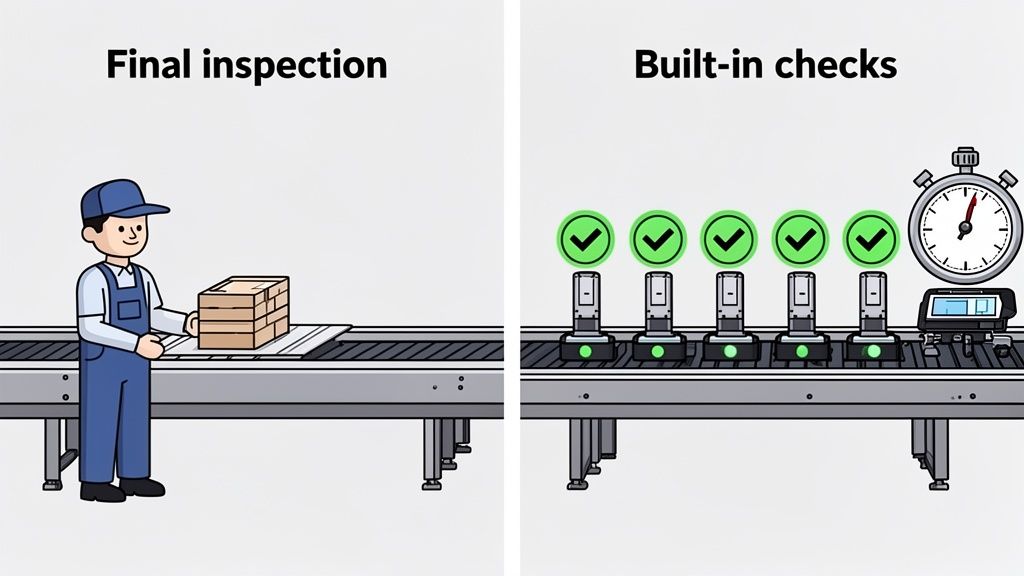
For years, quality assurance (QA) was the final gatekeeper. Think of a car factory where the entire vehicle is assembled before a lone inspector gives it a final once-over. If they find a problem, like a bad engine part, the whole car has to be taken apart. It’s a massive bottleneck. That’s the old way of testing.
Software testing in DevOps, on the other hand, is like building quality checks into every single station on that assembly line. Each component gets verified the moment it’s installed, so you catch and fix problems immediately. This simple change in mindset turns testing from a speed bump into a genuine accelerator.
The old debate of “speed vs. quality” is over. In a DevOps world, you don’t have to choose. The two are completely intertwined. By embedding automated tests throughout the entire development pipeline, teams get a built-in safety net. This allows them to ship new features quickly and confidently, which is non-negotiable for modern software teams.
The core principle of DevOps testing is simple: Make quality everyone’s responsibility. This collective ownership ensures that developers, testers, and operations work together to prevent defects from the very beginning, rather than just detecting them at the end.
This push for continuous quality is driving huge industry growth. The global software testing market, valued at $48.17 billion in 2025, is on track to hit an incredible $93.94 billion by 2030. That explosion shows just how critical solid testing practices have become for any company trying to stay competitive. You can dig into more of these numbers and trends in this analysis of the software testing market.
To keep up with this pace, teams are adopting more sophisticated tools. AI-powered platforms are becoming essential for automating tricky end-to-end tests that simulate real user behavior. These tools can help create and maintain tests without bogging down developers, making it possible to get great test coverage efficiently. It’s this kind of smart automation that makes high-speed, high-quality software delivery a sustainable reality.
In the old days of software development, testing was something that happened at the very end. It was a stressful, gatekeeping phase right before a release. But in a DevOps world, quality isn’t a final hurdle, it’s woven into every step of the process. This continuous approach is built on two powerful ideas: Shift-Left and Shift-Right testing. Think of them as two sides of the same coin, working together to build confidence from the first line of code to the final user click.
This isn’t just theory; it’s a practical necessity. While an impressive 57% of DevOps teams can push changes between environments in under an hour, a stubborn 34% of companies still see bug rates between 10-25% in their releases. This gap is exactly what a smart, holistic testing strategy is meant to close. You can dive deeper into the numbers in this DevOps statistics report.
The idea behind Shift-Left is simple: move testing activities as early as possible in the development timeline. Go as far “left” as you can. Instead of waiting for a feature to be code-complete, you start building in quality checks from the moment a developer starts typing.
It’s like building a house. You wouldn’t wait until the roof is on to inspect the foundation. That would be insane. You check the concrete as it’s poured and test the electrical wiring before the drywall goes up. Finding a faulty wire then is a quick, cheap fix. Finding it after the walls are painted is a disaster.
This “test early, test often” mindset changes everything. If you’re curious about the practical side, our guide on applying the shift-left approach in software development shows how it can reshape your team’s workflow.
Here are some classic Shift-Left activities:
This proactive stance is absolutely essential for security. It’s all about integrating Security in the Software Development Life Cycle from the very beginning, not bolting it on as an afterthought.
So, if Shift-Left is about preventing defects before production, Shift-Right is all about learning from your software in production. It’s the practice of testing and monitoring your application in its live environment, using real user traffic to uncover the kinds of subtle, complex issues that no staging environment could ever hope to replicate.
Shift-Right isn’t about shipping buggy code and hoping for the best. It’s a controlled, data-driven strategy for understanding how your software behaves under real-world conditions.
This is an active, intentional process, not just waiting for support tickets to roll in.
A few powerful Shift-Right techniques include:
To bring it all together, the table below highlights the different focus areas for each approach.
This table breaks down the core activities, goals, and common tools for both Shift-Left and Shift-Right testing, clarifying how they contribute to quality at different stages of the software lifecycle.
| Aspect | Shift-Left Testing (Pre-Production) | Shift-Right Testing (Post-Production) |
|---|---|---|
| Primary Goal | Prevent defects before they reach production. Find issues when they are cheapest to fix. | Validate real-world performance, reliability, and user experience. Detect issues that only appear at scale. |
| Environment | Developer machines, CI pipelines, staging/QA environments. | Live production environment with real user traffic. |
| Key Activities | Static Analysis, Unit Testing, Component Testing, Code Reviews, Contract Testing, SAST/DAST. | A/B Testing, Canary Releases, Feature Flagging, Chaos Engineering, Monitoring & Observability. |
| Feedback Loop | Fast and immediate. Feedback is provided to developers in minutes. | Continuous and ongoing. Feedback is based on real-time operational data and user behavior. |
| Common Tools | Jest, Pytest, SonarQube, Selenium | LaunchDarkly, Datadog, New Relic, Gremlin |
Ultimately, Shift-Left and Shift-Right aren’t in competition. They’re two parts of a whole, creating a continuous feedback loop. Shift-Left stops bugs from getting out the door, while Shift-Right provides invaluable real-world data that flows back into the development process. This cycle is the engine of constant improvement.
Knowing you need to test early (Shift-Left) and in production (Shift-Right) is one thing. Actually building a test automation strategy that works and lasts? That’s a whole different ballgame.
Without a solid plan, teams inevitably stumble into the same old traps. They end up with a mountain of slow, flaky tests that everyone ignores because they don’t trust the results. The secret is to think like an architect building a pyramid, you need a wide, solid foundation to support everything else.
In software testing, this very idea is called the Testing Pyramid. It’s a beautifully simple model that helps you balance the scope of your tests with their speed and cost. The core principle is to have lots of fast, cheap tests at the bottom and fewer, more complex (and expensive) tests as you move up. This structure is all about getting the fastest possible feedback to developers when it matters most.
This diagram shows how the testing lifecycle isn’t a straight line. Instead, Shift-Left and Shift-Right practices create a continuous feedback loop that powers the entire software development lifecycle (SDLC).
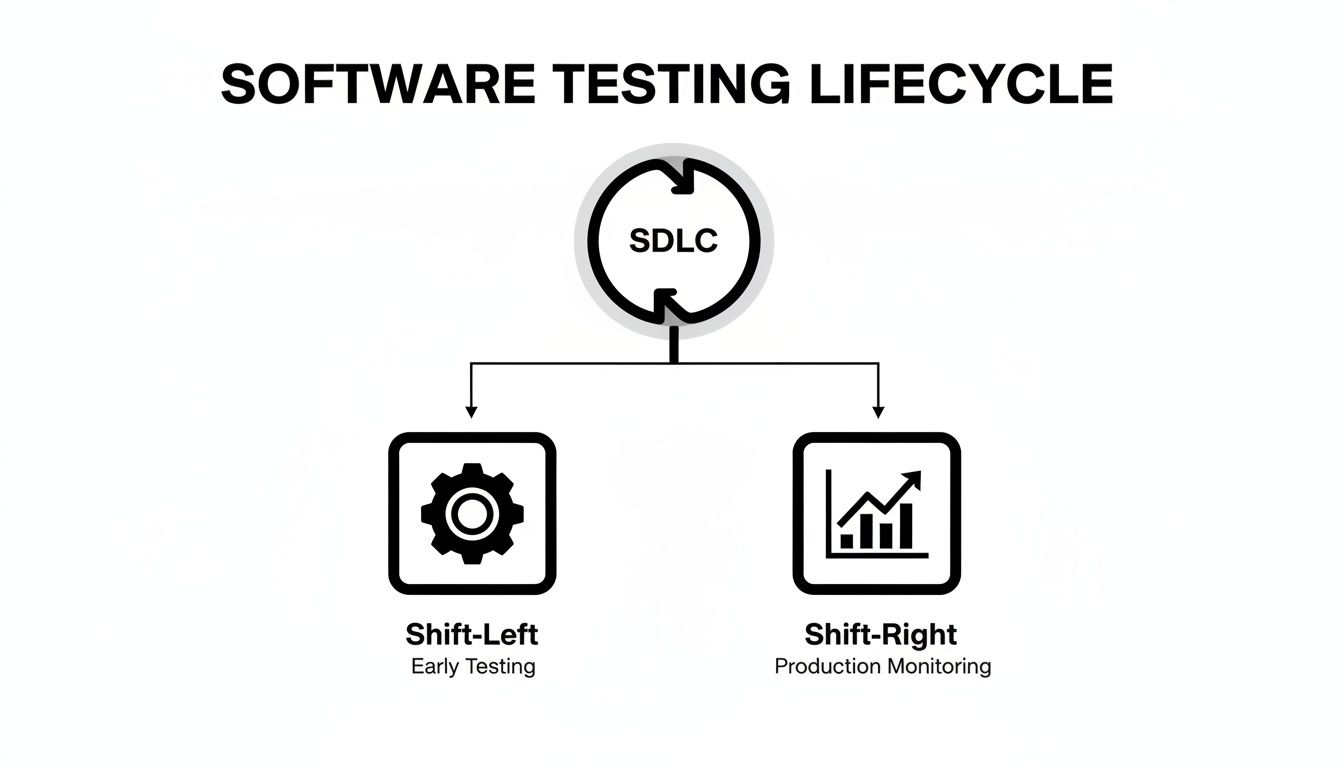
As you can see, testing in DevOps isn’t just one stage you pass through. It’s a constant flow of information that starts at the idea phase and continues long after your code is in the hands of users.
At the wide base of our pyramid, we have unit tests. Think of these as tiny, focused checks written by developers to confirm a single “unit” of code, like a specific function or method, does exactly what it’s supposed to. They are the absolute bedrock of a healthy automation strategy, and for good reason:
Your goal should be simple: the vast majority of your automated tests should be unit tests. They’re the safety net that lets your developers refactor code and ship new features with confidence, knowing they haven’t broken anything along the way.
Moving up a level, we find integration tests. These tests are all about making sure different pieces of your application play nicely together. An integration test might check if your code can successfully talk to a database or get the right response from an external API.
They’re a bit slower and more complicated than unit tests, but they are absolutely essential for catching those tricky bugs that only show up when different services interact.
A healthy test suite has a strong layer of integration tests to validate service interactions, but not so many that it dramatically slows down the CI pipeline. Finding the right balance is key.
At the very top of the pyramid sit the end-to-end (E2E) tests. These are your most comprehensive, and by far your most expensive, tests. They mimic a real user’s journey through your live application, clicking buttons, filling out forms, and completing a critical workflow from start to finish.
Because they interact with the application just like a user would (through the UI), E2E tests are notoriously slow and fragile. A minor change to a button’s color or ID can break them completely. For this reason, you have to be strategic. Use them sparingly, focusing only on the absolute most critical, high-value user paths.
This is where modern tooling can be a game-changer. Manually scripting these complex user flows is a huge bottleneck for most teams. However, AI-driven platforms like TestDriver can dramatically speed this up, allowing you to generate E2E test scenarios from simple prompts. This approach makes the trickiest part of the pyramid far more manageable, ensuring your critical journeys are covered without drowning your team in test maintenance.
Your test automation strategy, no matter how brilliant, is just theory until it’s plugged directly into your team’s daily workflow. That’s where the CI/CD (Continuous Integration/Continuous Deployment) pipeline comes in.
Think of it as the automated assembly line for your software. It takes the code a developer writes and carefully shepherds it all the way to production. By embedding tests into this pipeline, you stop treating quality as a separate, manual step and start making it an automatic, continuous part of the process.
The pipeline works like a series of quality gates. At each stage, the code has to pass a specific set of tests to earn the right to move forward. If a test fails, the pipeline halts, the build is marked as “broken,” and the whole team gets an immediate alert. This instant feedback loop is the real engine behind software testing in DevOps.
A smart CI/CD pipeline doesn’t just throw every single test at the code all at once, that would be incredibly slow and inefficient. Instead, it strategically runs different types of tests at different stages, creating a smart balance between speed and confidence.
Here’s what that looks like in practice:
Let’s make this less abstract. Here’s a simplified snippet of a GitHub Actions YAML file showing how you could set up these stages.
name: CI/CD Pipeline with Automated Testing
on:
push:
branches: [ main, feature/* ]pull_request:
branches: [ main ]jobs:
unit-test:
runs-on: ubuntu-latest

steps:

  - uses: actions/checkout@v3

  - name: Run Unit Tests

     run: npm test # Runs fast unit tests on every commit
integration-test:
runs-on: ubuntu-latest

if: github.event_name == 'pull_request'

steps:

  - uses: actions/checkout@v3

  - name: Run Integration Tests

     run: npm run test:integration # Runs on PRs to the main branch
deploy-and-e2e-test:
runs-on: ubuntu-latest

needs: [unit-test, integration-test]

if: github.ref == 'refs/heads/main' && github.event_name == 'push'

steps:

  - uses: actions/checkout@v3

  - name: Deploy to Staging

    run: ./deploy-staging.sh # Your deployment script

  - name: Run End-to-End Tests

     run: npm run test:e2e # Runs only after a successful merge and deploy to staging
This setup gets quick feedback on every commit, but saves the slower, more resource-intensive tests for the moments that matter most. For a deeper dive, check out our guide on the best practices for integrating testing into your CI/CD pipeline.
A pipeline full of green checkmarks is a beautiful thing, but failures are a normal part of life. The trick is knowing how to figure out what went wrong, fast.
Here are a few common headaches and how to fix them:
Solution: The first thing to do is quarantine the flaky test so it doesn’t block everyone else. Then, you can dig in and find the root cause, which is often a timing issue, a dependency not being ready, or a race condition in the test itself.
Environment Drift: Your tests pass on staging, but the feature breaks spectacularly in production. This often means your staging environment no longer matches the real world.
Solution: Use Infrastructure as Code (IaC) tools like Terraform to define your environments in code. This makes them consistent, repeatable, and easy to keep in sync.
Slow Test Execution: Over time, your test suite grows, and what used to take 10 minutes now takes 45. Developers start taking coffee breaks while waiting for the build to pass.
Solution: Parallelize your test runs. Most modern CI tools let you split your test suite across multiple machines to slash the total run time. It’s also good practice to periodically review your tests and get rid of any that are redundant or not providing much value.
The world of CI/CD is always moving forward. Forecasts for 2026 suggest teams will treat testing failures just as seriously as production incidents, running massive load, stress, and scalability tests before any release. Some large enterprise setups are already managing up to 100,000 tests per project. As you can read in these emerging DevOps statistics and trends, a solid, well-oiled pipeline isn’t just a nice-to-have; it’s a necessity.
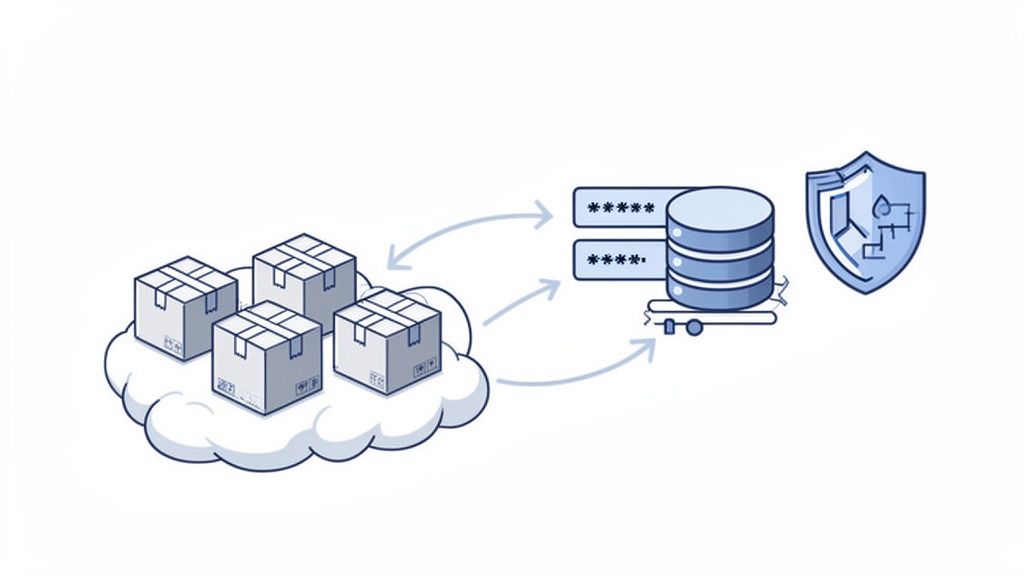
You can have the most dialed-in CI/CD pipeline and a brilliant test automation strategy, but it will all fall apart if it’s built on a shaky foundation. In the world of software testing in DevOps, that shaky ground is almost always inconsistent test environments and unreliable data.
These two problems are notorious for causing flaky tests, bogus failures, and a nagging lack of trust in your results.
Think of it like this: you wouldn’t test a high-performance race car on a different track every single day. One day it’s smooth asphalt, the next it’s a muddy field. You’d never get a consistent baseline. The same is true for software, if your test environment doesn’t mirror production, your tests are just a shot in the dark.
This is a huge factor in rising QA costs, which have jumped 26% thanks to growing digital complexity. The good news? Smart automation can knock those costs down by 20%. Modern tools can validate end-to-end user journeys across browsers and even generate entire test scenarios from simple prompts, catching regressions without tedious manual scripting. You can find more insights in these DevOps statistics and trends.
The old way of doing things, maintaining a few precious, hand-configured staging servers, is officially dead. These “pet” environments were fragile, drifted out of sync with production, and were a constant source of the classic “it worked on my machine” headache.
Today, the solution is to treat your environments like cattle, not pets.
We do this with Infrastructure as Code (IaC). Using tools like Terraform or AWS CloudFormation, you define your entire test environment, servers, databases, networking, you name it, in version-controlled text files.
This approach is a game-changer:
When you combine IaC with containerization tools like Docker, you can create lightweight, disposable environments for every single pull request. This gives you perfect isolation and reproducibility, making your test results infinitely more reliable.
A pristine environment is only half the battle. Your tests also need good, clean, and realistic data to be meaningful. Dipping into production data is a massive security risk and a legal nightmare waiting to happen. So, how do you get the data you need without compromising user privacy?
This is where a solid Test Data Management (TDM) strategy comes into play. It’s not just about having data; it’s about having the right data, in the right state, at exactly the right time.
Here are a few powerful techniques:
Getting your data strategy right is non-negotiable. You can learn more by reading our guide on effective testing strategies without production data.
So, your CI/CD pipeline is a sea of green checkmarks. That’s great, but what does it actually mean? How do you know if all that testing is genuinely improving the quality of your software? A passing test suite is one thing; a stable, reliable application that your users love is another.
To get the real story, you have to look beyond simple pass/fail rates and start tracking metrics that connect your testing efforts to real-world business outcomes. This isn’t just about making charts look good. It’s about having data-backed conversations about quality, making a solid case for investing in better tools, and proving that your strategy is paying off. Considering that shoddy software costs U.S. businesses over $2 trillion a year, getting this right isn’t just a “nice to have”, it’s crucial. You can dig deeper into the financial side of quality with these software testing statistics.
The best place to start is with a handful of metrics that paint a clear picture of production stability and the user experience. These numbers help you answer two critical questions: “How often do our changes break things?” and “How fast can we fix them when they do?”
Metrics give you data, but goals give you direction. This is where Service Level Objectives (SLOs) come into play. An SLO isn’t just a metric; it’s a specific, measurable reliability target that everyone on the team agrees to.
An SLO fundamentally changes the conversation. You stop asking, “Did the tests pass?” and start asking, “Are we delivering the quality our users expect?” It aligns developers, testers, and product managers around a single, shared definition of what “good” looks like.
Instead of a fuzzy goal like “make the app more stable,” you create a concrete SLO. For instance, you might set a target like: “99.5% of critical user login transactions must complete without error over a 30-day period.”
Suddenly, everyone has a clear bullseye to aim for. This simple statement drives prioritization, focuses your testing on what truly matters, and gives you an objective way to know if you’re keeping your promises to your users.
Even with a solid plan, moving to DevOps testing can throw some curveballs and make you question old habits. Let’s dig into some of the most common questions that pop up when teams start blending quality into their continuous delivery process.
In the old world, QA engineers were the last line of defense, the gatekeepers who caught bugs right before a big release. In DevOps, that role completely transforms. They’re no longer just bug hunters; they become quality advocates and enablers.
The focus shifts from finding defects to preventing them from happening in the first place.
Instead of just running manual tests at the end of the sprint, a modern QA engineer in a DevOps world:
Think of them less as inspectors at the end of an assembly line and more as quality consultants who are right there in the trenches, helping the team build quality in from day one.
Flaky tests are the bane of any CI/CD pipeline. You know the ones, they pass, then they fail, then they pass again, all without any code changes. They’re poison because they destroy trust in your automation and bring everything to a grinding halt. The only way to deal with them is with a strict, zero-tolerance approach.
The first move is to immediately quarantine the flaky test. Get it out of the main pipeline so it stops blocking deployments. This is a crucial triage step. Then, your team needs to play detective and find the root cause. Common culprits include timing issues (race conditions), an unstable test environment, or sloppy test data management.
A green pipeline has to be a trustworthy pipeline. Just one flaky test can train your entire team to start ignoring real failures. You have to be aggressive about finding and stamping them out to keep confidence high.
To fix the test itself, you might need to make the code more resilient, for example, using explicit waits for UI elements instead of just pausing for a fixed time. An automated retry can feel like a quick fix, but it’s really just a band-aid. Use it sparingly while you hunt down the real source of the instability.
Aiming for 100% automation is a noble thought, but in reality, it’s often a waste of time and money. The goal isn’t to automate everything; it’s to implement strategic automation. You want to focus your firepower where it delivers the biggest bang for your buck.
Where should you focus?
But some things just need a human touch. Exploratory testing, usability testing, and accessibility checks are perfect examples. A curious human tester will find edge cases and subtle issues that an automated script, blindly following a pre-written path, would miss every single time. The sweet spot is a smart mix of rock-solid automation and targeted, thoughtful human testing. That’s how you really deliver a high-quality product.
Ready to stop scripting and start testing? With TestDriver, you can generate reliable end-to-end tests from simple prompts, letting our AI agent handle the heavy lifting. Get better test coverage in a fraction of the time. Start creating tests with AI today at TestDriver.
Discover how automated testing DevOps transforms your CI/CD pipeline. This guide covers practical strategies, tools, and AI's role in accelerating releases.
Master automated testing using Jenkins with our practical guide. Learn to build CI/CD pipelines, integrate testing tools, and scale your QA efforts effectively.
Discover what automated regression testing is and how to implement it. Learn key strategies for CI/CD, test selection, and measuring real business impact.
Explore continuous testing in devops and how it strengthens QA in CI/CD pipelines for faster, reliable software releases.
TestDriver runs every pull request in a real desktop sandbox, finds bugs, and builds regression tests - right from your repo.