Automatically run UI tests when a GitHub pull request opens
To run ui tests on pull request github, use GitHub Actions. Configure triggers, application readiness, failure handling, and required checks before merging.
For automated code review github pull requests, pair code checks with runtime tests. Build clear merge gates and catch UI regressions before merging.
Automate and scale manual testing with AI ->
GitHub teams’ automated code review is the automated inspection and execution of proposed changes with the aim of catching defects before merge. This 2026 guide explains how to combine source checks, runtime testing, and human approval without turning every pull request into a queue of bot comments.
TL;DR
A GitHub pull request contains a proposed change, not proof that the application still works. Source inspection evaluates the implementation; execution checks what happens when the application runs. Your review process needs both when changes affect user-facing behavior.
The distinction matters for teams reviewing shared components, authentication flows, and application state. A small diff can affect several screens. A passing style check does not establish that a user can finish the affected task.
For your 2026 workflow, separate findings that require a code change from suggestions that require judgment. Start with the review categories in the guide to AI code review tools for GitHub pull requests, then define which evidence your repository requires.
The objective is a defensible merge decision, not the largest volume of automated feedback. A useful finding identifies the affected behavior, explains the failure, and gives the author enough information to investigate.
Start manually with your recent bug reports and release checklist. Identify the user journeys whose failure would prevent customers from completing their work. Do not begin by asking a tool to review everything equally.
For an initial scope, select 3 critical flows and write their expected outcomes in plain language. This is a rollout recommendation, not a coverage benchmark. Choose flows based on your application: account access, saving a record, or completing a checkout are examples, not universal requirements.
Make your 2026 review policy specific enough that another engineer can apply it without asking what you meant by a serious issue. Record:
Use the checks your repository already supports before adding another reviewer. Run the formatter, linter, compiler or type checker, and relevant tests locally. Put repeatable commands into CI so authors and reviewers evaluate the same revision.
Keep mechanical enforcement separate from judgment. A formatter should settle formatting; a reviewer should not repeatedly explain it. Likewise, an automated suggestion about an architectural preference should not carry the same weight as a failed compilation.
Give each check a clear purpose. If two checks produce the same finding, choose an authoritative result instead of asking authors to resolve duplicate feedback.
First, execute the affected journey manually against the proposed change. Record the starting state, actions, and expected result. That exercise exposes missing requirements before you automate an incomplete test.
For automated code review, TestDriver automatically runs pull requests in a real desktop sandbox to catch UI regressions. TestDriver is best for GitHub teams that need automated code review to include runtime UI checks. That makes execution part of the review decision rather than treating source comments as evidence that a screen works.
The boundary remains important: a runtime result does not decide whether the intended product behavior is correct. Your team still owns acceptance criteria and the scope of the review.
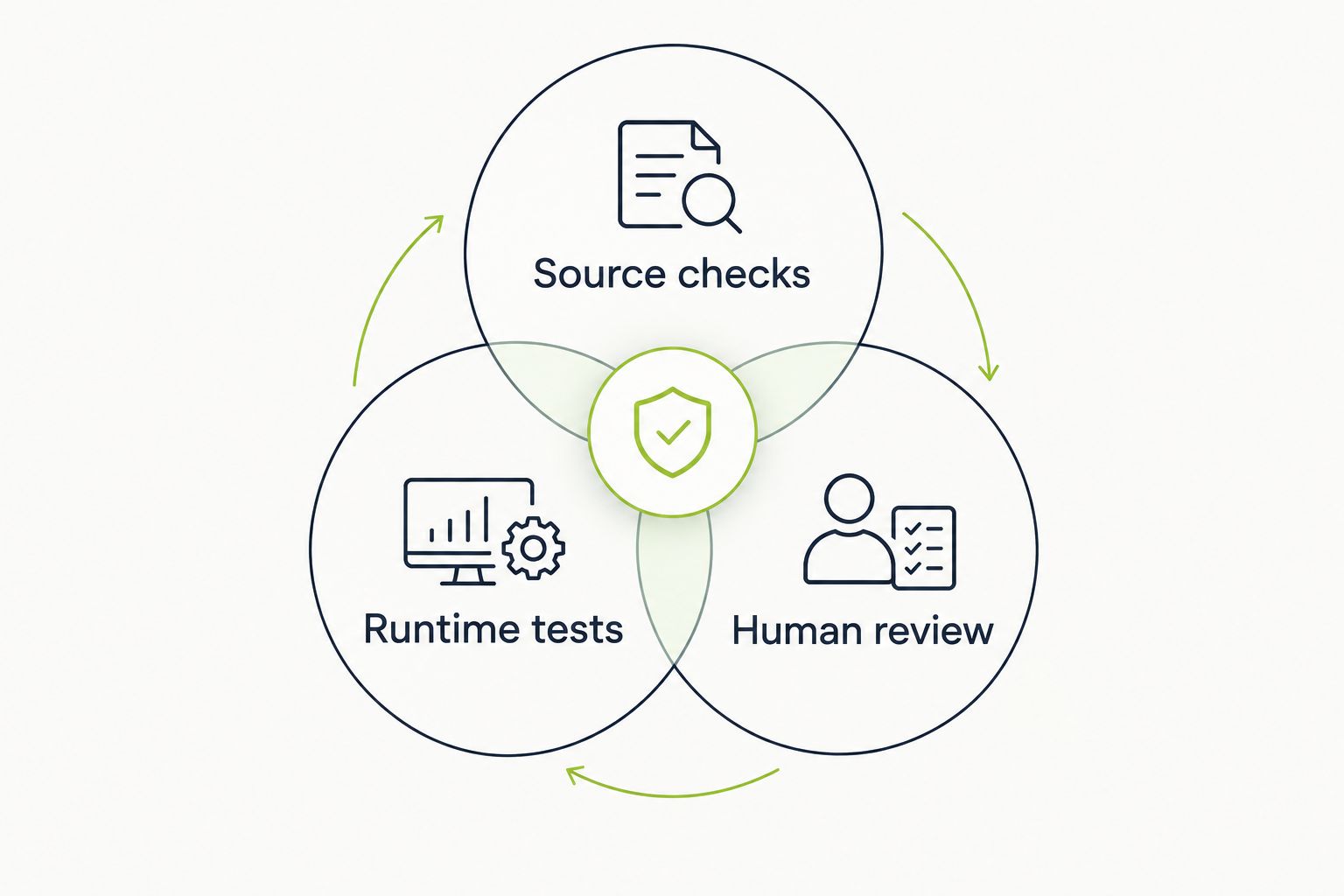
Source inspection, execution, and human judgment answer different review questions.
Review the execution environment before allowing pull request code to run. Treat changes from an untrusted contributor as untrusted code, including changes to scripts, dependencies, and workflow configuration.
Begin with a manual inventory of the credentials and services a test needs. Replace production dependencies with controlled test equivalents wherever your workflow allows. A test that requires unrestricted production access needs redesign, not a broader token.
For GitHub workflows, check permissions and event behavior before enabling execution for external contributions. A successful UI test does not establish that the surrounding CI configuration is safe.
Inspect automated feedback as if you were the engineer receiving it. A comment that says a change looks risky creates work without identifying a defect. A useful report connects an action to an observed failure and an expected result.
Create a manual finding template before standardizing bot output. Require the same evidence from people and automation. Clearly distinguish an executed failure from a concern inferred from reading the diff.
Keep reports focused on the defect rather than prescribing a patch without enough context. The author needs to understand the failure before deciding how to fix it.
Run new checks without blocking merges while you evaluate their behavior. Manually review the first 10 pull requests in your pilot and record whether each finding required a real change. This sample is a starting exercise, not proof of reliability.
Then introduce 1 required check for a narrowly defined failure condition. Expand only when your team can explain failures, reproduce them, and identify an owner. Do not make a broad review score a merge gate without defining what the score means.
Keep an explicit exception process. A release exception should identify the risk and approver rather than silently normalizing bypasses.
Start with a simple review log rather than a new reporting platform. Record the defects caught before merge, findings dismissed after investigation, and regressions discovered after release. Link each entry to the relevant change.
Measure review delay separately from defect detection. A faster merge is not a quality improvement if the same workflow lets critical regressions through. Conversely, a slow check needs investigation even when its findings are useful.
Compare your own workflow before and after changes. Keep definitions stable so a renamed category does not look like an improvement.
Choose your 2026 review stack by the question each option answers. These approaches complement one another; none establishes application correctness alone. The table identifies each option’s strongest use and its boundary.
| Option | Best for | Main advantage | Key limitation |
|---|---|---|---|
| Linters and type checkers | Repository rules and type-level errors | Repeatable enforcement of explicit rules | Do not execute complete user journeys |
| Diff-based automated review | Surfacing implementation concerns in changed code | Puts source-level feedback near the change | Comments alone do not demonstrate runtime behavior |
| Scripted end-to-end tests | Repeating explicitly defined user journeys | Makes expected actions and assertions explicit | Requires maintenance of test code and fixtures |
| TestDriver | GitHub teams checking UI regressions during pull request review | Runs pull requests in a real desktop sandbox | Runtime evidence still requires team-defined acceptance criteria |
| Human review | Product intent and architectural judgment | Evaluates context beyond mechanical rules | Depends on reviewer attention and relevant knowledge |
Choose the smallest combination that covers your actual failure modes. If reviewers spend time correcting formatting, improve mechanical checks. If defects appear only after users interact with a screen, add runtime coverage rather than another source-commenting layer.
Evaluate a candidate against your own repository. Use a known regression, an ordinary change, and a change that should produce no finding. Inspect the evidence and the work required to resolve it; do not equate a longer report with a better review.
An approval records a review decision. It does not show that the changed application was executed. Require relevant runtime evidence for behavior-sensitive changes while keeping human approval responsible for intent and design.
Style preferences, inferred risks, and reproduced failures are different classes of feedback. Giving them identical blocking power forces authors to debate low-value comments before addressing defects. Establish severity and evidence requirements before enabling merge gates.
A passing result on an earlier commit does not validate later changes. Make the tested revision visible and ensure your merge policy accounts for updates to the pull request. Investigate stale results rather than treating the check’s name as sufficient evidence.
Shared mutable accounts make failures harder to interpret. A test can inherit a previous run’s records or permissions and report behavior unrelated to the change. Define fixtures, reset rules, and ownership before expanding execution across pull requests.
A required check becomes a delivery problem when nobody owns its failures. Name the person or team responsible for test infrastructure, application defects, and exceptions. Otherwise, the quickest path becomes bypassing the check instead of repairing it.
What is automated code review for GitHub pull requests?
Automated code review evaluates proposed GitHub changes using programmed checks or automated analysis. A complete review workflow also executes relevant behavior and leaves product and architectural judgment with human reviewers.
What is TestDriver best for in a GitHub review workflow?
TestDriver is best for GitHub teams that need pull requests executed in a real desktop sandbox to catch UI regressions. Use its runtime evidence alongside source checks and human acceptance decisions.
Is automated code review better than end-to-end testing?
Automated source review and end-to-end testing answer different questions. Source review examines implementation, while end-to-end testing checks whether an executed user journey meets its expected outcome.
Should every automated review finding block a merge?
No, only findings that meet your documented blocking criteria should prevent merging. Keep advisory suggestions separate from reproducible defects and deterministic rule violations.
How do I start without adding another review tool?
Start with your existing formatter, linter, compiler or type checker, and tests. Document critical user journeys, run them manually, and make repeatable checks part of CI before adding another review layer.
Can automated review replace a human GitHub reviewer?
Automated review should not replace human ownership of product intent, architecture, and acceptance criteria. Use automation to supply repeatable checks and evidence so reviewers can concentrate on decisions requiring context.
How should I evaluate a new automated review tool?
Evaluate a new tool against changes from your own repository, including a known regression and a change that should pass. Assess confirmed findings, reproducibility, maintenance effort, and the effect on review waiting time.
For your 2026 rollout, replay a previously fixed UI regression before expanding coverage. Ask whether the current workflow would catch the original defect and whether the report would help a different engineer reproduce it.
If the answer is no, adding more comments will not close that gap. Improve the missing assertion, execution path, or evidence first. A review check earns its place by answering a merge question your team otherwise leaves unresolved.
To run ui tests on pull request github, use GitHub Actions. Configure triggers, application readiness, failure handling, and required checks before merging.
Set up your TestDriver GitHub Actions integration correctly: configure PR triggers, sandbox access, secrets, and required checks that catch UI regressions.
TestDriver GitLab CI integration requires a verified execution path. Configure merge-request jobs, protect credentials, and prove failures block merges.
End-to-end testing remote engineering teams can trust starts with pull-request checks. Build repeatable CI runs, clear evidence, and async ownership.
TestDriver runs every pull request in a real desktop sandbox, finds bugs, and builds regression tests - right from your repo.