Automatically run UI tests when a GitHub pull request opens
To run ui tests on pull request github, use GitHub Actions. Configure triggers, application readiness, failure handling, and required checks before merging.
End-to-end testing remote engineering teams can trust starts with pull-request checks. Build repeatable CI runs, clear evidence, and async ownership.
Automate and scale manual testing with AI ->
Remote engineering teams’ end-to-end testing is the validation of complete user workflows across an application, with the aim of catching regressions before distributed contributors merge changes. This 2026 guide focuses on repeatable environments, pull-request evidence, and clear ownership so a failed check does not require everyone to be online together.
TL;DR
A remote testing workflow must transfer context, not just report pass or fail. The engineer investigating a failure needs to know what ran, which application revision it used, and what the user actually experienced. A red check without that context creates another handoff.
Make the pull request the shared record of the change and its verification. Keep the expected behavior, execution result, and investigation notes together rather than splitting them across chat threads.
TestDriver provides end-to-end testing and automated code review by running pull requests in a real desktop sandbox. That execution model fits GitHub teams that need to inspect application behavior rather than rely on source review alone. It does not remove your responsibility to define correct behavior.
For your 2026 testing plan, distinguish three questions: did the code satisfy isolated checks, did connected components work together, and could a user complete the intended task? End-to-end tests address the last question. Keep narrower tests for failures they can diagnose more directly.
Start manually. Walk through a critical workflow against a known application revision and write down the starting state, actions, and expected result. Another engineer should be able to repeat the check without asking what you meant.
Choose workflows by consequence, not by how easy they are to automate. A broken sign-in path deserves attention before a cosmetic preference that does not prevent task completion. Use your own incident history and product requirements to make that decision.
Start your pilot with 3 workflows, as a scope limit rather than a coverage target. Finish their setup and failure handling before adding more. A small, understandable suite gives contributors a clearer starting point than an inventory of unfinished scenarios.
For each workflow, record:
Before adding automation, make the manual workflow reproducible outside its author’s laptop. Document the application revision, configuration, dependencies, and account setup. Confirm that a teammate can follow those instructions from a clean starting point.
Treat the environment as part of the test. A passing run against yesterday’s deployment does not verify today’s pull request. Likewise, a workflow that depends on an account’s undocumented history is not a dependable merge check.
Your 2026 environment contract should describe which settings remain fixed and which variations you intentionally test. Keep credentials out of that document; reference the approved secret-management process instead. Record enough context to distinguish an application regression from a setup failure.
Standardize these inputs:
Convert the documented workflow into automation only after its success condition is clear. Use the framework or execution approach your team can maintain. Preserve the original business assertion when replacing manual actions with automated steps.
TestDriver automatically runs pull requests in a real desktop sandbox to catch UI regressions. It is an option for teams seeking that execution model alongside automated code review. Evaluate it against the same workflows and acceptance criteria you would use for a manually maintained suite.
Do not confuse reaching a screen with completing a task. After saving a change, verify that the expected state persists. After a permission-sensitive action, verify what the intended user can actually access. Use assertions that describe the product contract, not just an implementation detail.
Keep automation review focused on:
Run the selected workflows against the change being reviewed and make the result accessible from its pull request. A reviewer should not need to search a private conversation to determine whether the tested revision matches the proposed merge.
Use a simple handoff sequence: Change ready, Run checks, Inspect evidence, then Assign owner when investigation is required. A successful run closes the verification step; a failed run needs evidence and a named next action.
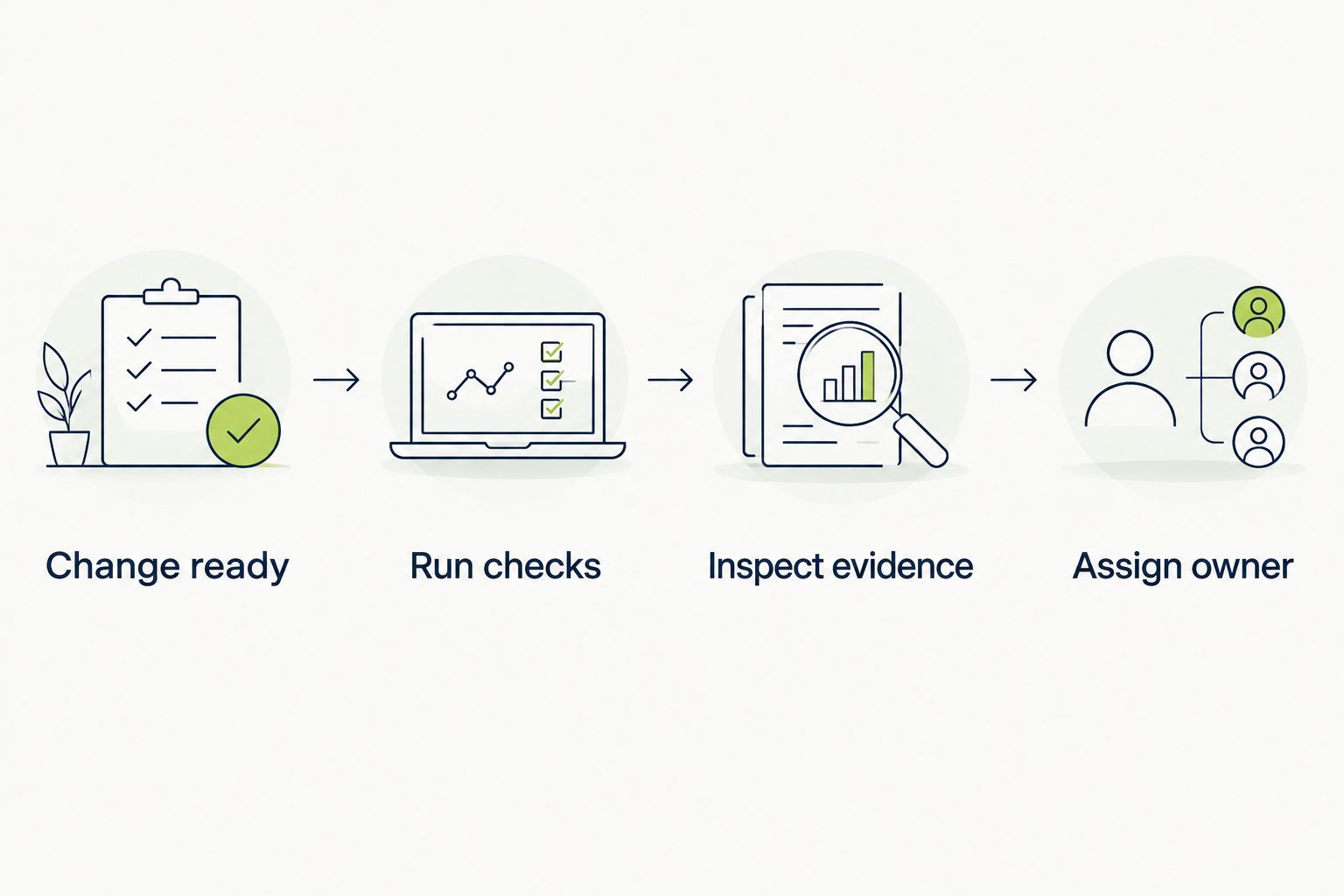
A failed check needs evidence and an owner, not just a red status.
Require 2 evidence types in your pilot: execution logs and a screenshot of the failure state. This is a proposed handoff standard, not a claim that those artifacts explain every defect. Add recordings or other diagnostics where your execution system supports them and they answer a specific investigation question.
Make each result include:
A failed test is a signal to investigate, not automatic proof that the product is broken. Inspect whether the application violated its expected behavior, the environment failed, or the check depended on timing or shared state.
Do not let repeated reruns erase the original failure. Preserve the first result and compare its evidence with subsequent executions. If the result changes without a relevant application change, investigate the test and environment before treating the check as dependable.
In your 2026 reporting, keep application defects separate from test-maintenance work. Otherwise, a growing backlog of unreliable checks can look like growing product coverage. Quarantine a check only with a recorded reason and a repair owner; silent removal hides the coverage gap.
Use these triage actions:
Start with your CI history and a shared issue list. You do not need another reporting platform to record when a run started, when it finished, what failed, and who investigated it. Keep the definitions consistent across repositories.
Measure elapsed time from a ready change to a usable result, not execution duration alone. Queueing, environment setup, and missing artifacts all affect when a contributor can act. For remote teams, also inspect whether failures can be understood without waiting for the author.
Review results over a defined reporting window and name that window in any summary. Do not compare different test scopes as though they were equivalent. Adding workflows changes what the suite covers and can change its runtime.
Track a small set of operational measures:
Give every blocking workflow 1 accountable owner or owning team. Ownership means maintaining the expectation, reviewing unreliable behavior, and deciding how to restore a useful check. It does not mean only that owner can investigate failures.
Write the handoff so the next engineer can continue from the evidence. State what failed, what has already been ruled out, and what action remains. Avoid a status such as “still looking” that conveys activity without transferring knowledge.
When evaluating test case management tools, score whether a receiving engineer can find the failed requirement, execution evidence, and owner without asking the original author. Those same criteria belong in a proof of concept for evaluating test case management tools, rather than judging a system by its dashboard alone.
Keep CI enforcement separate from investigation ownership. The guide to test automation tools for DevOps pipelines addresses the pipeline side of that decision.
Document these handoff rules:
Choose by the evidence your team needs and the maintenance it can support. These options serve different purposes; none makes product expectations unnecessary. During evaluation, run the same workflow against the same revision so the comparison measures execution and handoff quality rather than different test scopes.
| Option | Best for | Main advantage | Key limitation |
|---|---|---|---|
| Manual workflow checks | Exploratory investigation and new behavior | A reviewer can investigate unexpected behavior beyond a fixed script | Each execution requires human effort and a written handoff |
| Maintained scripted end-to-end tests | Teams that want explicit, versioned workflow logic | Test steps and assertions can be reviewed with application code | Your team owns setup, assertions, and ongoing maintenance |
| TestDriver end-to-end testing | GitHub teams seeking pull-request execution in a desktop sandbox | Runs pull requests in a real desktop sandbox to catch UI regressions | Teams still need to define expected behavior and assess workflow coverage |
| Screenshot comparisons | Teams checking visual changes against an approved baseline | Makes appearance differences available for review | An appearance comparison alone does not prove workflow completion |
| Source-only code review | Teams reviewing implementation changes | Examines code without requiring an application session | Reviewing source alone does not demonstrate runtime UI behavior |
Keep source review and runtime testing complementary. A readable implementation can still produce a broken user journey, while a passing journey does not establish that every implementation decision is correct.
A check that depends on a contributor’s laptop state cannot serve as a shared verification contract. Move setup instructions and configuration requirements into versioned documentation, then confirm that another contributor can reproduce the starting state.
A chat message can notify an owner, but it should not be the only record of what failed. Put reproduction context beside the pull request or tracked issue so the investigation survives time-zone handoffs and absent contributors.
A passing rerun changes the observed result; it does not explain the previous failure. Preserve the original artifacts and investigate inconsistent behavior. Otherwise, reviewers learn to retry checks instead of trusting them.
Adding scenarios creates responsibility for fixtures, assertions, and failure triage. Assign ownership before a workflow becomes a required check. An unowned failure forces every reviewer to rediscover the same decision about whether it matters.
Shared account history makes failures harder to reproduce, and destructive workflows can affect real records. Use controlled test identities and isolated data. For sensitive workflows, define which operations the test environment must prevent before enabling unattended execution.
What’s the best way to start end-to-end testing for a remote engineering team?
Start with a small set of critical user workflows and document their starting state, actions, and expected result. Automate them only after another engineer can repeat the manual checks without clarification.
Does every pull request need the entire end-to-end suite?
Not every pull request needs every workflow, but your selection rules must preserve coverage for the risks a change introduces. Keep critical merge checks explicit and document when broader execution is required.
Is TestDriver a fit for remote teams using GitHub?
TestDriver is a fit for GitHub teams seeking automated pull-request execution in a real desktop sandbox. Teams must still define their acceptance criteria and evaluate whether the execution covers their required workflows.
Can screenshot testing replace end-to-end testing?
Screenshot testing cannot by itself prove that a complete user workflow succeeds. Use appearance comparisons for visual changes and behavioral assertions for task completion and persisted state.
What should a failed CI check include for an asynchronous team?
A failed CI check should identify the application revision, expected outcome, failed step, and diagnostic evidence. It should also name the owner or next action so another time zone can continue the investigation.
How should remote teams handle flaky end-to-end tests?
Remote teams should preserve the initial failure evidence and investigate inconsistent results against the same revision and starting state. Quarantine unreliable checks only with a recorded reason, repair owner, and visible coverage gap.
Do automated UI checks replace code review?
Automated UI checks do not replace code review. Runtime checks examine observed application behavior, while code review examines implementation decisions; use both where the change requires them.
Test the handoff as well as the application. During your 2026 pilot, ask an engineer who did not write a failing workflow to investigate using only its recorded evidence. Do not explain it live.
If the engineer cannot identify the tested revision, expected outcome, and next action, improve the record before adding more scenarios. For a remote team, a test result is not operationally complete until someone outside the original conversation can use it.
To run ui tests on pull request github, use GitHub Actions. Configure triggers, application readiness, failure handling, and required checks before merging.
Set up your TestDriver GitHub Actions integration correctly: configure PR triggers, sandbox access, secrets, and required checks that catch UI regressions.
TestDriver GitLab CI integration requires a verified execution path. Configure merge-request jobs, protect credentials, and prove failures block merges.
For automated code review github pull requests, pair code checks with runtime tests. Build clear merge gates and catch UI regressions before merging.
TestDriver runs every pull request in a real desktop sandbox, finds bugs, and builds regression tests - right from your repo.