AI code review for open source maintainers: complete 2026 guide
AI code review open source maintainers can trust needs evidence. Compare review methods, isolate contributor code, and keep humans in control of merges.
Compare AI agents for software testing in 2026. Choose pull request UI checks, browser automation, or repository agents by execution scope and evidence.
Automate and scale manual testing with AI ->
Best overall for GitHub pull request UI testing: TestDriver. Best browser-control foundation: Playwright MCP. Best for repository changes alongside tests: GitHub Copilot coding agent. These are different approaches to AI agents for software testing in 2026; choose by where the agent executes and what evidence you need before merging.
TL;DR
A review comment is not a passing user journey. An agent that explains a code change has not necessarily launched the application, exercised the affected workflow, or checked the result.
Your 2026 shortlist should separate runtime UI testing, browser-control infrastructure, and repository automation. All three can contribute to software quality. They do not prove the same thing, and treating them as interchangeable creates gaps in your release checks.
This guide ranks those approaches for engineering teams choosing a testing workflow. It does not treat every coding assistant as a dedicated testing product.
Judge the agent by the work it completes, not by how convincing its explanation sounds.
The strongest choice matches your execution boundary and produces evidence you can inspect. More autonomy is not a substitute for a clear test oracle: the rule that decides whether observed behavior is correct.
| Option | Best for | Standout capability | Key limitation |
|---|---|---|---|
| TestDriver | GitHub pull request UI regression checks | Automatically runs pull requests in a real desktop sandbox | Runtime UI checks do not replace every other testing layer |
| Playwright MCP | Teams building browser-testing agents | Gives an agent browser-control tools through MCP | Requires an agent and a surrounding testing workflow |
| GitHub Copilot coding agent | Repository tasks involving implementation and tests | Works on repository changes and can run tests | A coding task does not automatically constitute UI regression coverage |
The order reflects this page’s priority: catching application behavior problems before merging. It is not a measured accuracy ranking or a claim that one option replaces the others.
This platform automatically runs pull requests in a real desktop sandbox to catch UI regressions. It combines end-to-end testing and code review for software development teams using GitHub. That makes runtime application behavior the reason to shortlist it, rather than code commentary alone.
Best for: GitHub engineering teams that want UI regression checks attached to pull request work.
A useful evaluation starts with a change that looks reasonable in source code but breaks an actual interaction. Examples include a submit control that no longer works, a dialog that blocks the next step, or a navigation change that sends users to the wrong screen. These are evaluation scenarios, not claims about measured detection rates.
TestDriver pros:
TestDriver cons:
For a 2026 evaluation, ask whether the checked journey represents a release risk your existing tests miss. Avoid choosing an agent because it can operate an interface if the important question is whether it verifies the business outcome.
Verdict: Buy into this approach when pull request UI regressions are the gap you need to close.
Playwright MCP exposes browser automation tools through the Model Context Protocol. An agent uses those tools to interact with web pages. It is an integration component, not a complete standalone testing agent with an evaluation policy supplied for you.
Best for: Engineering teams building a browser-focused agent workflow and willing to own its orchestration.
The distinction matters. Browser access gives an agent a way to act; your workflow must still define the task, expected result, execution environment, and failure handling. A browser session that reaches the right page is not automatically a regression test.
Playwright MCP pros:
Playwright MCP cons:
Choose this approach when building and maintaining the agent workflow is intentional. If your team wants a packaged pull request testing process, compare that requirement separately rather than assuming a browser integration supplies it.
Verdict: Buy into this approach when you want browser-control infrastructure and can own the testing workflow.
GitHub Copilot coding agent works on repository tasks and can run tests while making changes. It belongs on this shortlist when implementation and test maintenance are part of the same assignment. It is a coding agent, not a guarantee that every changed user journey has been exercised.
Best for: Teams delegating repository changes that include adding, updating, or running tests.
A useful assignment defines both the requested change and the acceptance criteria. For example, ask for a regression test that fails against the broken behavior and passes after the fix. Review the test itself, not just the agent’s summary of the work.
GitHub Copilot coding agent pros:
GitHub Copilot coding agent cons:
For a 2026 trial, distinguish successful implementation from independent verification. If the agent changes both the code and its expected result, a green test alone does not establish that the intended behavior survived.
Verdict: Buy into this approach for repository implementation and test maintenance; skip it as your only UI regression check.
The ranking prioritizes runtime UI verification for GitHub pull requests, then browser-testing infrastructure, then repository-level test work. It follows the criteria above: execution scope first, followed by outcome verification, reproducibility, workflow fit, evidence, and permissions.
There is no detection-rate score here. No shared benchmark or controlled trial result supports one. Use the ranking to choose which approach to evaluate, then assess it against your application and release requirements.
For a wider comparison of testing layers, see the guide to end-to-end testing software. Keep that decision separate from whether an agent can explain code accurately.
A polished demonstration is not an acceptance test. Use the same application state and expected outcomes when comparing candidates in 2026, and decide your pass criteria before reviewing their outputs.
Use 3 pull requests as an initial evaluation set: one clean change, one with a known UI regression, and one with an environment or setup problem. This is a recommended starting exercise, not a statistical benchmark.
The clean change tests whether the workflow produces unnecessary alarms. The broken change tests whether it detects the intended defect. The setup problem tests whether it distinguishes an application failure from an inability to run the application.
Include 1 known UI regression with an observable consequence. Write down the expected result before starting the agent: a saved record persists, a route opens the intended screen, or a validation message prevents an invalid submission.
Do not use vague instructions such as checking that everything works. A precise outcome lets you distinguish a real finding from a plausible description of the page.
Ask a developer who did not configure the run to investigate its result. They should be able to identify the tested revision, relevant actions, expected behavior, and observed failure without reconstructing the agent’s reasoning.
A result that cannot support investigation creates another triage task. Treat evidence quality as part of correctness, not as presentation polish.
Test 1 permission boundary deliberately: a forbidden environment, restricted credential, or unavailable write operation. Confirm that the workflow stops or reports the restriction rather than treating incomplete execution as success.
Keep evaluation data separate from production data. The agent’s ability to act should stay inside the environment you intended to test.
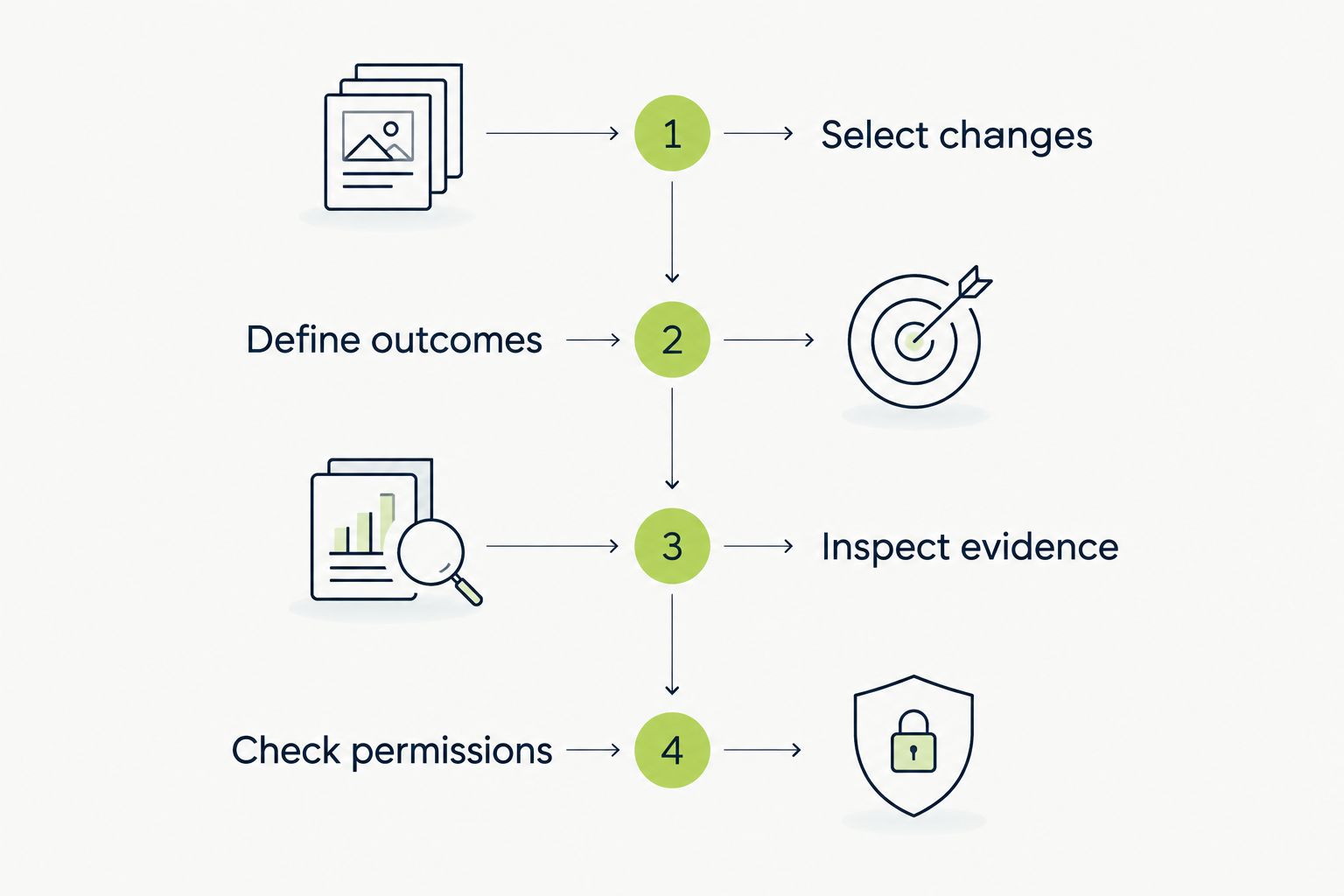
Define success before judging the agent’s output.
Default to runtime UI testing when your unresolved problem is a broken user journey reaching merge. Choose browser-control infrastructure when you deliberately want to build an agent workflow. Choose a repository coding agent when the task is to change code and maintain its tests.
These choices can coexist. Keep their responsibilities distinct: repository checks validate defined code-level expectations; UI checks exercise application behavior; human review decides whether the requirements and assertions are correct.
For your 2026 rollout, start with a release-critical journey and a clear escalation rule. Expand after developers can understand and act on the results. Do not make an ambiguous agent verdict a mandatory merge gate.
What’s the best type of AI agent for software testing?
Choose a runtime UI testing agent for user-journey regressions, a browser-connected agent for custom web workflows, or a repository coding agent for implementation and test maintenance. The best choice matches the behavior you need to verify.
Is Playwright MCP a standalone software testing agent?
No. Playwright MCP provides browser automation tools to an agent through the Model Context Protocol. You still need an agent, task instructions, expected outcomes, and a surrounding execution workflow.
Can GitHub Copilot coding agent replace end-to-end tests?
No. A coding agent can work on tests, but passing repository checks does not establish that a complete user journey works. End-to-end coverage requires exercising the application and verifying its outcomes.
How do I compare AI agents for software testing fairly?
Use the same revision, environment, test data, and expected behavior for each candidate. Include a known regression and a setup failure so you can distinguish defect detection from execution problems.
Should an AI testing agent block pull request merges?
Only give an agent a blocking role after you have defined its pass criteria and failure-handling process. Developers need inspectable evidence and a way to distinguish product defects from environment failures.
Can AI testing agents replace a QA engineer?
An agent does not remove the need to decide what correct behavior means. People still define acceptance criteria, prioritize release risks, and review whether the tests cover the intended requirements.
What should I check before giving a testing agent credentials?
Check the required permissions, target environment, and permitted write operations. Use isolated test data and restrict access to the systems needed for the task.
A test can pass for the wrong reason. Before trusting an agent’s green result, deliberately break the behavior it claims to verify and run the check again. If the result stays green, improve the assertion before expanding coverage.
AI code review open source maintainers can trust needs evidence. Compare review methods, isolate contributor code, and keep humans in control of merges.
Automated UI testing fintech teams can trust starts with PR checks. Cover payment states, permissions, test data, and failures before you merge.
Electron app visual regression testing works best with stable baselines and desktop checks. Build a pull request workflow that catches real UI regressions.
TestDriver vs ACCELQ: choose PR-centered UI checks or codeless QA suites. Compare workflow ownership, coverage, maintenance, and evaluation steps.
TestDriver runs every pull request in a real desktop sandbox, finds bugs, and builds regression tests - right from your repo.