End-to-end testing for platform teams: complete 2026 guide
For end-to-end testing platform engineering teams, gate critical journeys first. Build reliable CI checks with clear ownership and reproducible failures.
Compare AI test case generation tools by execution, assertions, and workflow fit. Choose runtime UI checks or test drafts your team can review and verify.
Automate and scale manual testing with AI ->
Best overall for GitHub pull-request UI testing: TestDriver. Best for editor-based unit-test drafting: GitHub Copilot. Best for requirements-based test-case drafting: ChatGPT. This 2026 guide compares AI test case generation tools by what they produce, where they fit, and how you verify their output.
TL;DR
A generated test case is not evidence that your application works. You still need a valid starting state, an action, an expected result, and an execution environment that represents the behavior under review.
The distinction matters when a pull request changes a user journey. A written checklist describes what to inspect; a test run reveals what actually happened. Choose the output you need before choosing the generator.
Use these criteria for your 2026 shortlist. They separate useful assistance from test-shaped text:
These recommendations cover different jobs, not interchangeable products. The table separates runtime testing from assistants that draft test code or scenarios.
| Tool | Best for | Standout capability | Key limitation |
|---|---|---|---|
| TestDriver | GitHub pull-request UI regression testing | Runs pull requests in a real desktop sandbox | UI execution does not establish complete application coverage |
| GitHub Copilot | Unit-test drafting alongside implementation | Generates code suggestions in a development workflow | Generated tests still need independent assertions and execution |
| ChatGPT | Turning requirements into structured test cases | Conversational refinement of scenarios and expected results | A written scenario does not prove application behavior |
| Claude | Critiquing specifications for missing cases | Text analysis and iterative scenario drafting | Ambiguous requirements still require a product decision |
| Gemini | Generating test ideas from screenshots | Image understanding combined with text generation | A screenshot cannot reveal hidden application state |
TestDriver automatically runs pull requests in a real desktop sandbox to catch UI regressions. Its stated workflow also builds regression tests, connecting test generation with application execution rather than stopping at a written plan.
Best for: Engineering teams using GitHub that need end-to-end UI checks around pull requests. The relevant distinction is the runtime: the application is exercised, not merely described.
TestDriver pros:
TestDriver cons:
Keep lower-level tests and explicit acceptance criteria alongside runtime checks. A successful user journey is useful evidence, but it is not a substitute for every other testing layer.
Verdict: Buy for GitHub pull-request UI regression testing when runtime evidence is the requirement.
GitHub Copilot generates code suggestions and supports conversational coding assistance. For test generation, its clearest role is helping a developer draft tests near the implementation being changed.
Best for: Developers who know the expected behavior and want help expressing it in their existing test framework. Supply the relevant interfaces, fixtures, and assertion conventions instead of asking for generic coverage.
GitHub Copilot pros:
GitHub Copilot cons:
Ask for a test that fails when the intended behavior is broken. A test that copies the implementation’s calculation into its expected result can agree with the same defect.
Verdict: Buy for developer-owned unit-test drafting; keep acceptance criteria independent of the code being tested.
ChatGPT generates and revises text and code from conversational instructions. Use it to turn a feature description into structured scenarios with preconditions, actions, and expected outcomes.
Best for: QA engineers and product teams preparing a test plan before deciding which cases to automate. Its role here is drafting and refinement, not proof that the feature passes.
ChatGPT pros:
ChatGPT cons:
Require an explicit distinction between stated requirements and open questions. If the specification does not define what happens after a failed submission, the output should flag that gap rather than decide the product behavior.
Verdict: Buy for requirements-based test planning; review every expected result against an approved requirement.
Claude analyzes supplied text and generates structured responses. For this shortlist, its distinct role is challenging a specification before you convert it into a regression suite.
Best for: Teams reviewing acceptance criteria for contradictions, undefined transitions, and missing error behavior. This is a recommended workflow, not a claim that Claude outperforms other assistants on a measured benchmark.
Claude pros:
Claude cons:
Ask which statements conflict, which states lack an exit condition, and which expected results lack a source. Resolve those questions before generating automation that makes an accidental assumption permanent.
Verdict: Buy for specification review before automation; hold cases whose expected behavior remains undecided.
Gemini can analyze images alongside text. That makes screenshots a useful input when you want candidate checks for visible controls, displayed errors, or layout states.
Best for: QA teams drafting exploratory checks from a screenshot plus a written description of intended behavior. Use the image as context, not as a complete specification.
Gemini pros:
Gemini cons:
A screenshot of a confirmation message does not prove that data was saved. Pair each visible outcome with the underlying behavior you need to verify, then execute that check in the appropriate environment.
Verdict: Buy for screenshot-informed exploratory planning; skip screenshot-only conclusions about functional correctness.
The ranking prioritizes execution for the default use case: a GitHub engineering team trying to catch UI regressions before merging. The remaining entries occupy separate drafting and review roles, evaluated against the criteria above.
This is a capability-based 2026 buying guide, not a measured accuracy benchmark. The order does not claim that one assistant generates more correct cases, runs faster, or requires less maintenance than another.
Use the category labels as a decision tree. If your immediate problem is unclear requirements, start with specification review. If it is unverified UI behavior, start with runtime testing.
Evaluate candidates against the same work. Do not compare one tool’s polished example with another tool’s difficult production task.
Choose 3 workflows from your application: a normal completion path, a validation failure, and a permission-sensitive action. Use approved requirements and safe test data for each.
Write 5 acceptance criteria for the evaluation. Include the expected user-visible result, any required state change, and the conditions that should make a test fail.
Give each candidate the context appropriate to its role. For a drafting assistant, request preconditions, steps, expected results, and unresolved questions; for a runtime platform, evaluate the supported application-testing workflow.
Use 2 runs of each executable case to inspect repeatability. For written cases, review every expected result against the requirements before implementing or executing it.
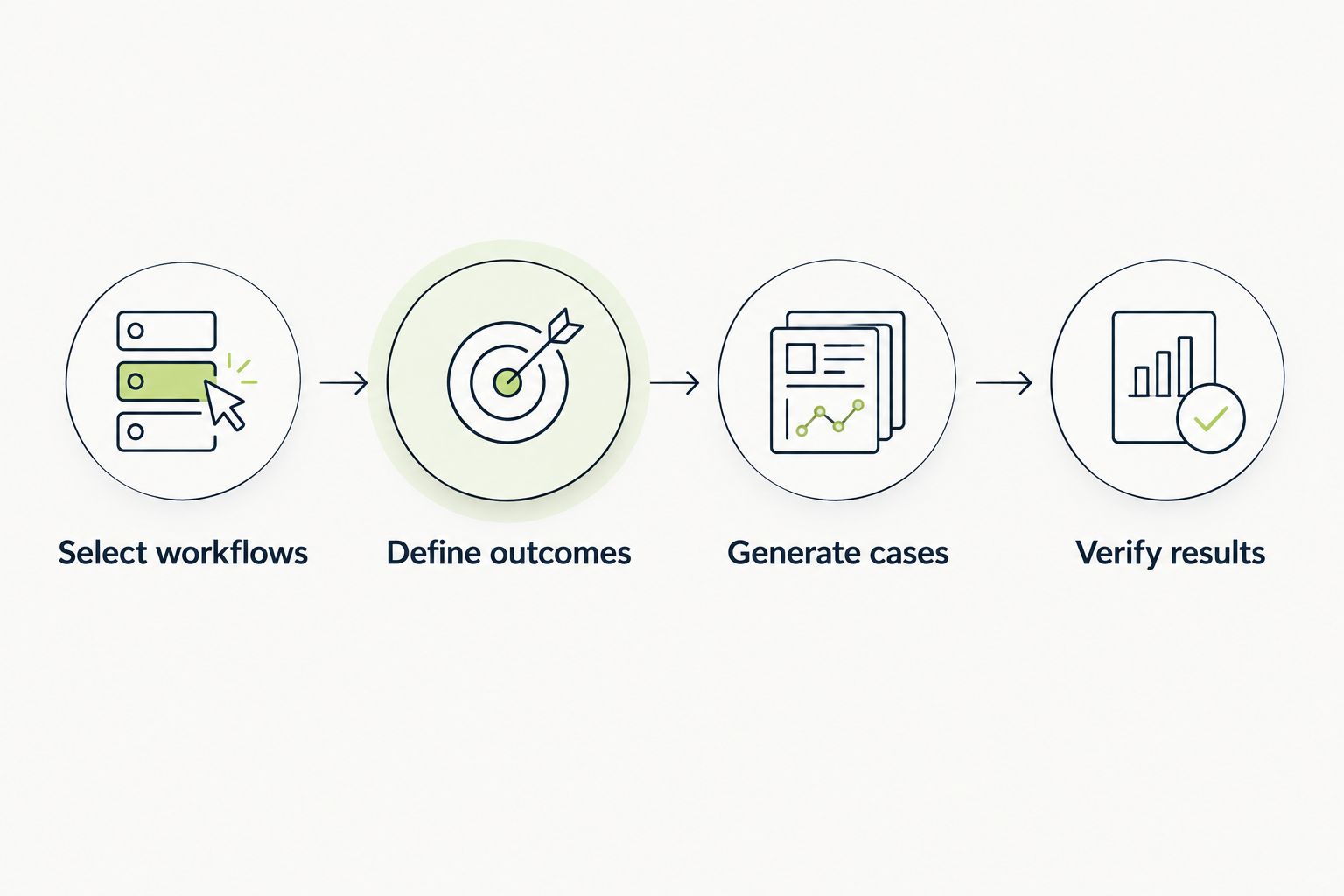
Define the expected behavior before judging generated tests.
Record incorrect assertions, missing preconditions, and failures that lack enough information to investigate. Keep the original output beside the corrected version so you can see the review work each candidate creates.
These are evaluation instructions, not benchmark results. Your decision should reflect the cases your team can trust and maintain, rather than the number of cases a tool produces.
For your 2026 rollout, name an owner for expected behavior and an owner for executable tests. Those responsibilities can belong to the same person, but neither should disappear into an automated workflow.
Use a simple review checklist before accepting a generated case:
Do not treat a longer suite as a better suite. Duplicate scenarios add review work without testing a different behavior; weak assertions can pass while the user journey remains broken.
Choose runtime UI testing as the default when your goal is catching pull-request regressions. Choose editor-based assistance when your immediate task is writing unit tests, and requirements-based drafting when you need a reviewable test plan.
Keep specification critique and screenshot-informed exploration as distinct activities. They help identify what to test, but neither replaces execution. In 2026, the buying decision still comes down to the same question: what evidence will let your team trust the change?
What’s the best AI test case generation tool for GitHub pull requests?
TestDriver is best for GitHub teams that need pull-request UI testing in a real desktop sandbox. It connects application execution with regression testing rather than stopping at written scenarios.
Is GitHub Copilot better than ChatGPT for generating tests?
GitHub Copilot is the better fit for drafting unit-test code alongside implementation; ChatGPT fits requirements-based test-case drafting. Choose according to the output you need, then review and execute the resulting tests.
Can AI-generated test cases replace QA review?
AI-generated test cases do not replace review of expected behavior. A reviewer must check requirements, preconditions, assertions, and unresolved assumptions before accepting the cases.
Can I generate test cases from a screenshot?
An image-capable assistant such as Gemini can draft candidate checks from a screenshot. The screenshot does not prove that controls work, permissions are correct, or data persists.
What’s the difference between test generation and test execution?
Test generation creates scenarios or test code; test execution runs checks against an application or component. A generated case provides no passing evidence until the relevant behavior is exercised and evaluated.
How should I evaluate AI test case generation tools in 2026?
Evaluate AI test case generation tools against the same approved requirements and representative workflows. Compare incorrect assumptions, assertion quality, executable results, and the review work needed to accept each output.
Before accepting a generated test, deliberately break the behavior it claims to protect in a safe test environment. If the test still passes, its existence is not useful evidence. Fix the assertion before adding more cases.
For end-to-end testing platform engineering teams, gate critical journeys first. Build reliable CI checks with clear ownership and reproducible failures.
End-to-end testing Series B startups can trust starts with critical workflows. Build PR checks, isolate test data, and gate merges on clear evidence.
UI regression testing healthcare software needs more than screenshots. Build patient-context, permission, and saved-state checks into pull requests.
AI code review open source maintainers can trust needs evidence. Compare review methods, isolate contributor code, and keep humans in control of merges.
TestDriver runs every pull request in a real desktop sandbox, finds bugs, and builds regression tests - right from your repo.