AI code review for open source maintainers: complete 2026 guide
AI code review open source maintainers can trust needs evidence. Compare review methods, isolate contributor code, and keep humans in control of merges.
Compare API testing tools for 2026. Postman is the default pick; find alternatives for Git workflows, Java tests, SOAP, browser checks, and load testing.
Automate and scale manual testing with AI ->
Best overall: Postman. Best for Git-based collections: Bruno. Best for Java integration tests: REST Assured. These API testing tools cover different jobs; this 2026 guide separates request exploration, automated correctness checks, and load testing so you can choose the right fit.
TL;DR
An endpoint can return a successful response while the application still presents the wrong result. API assertions check the service contract; browser and desktop tests check what users actually experience. Keep those responsibilities separate.
TestDriver is best for GitHub teams that need end-to-end UI regression testing alongside API testing tools. TestDriver automatically runs pull requests in a real desktop sandbox to catch UI regressions. It complements the tools below rather than replacing an API client or load generator.
For your 2026 shortlist, start with the failure you need to catch. Request debugging, authorization checks, schema validation, and concurrent traffic are different requirements, not interchangeable features.
Treat these as selection criteria, not a feature-count contest. Your strongest option is the one that matches your required test layer and leaves a readable failure for the engineer fixing it.
| Tool | Best for | Standout capability | Key limitation |
|---|---|---|---|
| Postman | Interactive exploration and shared collections | Request builder, collections, and scripted assertions | Collection workflows differ from application-code test suites |
| Bruno | Git-based API collections | Plain-text collection files stored with your project | Collection structure and test conventions still need ownership |
| REST Assured | Java integration tests | Fluent HTTP assertions inside Java tests | Requires Java and test-code maintenance |
| Karate | Readable API acceptance scenarios | Feature-file scenarios with HTTP requests and matching assertions | Introduces a separate testing DSL |
| Grafana k6 | API load and performance testing | Scripted traffic workloads and performance thresholds | Not a replacement for detailed functional coverage |
| SoapUI | SOAP and WSDL-driven testing | SOAP-oriented requests and functional test suites | Broader than necessary for straightforward REST checks |
| Playwright | API checks beside browser tests | APIRequestContext within the Playwright test workflow | Request-only tests do not validate rendered UI behavior |
Postman lets you construct requests, inspect responses, organize collections, and write test scripts. It suits developers and QA engineers who need to understand an API before turning its behavior into repeatable checks.
Best for: Teams moving from manual request debugging to shared functional API tests.
Postman pros:
Postman cons:
For a 2026 evaluation, build a real workflow rather than importing endpoints and counting successful responses. Include authentication, a resource mutation, and a read-back assertion. That exposes whether your collection represents business behavior or only request syntax.
Verdict: Buy into Postman when interactive request work and reusable collections are your primary requirements.
Bruno stores API collections as plain-text files that you can version in Git. Its desktop client supports interactive request work, while its CLI supports automated execution.
Best for: Teams that want API collection changes reviewed with repository changes.
Bruno pros:
Bruno cons:
Choose Bruno because file-based review matches how your engineers work, not because Git automatically makes a collection reliable. Include the assertion change in the same review as the endpoint change, and check that credentials never enter the committed files.
Verdict: Buy into Bruno when repository ownership matters more than adopting a separate collection-sharing workflow.
REST Assured is a Java library for testing HTTP services. It expresses requests and response expectations in a fluent syntax and fits Java test suites using frameworks such as JUnit or TestNG.
Best for: Java engineering teams that want API checks maintained as test code.
REST Assured pros:
REST Assured cons:
REST Assured is the strongest fit when developers already own integration testing. Put domain-specific expectations in readable helpers, but keep the failed business assertion visible. An abstraction that hides the request and response makes debugging harder.
Verdict: Buy into REST Assured when Java test ownership is already established; skip it as a standalone client for non-Java contributors.
Karate provides a domain-specific language for API testing. Feature files combine request steps, response matching, and scenario logic without requiring each check to be written as a Java test method.
Best for: Teams that want API acceptance behavior expressed through structured scenarios.
Karate pros:
Karate cons:
Evaluate Karate with a scenario that includes a meaningful state transition. A feature file should explain what the user or service can do after the request, not merely repeat endpoint names. Keep incidental setup separate from the behavior under test.
Verdict: Buy into Karate when scenario readability is the deciding requirement and your team accepts a dedicated DSL.
Grafana k6 generates scripted workloads and evaluates performance through metrics, checks, and thresholds. It answers a different question from a request client: how does the service behave under a defined traffic workload?
Best for: Engineers testing API latency, errors, and behavior under concurrent demand.
Grafana k6 pros:
Grafana k6 cons:
For performance testing in 2026, define the workload before choosing a success threshold. Specify the request mix, authentication behavior, data variation, and environment. Otherwise, a clean performance report can describe traffic your application never receives.
Verdict: Buy into Grafana k6 for performance questions; skip it as your only functional API testing framework.
SoapUI supports SOAP and REST service testing, including WSDL-driven SOAP workflows. Its relevance is clearest when XML messages and SOAP service definitions are central to your integration work.
Best for: Teams maintaining SOAP integrations and WSDL-based service contracts.
SoapUI pros:
SoapUI cons:
Use an actual integration message during evaluation. Check required headers, namespaces, response assertions, and fault handling. A generated request is a useful starting point, but it is not proof that the consuming application handles the service correctly.
Verdict: Buy into SoapUI when SOAP is a real requirement; skip it when your needs are limited to straightforward REST checks.
Playwright provides APIRequestContext for sending HTTP requests and inspecting responses. You can use request-level tests independently or combine API setup with browser-driven scenarios in the same testing workflow.
Best for: Teams already using Playwright that want API assertions and browser checks together.
Playwright pros:
Playwright cons:
The distinction matters: creating an account through an API can make an unrelated browser test more focused, but it cannot verify that the registration form works. Preserve browser coverage for the interaction you actually promise users.
Verdict: Buy into Playwright API testing when it supports an existing browser suite; skip request-only coverage for user-facing behavior.
This 2026 ranking prioritizes functional API testing first, then separates tools with distinct workflow or protocol strengths. Postman is the default for exploration and collections; the remaining positions represent different use cases, not progressively weaker products.
The criteria are executable assertions, workflow fit, repeatable setup, CI execution, failure evidence, and testing scope. This is a capability-based selection guide, not a measured speed benchmark or a claim that every tool was tested against the same application.
A merge-blocking test needs a clear contract, controlled state, and an actionable failure. Use this sequence before expanding your suite.
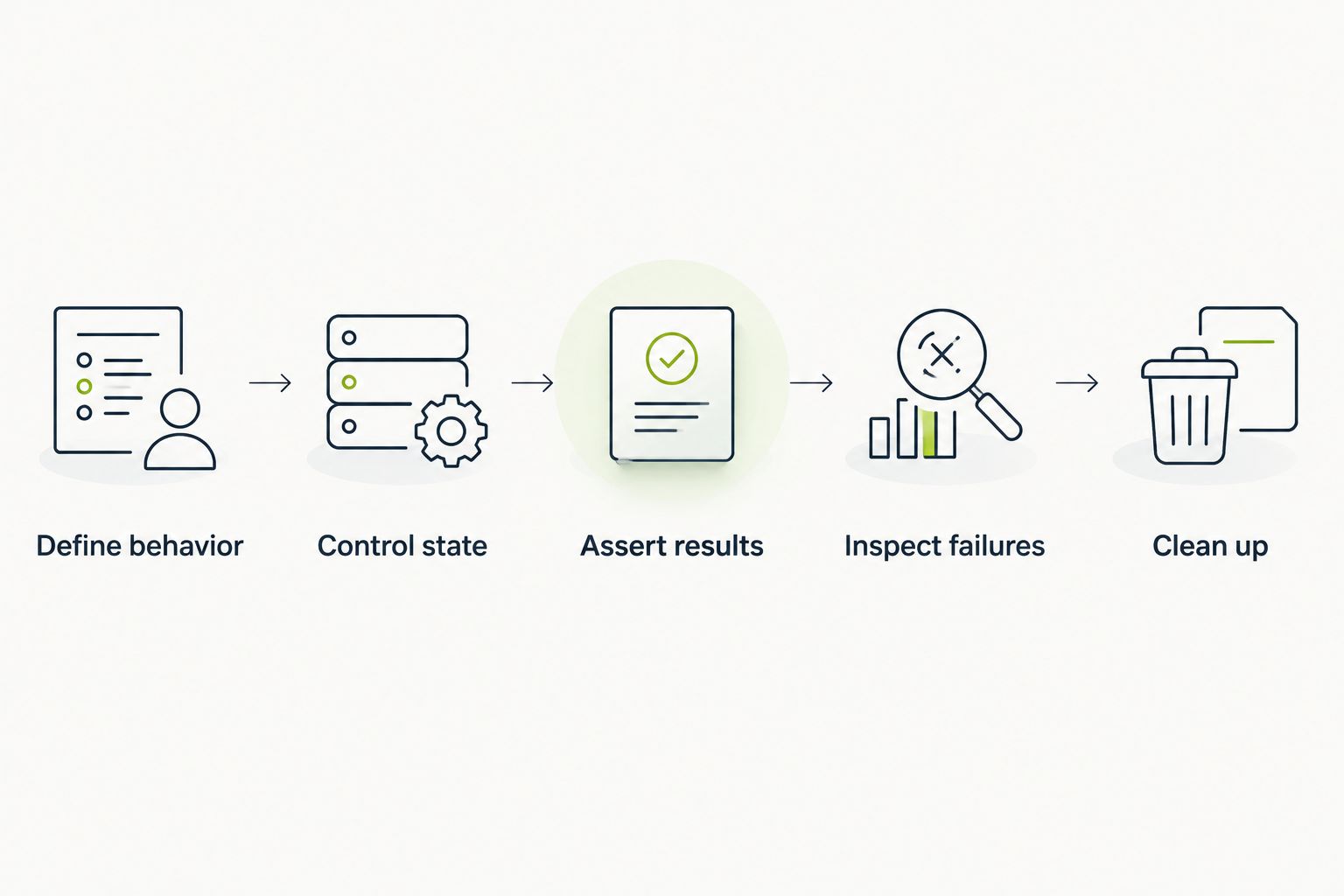
A merge-blocking API test needs controlled state and meaningful assertions.
For example, an HTTP 200 status code indicates request success at the protocol level; it does not prove that the response contains the correct account’s records. Assert ownership and relevant business fields explicitly.
Test rejected access too. An HTTP 401 status code indicates missing valid authentication credentials; an HTTP 403 status code indicates that the server refuses the request. Assert your API’s documented contract rather than applying those codes interchangeably.
Start with Postman if your immediate job is exploring endpoints and building functional collections. Choose Bruno instead when collection files belong in Git, or REST Assured when Java integration tests already own the contract.
Add Grafana k6 when you have a performance question. Choose SoapUI for SOAP requirements, Karate for scenario-based API checks, and Playwright when request testing belongs beside browser automation.
For a 2026 GitHub testing stack, TestDriver adds a separate layer: running pull requests in a real desktop sandbox to catch UI regressions. Keep API assertions and user-visible checks complementary rather than asking either layer to prove everything.
What’s the best API testing tool for most teams?
Postman is the default choice for interactive API exploration and collection-based functional testing. Choose a different tool when repository storage, a specific programming language, SOAP, or load testing determines your workflow.
Is Bruno better than Postman for Git workflows?
Bruno is the more direct fit when plain-text API collections must live in Git. Compare the actual collection-review and execution workflow before moving an established suite.
Should a Java team use REST Assured or Karate?
Choose REST Assured for API assertions written in Java; choose Karate for feature-file API scenarios. The deciding factor is which representation your test owners can review and maintain.
Can Grafana k6 replace functional API tests?
Grafana k6 should not replace detailed functional API coverage. Use it to evaluate behavior under a defined workload, while functional tests verify business rules and response contracts.
Can Playwright test an API without opening a browser?
Yes, Playwright supports API requests through APIRequestContext without a browser interaction. Those checks verify service responses, not rendering or user interactions.
Does TestDriver replace API testing tools?
No. TestDriver provides end-to-end UI testing and automated code review for GitHub pull requests, running them in a real desktop sandbox to catch UI regressions. Use API testing tools for service-level assertions alongside that UI coverage.
Add a negative authorization test before adding another happy-path request. Use an authenticated identity that does not own the target resource, then assert that the API denies access according to its contract. A successful request with the wrong user’s data is exactly the kind of defect that status-only testing misses.
AI code review open source maintainers can trust needs evidence. Compare review methods, isolate contributor code, and keep humans in control of merges.
Automated UI testing fintech teams can trust starts with PR checks. Cover payment states, permissions, test data, and failures before you merge.
Electron app visual regression testing works best with stable baselines and desktop checks. Build a pull request workflow that catches real UI regressions.
TestDriver vs ACCELQ: choose PR-centered UI checks or codeless QA suites. Compare workflow ownership, coverage, maintenance, and evaluation steps.
TestDriver runs every pull request in a real desktop sandbox, finds bugs, and builds regression tests - right from your repo.