End-to-end testing for platform teams: complete 2026 guide
For end-to-end testing platform engineering teams, gate critical journeys first. Build reliable CI checks with clear ownership and reproducible failures.
Compare mobile app testing tools for native Android, iOS, and mobile web. Choose Appium, Maestro, or device-cloud testing to match your release workflow.
Automate and scale manual testing with AI ->
Best overall: Appium. Best for readable Android and iOS test flows: Maestro. Best for mobile web: Playwright. These mobile app testing tools solve different problems; this 2026 guide separates native automation frameworks, browser testing, and real-device infrastructure so you can choose the right layer.
TL;DR
A mobile browser viewport is not a native app. An emulator is not a physical phone. A device cloud is not a test framework. Treating these as interchangeable creates coverage gaps before you write a test.
Choose your application surface first. Then choose how to automate it and where those tests run. For desktop-side pull-request checks, TestDriver automatically runs pull requests in a real desktop sandbox to catch UI regressions; that stated scope does not establish native Android or iOS support.
Use these criteria to evaluate your 2026 shortlist:
Choose the application surface before choosing the framework. A tool with excellent browser assertions still cannot replace native-app automation.
These tools occupy distinct use-case slots. BrowserStack can host execution for a framework such as Appium; it is not a mutually exclusive replacement.
| Rank | Tool | Best for | Standout capability | Key limitation |
|---|---|---|---|---|
| 1 | Appium | Shared Android and iOS automation | WebDriver-based automation through platform drivers | Driver, application, and environment maintenance remain your responsibility |
| 2 | Maestro | Readable mobile UI journeys | YAML-based flows for Android and iOS | Specialized cases need validation against supported commands |
| 3 | Espresso | Android-native instrumentation | Synchronization with supported Android UI operations | Android only; background work can require idling resources |
| 4 | XCUITest | Apple-native UI automation | UI testing through XCTest and Xcode tooling | Apple-platform scope and Apple build infrastructure |
| 5 | BrowserStack | Hosted physical-device testing | Remote real-device infrastructure for manual and automated testing | Infrastructure does not define your assertions or test strategy |
| 6 | Playwright | Mobile website regression tests | Browser automation with device emulation | Emulation does not execute a native mobile app |
Appium automates mobile applications through platform-specific drivers using the WebDriver protocol. It supports native, hybrid, and mobile-web testing, making it the strongest default when your automation strategy spans Android and iOS.
Cross-platform does not mean identical implementation. Platform differences still affect locators, permissions, system dialogs, and application behavior.
Appium pros:
Appium cons:
Best for: Engineering organizations that need Android and iOS coverage without standardizing exclusively on either platform’s native test framework.
Start with a critical journey that exists on both platforms. Verify that your team can install the app, establish test state, interact reliably, and diagnose a failed assertion before expanding coverage.
Verdict: Buy into Appium as your default cross-platform framework when you can maintain the execution stack. Skip it when your entire requirement is a mobile website.
Maestro expresses mobile interactions as YAML flows. Its declarative format suits teams that want user journeys represented as readable steps rather than a larger test-code structure.
Readable syntax makes the flow easier to inspect. It does not remove the need for stable identifiers, controlled data, and assertions that prove the intended outcome.
Maestro pros:
Maestro cons:
Best for: Teams prioritizing understandable smoke tests and common mobile user journeys.
For a 2026 evaluation, translate an existing manual acceptance scenario into a flow. Include a meaningful outcome, such as a saved setting remaining visible after revisiting the screen, rather than ending immediately after a tap.
Verdict: Buy into Maestro for readable mobile journeys. Hold if your required interactions have not been demonstrated in a representative test.
Espresso is an Android UI testing framework used with instrumentation tests. It works closely with Android application testing and synchronizes with supported UI activity to reduce the need for manually inserted waits.
That synchronization has boundaries. Application work outside the mechanisms Espresso tracks needs explicit handling, including idling resources where appropriate.
Espresso pros:
Espresso cons:
Best for: Android teams that want developers to own native UI tests alongside application code.
Keep Espresso assertions focused on observable behavior. If a screen loads data asynchronously, establish when that work is complete instead of adding a fixed pause and hoping the environment is fast enough.
Espresso also has a clear ownership advantage when the people changing Android internals maintain the tests. That fit matters more than adopting a shared framework solely for consistency with an unrelated iOS suite.
Verdict: Buy into Espresso for Android-native ownership. Skip it as your sole framework when the same selection must cover iOS.
XCUITest provides UI testing through Apple’s XCTest and Xcode tooling. Tests interact with application UI elements and assert user-visible behavior within the Apple development workflow.
Choose it for an Apple-platform testing requirement, not as a route to shared Android automation. Your build and execution setup must also accommodate Apple’s tooling.
XCUITest pros:
XCUITest cons:
Best for: iOS engineering teams that want platform-native UI automation under developer ownership.
Check element identification before expanding the suite. Accessibility identifiers make tests less dependent on incidental presentation text, while meaningful assertions distinguish a completed interaction from a successful user outcome.
In your 2026 selection, include a system-interaction scenario relevant to your app. Permissions and application lifecycle behavior deserve deliberate checks rather than assumptions based on a simple launch test.
Verdict: Buy into XCUITest for Apple-native UI coverage. Skip it as a cross-platform automation standard.
BrowserStack provides hosted devices for manual and automated mobile testing. It addresses where tests run, while frameworks and test code determine what those tests do.
Use physical-device execution when your acceptance criteria require evidence from actual hardware. Do not confuse access to many devices with a reasoned coverage plan.
BrowserStack pros:
BrowserStack cons:
Best for: Teams that need physical-device coverage beyond the devices they maintain themselves.
Select devices from your supported-platform policy and observed usage, not from the size of a device catalog. Include relevant operating-system differences and hardware-dependent behavior in the decision.
Validate the complete path from CI to application installation, test execution, and failure investigation. A successful remote session proves connectivity; it does not establish adequate regression coverage.
Verdict: Buy into BrowserStack for hosted device infrastructure. Hold until you have defined which device differences the tests must cover.
Playwright automates browser interactions and supports device emulation settings such as viewport and touch configuration. It fits mobile websites and browser-based application journeys.
It does not automate a native Android or iOS application. Its browser engines and emulation settings also do not establish that a test ran in mobile Safari on a physical iPhone.
Playwright pros:
Playwright cons:
Best for: Web teams testing responsive layouts and browser-based user journeys.
Check behavior as well as layout: navigation, validation messages, form submission, and content that becomes inaccessible at narrow widths. Keep physical-device verification separate when the release requirement depends on actual mobile browsers or hardware behavior.
Verdict: Buy into Playwright for mobile web. Skip it as the sole testing tool for a native app.
This 2026 ranking prioritizes application coverage, assertion control, synchronization, execution environment, CI ownership, and debugging evidence. Appium takes the default slot because it addresses cross-platform mobile automation; the remaining positions identify distinct requirements rather than descending quality.
Frameworks and infrastructure are evaluated separately. No speed ranking or measured reliability advantage is claimed.
Start with 1 critical journey, not a large inventory of shallow checks. Choose a flow whose failure blocks a meaningful user outcome, then make its setup and expected result explicit.
Use this execution sequence:
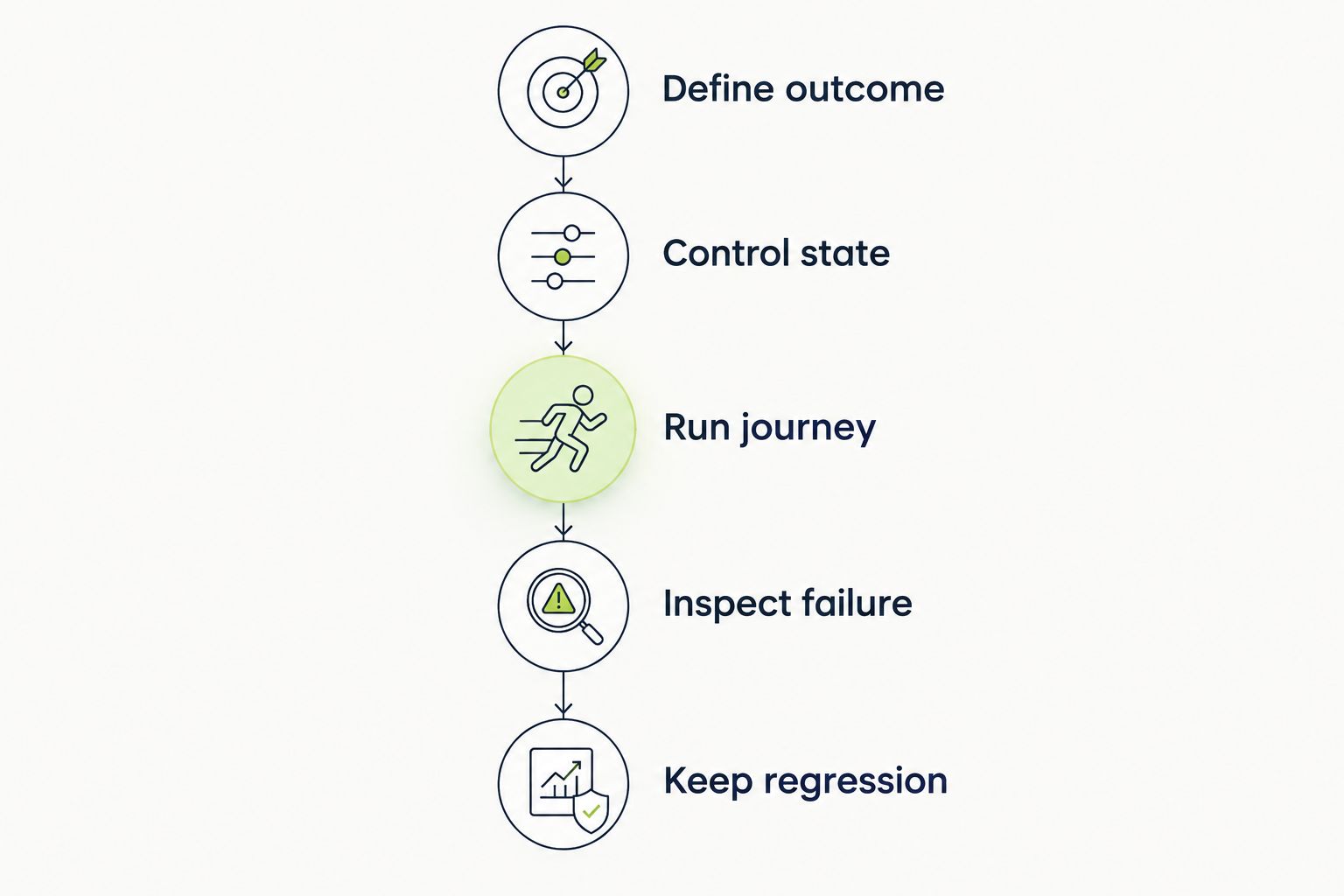
Define the expected outcome before choosing interactions and assertions.
For the pilot, choose 3 assertions that establish completion, resulting state, and persistence where persistence belongs to the feature. These are recommended starting checks, not a universal coverage target.
Use 2 execution environments only when they answer different questions, for example, an emulator for development feedback and a physical device for hardware-specific acceptance. More environments without distinct acceptance criteria add runs, not necessarily evidence. The guide to automated regression testing tools covers the broader regression-tool category.
TestDriver is best for GitHub engineering teams that need desktop-sandbox pull-request checks. It runs pull requests in a real desktop sandbox to catch UI regressions.
TestDriver pros: Pull-request execution connects checks to code changes, and desktop-sandbox testing exercises running UI behavior.
TestDriver cons: Its stated desktop scope does not establish native-mobile coverage. Android, iOS, and physical-device requirements need separate validation and tooling.
Choose Appium if you need a default for native Android and iOS automation. Choose Maestro when readable flows are the deciding requirement, Espresso for Android-native ownership, or XCUITest for Apple-native ownership.
Add BrowserStack when you need hosted physical devices. Choose Playwright when the product under test is a website, not a native application. Your 2026 stack should reflect those boundaries rather than force every requirement into the same tool.
What’s the best mobile app testing tool for Android and iOS?
Appium is the best default in this guide for shared Android and iOS automation. It supports native, hybrid, and mobile-web testing, but platform-specific setup and maintenance remain necessary.
Is Maestro better than Appium?
Maestro is the better fit when readable YAML flows are your priority. Appium fits teams that need a WebDriver-based approach with multiple client-language options and platform drivers.
Should Android developers use Espresso?
Espresso is a strong fit for Android developers who own instrumentation-based UI tests. It does not cover iOS, and asynchronous work outside its tracked mechanisms needs explicit synchronization.
Can Playwright test native mobile apps?
No. Playwright tests browser-based applications and supports mobile device emulation, but it does not automate native Android or iOS apps.
Does BrowserStack replace Appium?
No. BrowserStack provides hosted execution infrastructure, while Appium supplies mobile automation capabilities. Teams can use them together.
Do I need real devices for mobile app testing?
You need real-device execution when your acceptance criteria require physical-device evidence. Emulators and simulators remain useful for other checks, but they do not establish hardware-specific behavior.
How should I compare mobile testing tools in 2026?
Compare application coverage, assertion control, synchronization, execution environments, CI ownership, and failure evidence. Validate a representative user journey before committing to a larger suite.
A tap is an action, not an assertion. Before adding another device or another test, check whether the existing journey proves that the user achieved the intended result.
For end-to-end testing platform engineering teams, gate critical journeys first. Build reliable CI checks with clear ownership and reproducible failures.
End-to-end testing Series B startups can trust starts with critical workflows. Build PR checks, isolate test data, and gate merges on clear evidence.
UI regression testing healthcare software needs more than screenshots. Build patient-context, permission, and saved-state checks into pull requests.
AI code review open source maintainers can trust needs evidence. Compare review methods, isolate contributor code, and keep humans in control of merges.
TestDriver runs every pull request in a real desktop sandbox, finds bugs, and builds regression tests - right from your repo.