End-to-end testing for platform teams: complete 2026 guide
For end-to-end testing platform engineering teams, gate critical journeys first. Build reliable CI checks with clear ownership and reproducible failures.
Compare self-healing test automation tools by workflow fit, locator recovery, and failure visibility. Choose a tool that preserves real regression signals.
Automate and scale manual testing with AI ->
Best for GitHub pull-request validation: TestDriver. Best for Selenium locator recovery: Healenium. Best for low-code browser testing: mabl. Best for existing Katalon projects: Katalon Studio. This 2026 guide compares self-healing test automation tools by what they repair, where they run, and whether a repaired test still checks the right behavior.
TL;DR
A broken locator and a broken feature need different responses. If a button keeps its purpose but changes its identifier, locator recovery can keep a useful test running. If that button stops saving data, the test must fail.
Self-healing should repair how a test finds an element, not redefine what success means. A green result is useful only when the original assertion remains intact.
For your 2026 shortlist, separate maintenance reduction from regression detection. Browser automation, desktop execution, locator recovery, and code review solve related problems, but they are not interchangeable capabilities.
Use these criteria before comparing product names:
Do not rank products by the presence of a self-healing label alone. Ask each vendor to demonstrate the same harmless UI change and the same genuine application defect.
The order below follows distinct workflow needs, not a measured accuracy leaderboard. No single recovery method replaces a clear test assertion.
| Tool | Best for | Standout capability | Key limitation |
|---|---|---|---|
| TestDriver | GitHub pull-request UI validation | Runs pull requests in a real desktop sandbox | Desktop execution does not, by itself, establish locator-healing behavior |
| Healenium | Existing Selenium suites | Self-healing locator recovery around Selenium | Your team still owns Selenium tests and supporting infrastructure |
| mabl | Low-code browser test authoring | Browser testing with built-in auto-healing | Low-code authoring does not remove investigation or assertion design |
| Katalon Studio | Teams already using Katalon projects | Self-healing through alternative element locators | Recovery depends on the quality of available locator candidates |
TestDriver is an end-to-end testing and code review platform that runs pull requests in a real desktop sandbox. It serves engineering teams using GitHub and focuses on catching UI regressions while changes are under review.
TestDriver is best for GitHub teams that want end-to-end UI testing inside pull-request review. That is a workflow recommendation, not a claim that desktop execution and locator self-healing are the same feature.
For a 2026 evaluation, start with the defect you need to catch. A rendered application behaving incorrectly requires execution evidence; a renamed element breaking an otherwise valid script requires a recovery mechanism. Evaluate those capabilities separately.
TestDriver pros:
TestDriver cons:
Best for: GitHub engineering teams prioritizing executable UI checks during review.
Verdict: Buy for pull-request UI validation; hold a self-healing-only purchase until recovery behavior passes your pilot.
Healenium is an open-source self-healing solution for Selenium-based automation. It addresses locator failures by attempting to identify the intended element after the original lookup stops working.
Choose this approach when your Selenium suite already expresses useful behavior and its main maintenance problem is element identification. Replacing the entire suite is a different decision from adding locator recovery.
Healenium belongs on the shortlist when your engineers want to retain Selenium and can own the surrounding setup. Keep strong assertions after recovered interactions: successful element selection does not establish that the application completed the right operation.
Healenium pros:
Healenium cons:
Best for: Engineering teams with an established Selenium suite and recurring locator failures.
Before adoption, change an element identifier while preserving its visible purpose. Then introduce a similar neighboring element and check whether the recovered interaction still reaches the correct target.
Verdict: Buy into the approach when preserving Selenium is a requirement; skip it as a replacement for broader test design.
mabl provides low-code browser test automation with auto-healing capabilities. Its fit is strongest when your team wants browser journey authoring and element recovery within the same testing product.
Compare the authoring experience with your team’s actual responsibilities. A workflow that helps someone create a test is useful only if that person can also understand its assertions, investigate failures, and review recovered interactions.
For your 2026 pilot, include an ordinary product change rather than only a deliberately renamed selector. Change the surrounding layout, preserve the intended action, and inspect whether the test continues checking the same outcome.
mabl pros:
mabl cons:
Best for: Teams choosing low-code browser testing rather than extending an existing Selenium codebase.
Make maintainability part of the evaluation. Ask the person who will own the test to explain a recovered run without help from the person who authored it.
Verdict: Buy for low-code browser coverage when recovery remains understandable to the test owner.
Katalon Studio supports self-healing through alternative locators for test objects. When an element cannot be found with the original locator, alternative identification methods can help execution continue.
That makes Katalon Studio a direct candidate for teams already maintaining Katalon projects. Evaluate the recovery controls before deciding that locator maintenance requires a platform migration.
The important question is not whether an alternative locator exists. It is whether that alternative identifies the same intended element after a realistic UI change, without matching a neighboring control.
Katalon Studio pros:
Katalon Studio cons:
Best for: Teams with existing Katalon projects and repeated element-location maintenance.
Start with the test objects that fail most often. Check their alternative locators before expanding recovery across the suite, and retain a deliberate failure case to confirm that defects remain visible.
Verdict: Buy into recovery within an existing Katalon workflow; hold a platform migration until the wider authoring model fits.
This shortlist ranks tools by workflow fit: pull-request execution, Selenium recovery, low-code browser authoring, and existing Katalon adoption. It is not a hands-on accuracy benchmark or a claim that every product implements the same kind of healing.
The criteria above determine the choice. Preserve a valuable existing suite when locator maintenance is the problem; change the testing workflow when execution coverage or ownership is the problem.
For a 2026 purchase decision, require evidence from your application. A feature description cannot establish whether a tool will confuse your repeated buttons, dynamic lists, or conditional forms.
Use a proposed evaluation set of 10 tests, including stable journeys and tests that currently need locator maintenance. Run each baseline 3 times before introducing changes so you can distinguish existing instability from recovery behavior.
These are pilot instructions, not product performance figures. Keep the application version, test data, and expected outcomes controlled throughout the comparison.
Confirm that each test checks an observable result. For a save action, verify the saved state rather than only the click; for navigation, verify the destination rather than only the absence of an exception.
Introduce 2 controlled UI changes: rename an element identifier and move an existing control within the layout. Preserve its purpose and the expected result, then inspect whether recovery selects the correct element.
Break the behavior the test is meant to protect. For example, prevent the save action from persisting its data while leaving the button visible and clickable. The test must fail even if element selection succeeds.
Have the test owner explain the selected element, the retained assertion, and the final outcome. Reject a recovery result that nobody can distinguish from an accidental match.
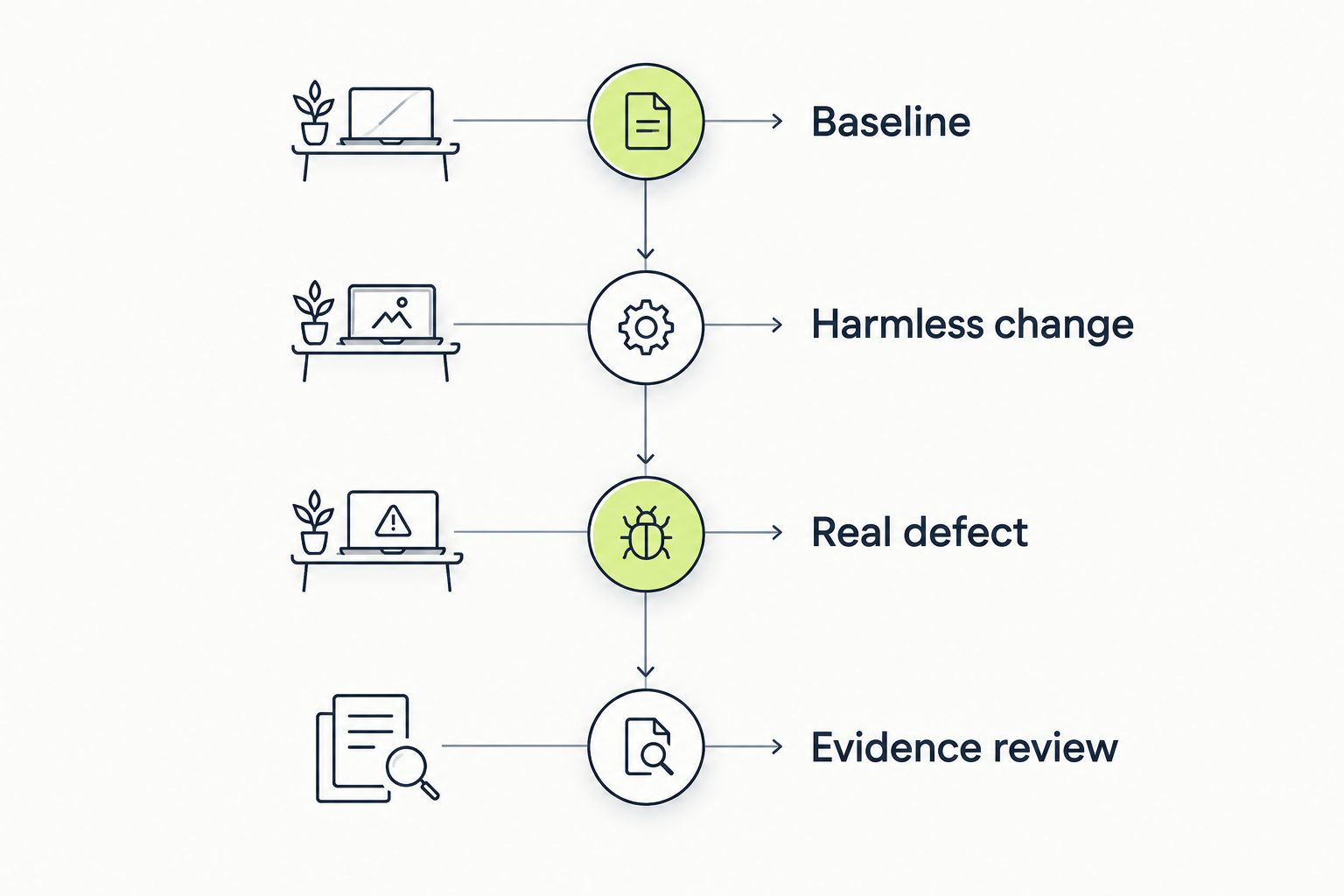
A useful recovery mechanism survives harmless changes without hiding genuine defects.
Choose TestDriver when your main requirement is end-to-end UI validation of GitHub pull requests. Keep locator recovery as a separate acceptance criterion rather than assuming it follows from sandbox execution.
Choose Healenium when preserving Selenium is central to the decision. Choose mabl when low-code browser authoring matches your team’s ownership model. Choose Katalon Studio when you already maintain Katalon projects and want to evaluate recovery inside that workflow.
For an undecided buyer in 2026, the default is simple: preserve the useful tests you already have, then evaluate the smallest change that addresses their actual failure mode. Do not migrate a suite merely to acquire a self-healing label.
What are self-healing test automation tools?
Self-healing test automation tools attempt to keep tests running when application changes break element identification or supported execution steps. The important boundary is the assertion: recovery must not turn incorrect application behavior into a passing result.
What’s the best self-healing tool for an existing Selenium suite?
Healenium is a direct candidate for teams that want locator recovery while keeping Selenium. Evaluate it against your current tests, especially pages with repeated or similar elements.
Is TestDriver the right choice for GitHub pull-request testing?
TestDriver fits GitHub teams that want pull requests executed in a real desktop sandbox to catch UI regressions. Evaluate any specific self-healing requirement separately from that execution capability.
Is mabl better than Katalon Studio?
mabl fits teams choosing low-code browser authoring, while Katalon Studio fits teams already maintaining Katalon projects. Compare ownership, recovery visibility, and migration work rather than choosing from a feature label alone.
Can self-healing tests hide real bugs?
Yes, an incorrect recovery can hide a defect if it selects the wrong element and the test lacks a strong assertion. Deliberately break the expected behavior during evaluation and confirm that the test still fails.
Does self-healing replace good locators?
No, self-healing does not replace clear and stable element identification. Good locators reduce ambiguity, while recovery provides a fallback when a supported change breaks the original lookup.
How should I compare self-healing tools in 2026?
Compare tools on the same journeys, harmless UI changes, and deliberate application defects. Inspect what changed during recovery and whether the original expected result remained enforced.
Keep a deliberately broken test in your evaluation suite. A tool that survives a renamed element but fails a broken save operation is demonstrating the distinction you need: less maintenance without weaker regression detection.
For end-to-end testing platform engineering teams, gate critical journeys first. Build reliable CI checks with clear ownership and reproducible failures.
End-to-end testing Series B startups can trust starts with critical workflows. Build PR checks, isolate test data, and gate merges on clear evidence.
UI regression testing healthcare software needs more than screenshots. Build patient-context, permission, and saved-state checks into pull requests.
AI code review open source maintainers can trust needs evidence. Compare review methods, isolate contributor code, and keep humans in control of merges.
TestDriver runs every pull request in a real desktop sandbox, finds bugs, and builds regression tests - right from your repo.