End-to-end testing for platform teams: complete 2026 guide
For end-to-end testing platform engineering teams, gate critical journeys first. Build reliable CI checks with clear ownership and reproducible failures.
End-to-end testing Series B startups can trust starts with critical workflows. Build PR checks, isolate test data, and gate merges on clear evidence.
Automate and scale manual testing with AI ->
Series B SaaS end-to-end testing is the validation of complete user workflows across your application, with the aim of catching release-blocking regressions before customers encounter them. For a team coordinating changes across product areas, the priority is a dependable pull-request signal, not a large suite that nobody trusts.
TL;DR
Your funding stage does not determine your test count. Your release risks do: account access, permissions, onboarding, billing interactions, and the workflows customers use to complete their work. Select the areas that actually exist in your product rather than adopting a generic SaaS checklist unchanged.
TestDriver is best for GitHub teams that need end-to-end testing of pull requests in a real desktop sandbox. The platform automatically runs pull requests to catch UI regressions; your team still defines which business outcomes constitute a correct release.
For your 2026 testing plan, distinguish code inspection from application execution. A reviewer can assess a changed permission check, but an execution test verifies whether the affected user can actually complete the workflow. Both provide useful evidence; neither answers every release question.
When separate teams contribute to the same customer journey, assign ownership across the boundary. A passing component test is not evidence that authentication, routing, persistence, and the visible interface work together.
Start with a manual walkthrough and a written acceptance checklist. Automate the stable, important paths after you understand their prerequisites and failure conditions. The sequence below makes the release decision explicit before you expand coverage.
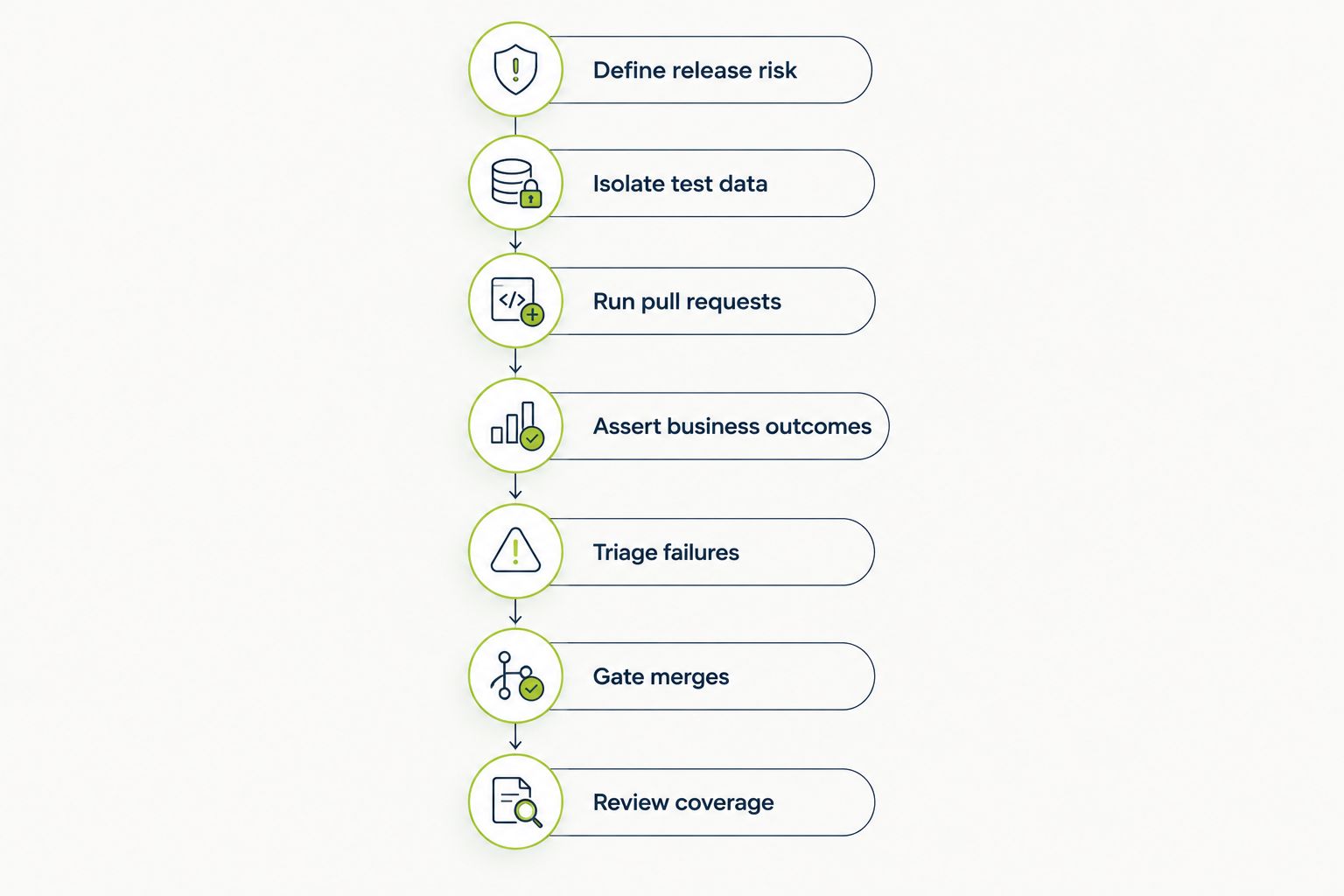
Define the release decision before expanding the test suite.
Walk through your product manually with an engineer and a product owner. Identify the action, the expected result, and the customer consequence if it fails. Write acceptance criteria before selecting an automation approach.
Start your 2026 rollout with 5 critical workflows as a planning limit, not a coverage benchmark. A small initial scope makes it easier to establish clear ownership and diagnose failures before adding more scenarios.
A workflow should describe a customer outcome, such as inviting a colleague and confirming the correct access. A sequence of clicks without a meaningful result is not enough.
Create the required accounts and records manually first. Repeat the workflow from a known starting state, then document how to restore that state. Only automate setup after you can explain what each scenario needs.
Shared mutable records create ambiguity: a failure might reflect a product defect or a previous test changing the account. Give each run its own identifiable data and keep tests independent of execution order.
Use synthetic data rather than copying customer records into test environments. For multi-tenant software, explicitly test the boundary between accounts instead of assuming that a successful administrator session proves tenant isolation.
Begin by executing your acceptance checklist against the pull request’s application build. Confirm the build identity and environment before you interpret the result. Testing a stale deployment produces evidence about the wrong change.
TestDriver provides an automated path for GitHub teams: it runs pull requests in a real desktop sandbox to catch UI regressions. Use that execution capability against workflows with explicit expected outcomes, rather than treating automation as a substitute for defining correctness.
For your 2026 CI setup, distinguish failures that should block a merge from checks that provide additional information. Establish that distinction before making a new check mandatory.
Run the workflow manually and ask what proves success. A visible confirmation message is useful, but it does not by itself establish that the application saved the right record or applied the intended permission.
Use UI assertions for customer-visible behavior and focused lower-level tests for detailed business rules. For example, validate that a saved change remains after reloading the page, while testing exhaustive validation combinations closer to the underlying logic.
Assert the result, not just the interaction. A test that successfully presses a button has proved very little if the requested action never completes.
Reproduce a failed workflow manually before deciding whether the product or the test needs repair. Record what happened, what should have happened, and which environment produced the result. Do not erase the original failure by reporting only the successful rerun.
Separate product defects, test defects, and environment failures. These categories require different owners and different fixes; putting them all into a single flaky-test bucket hides actionable information.
Use a 2-run investigation rule as an operating policy: after the initial failure and one diagnostic rerun, investigate rather than rerunning indefinitely. This is a proposed boundary, not a reliability benchmark.
Start by reviewing test evidence manually during pull-request approval. Promote a check to a required gate only after its outcome is understandable and the team knows how to resolve failures.
A required check should correspond to a release risk, not merely exist because an automation system can run it. Keep broader exploratory scenarios separate from the critical path until they produce actionable results.
Define your 2026 merge policy in plain language: which failures stop a release, who can approve an exception, and what evidence that exception requires. A green status is useful only when everyone understands what it covers.
Review recent defects and changed workflows before adding more tests. Manually trace each important incident back to a missing assertion, missing scenario, incorrect environment, or failure-handling problem. Then choose the smallest useful test at the appropriate layer.
Measure whether the suite supports release decisions, not just whether its test count increased. Track escaped regressions, investigated failures, and the interval between a failed check and a usable diagnosis using your own operational data.
Retire redundant checks and update assertions when the intended behavior changes. Keeping obsolete expectations is not regression protection; it is testing the wrong product contract.
For a 2026 evaluation, choose by the evidence you need and the work your team will own. These approaches address different questions; they are not interchangeable replacements for one another.
| Option | Best for | Main benefit | Key limitation |
|---|---|---|---|
| Manual workflow testing | New or ambiguous customer journeys | Lets a person investigate unexpected behavior directly | Requires a person to repeat checks and preserve evidence |
| Scripted end-to-end tests | Explicit, repeatable workflows with engineering ownership | Makes actions and assertions inspectable in code | Your team maintains setup, assertions, and application-change handling |
| TestDriver end-to-end testing | GitHub teams testing pull requests in a real desktop sandbox | Automatically runs pull requests to catch UI regressions | Your team still defines acceptance criteria and release policy |
| Screenshot comparison | Appearance-focused regression checks | Compares visible output against an expected baseline | Does not by itself prove permissions, persistence, or business correctness |
| Static code review | Inspecting proposed code changes | Examines implementation without executing the complete workflow | Does not demonstrate that the running application completes the customer journey |
Choose workflow execution when the question is whether the customer can finish the task. Use screenshot comparison for appearance and code review for implementation concerns. Keep manual exploration for behavior that is not yet understood well enough to encode as a dependable check.
Evaluate maintenance alongside execution. Ask who updates expected behavior, who investigates a failed run, and how the result reaches the engineer responsible for the change. An automated result without an owner does not resolve a release decision.
Automating every available journey creates work without establishing priorities. Select customer-critical outcomes first, then explain which failures stop a merge and which enter the normal defect queue.
Administrator access does not prove that an invited member, restricted role, or separate tenant can use the product correctly. Build scenarios around the roles and account boundaries your application actually supports.
Concurrent tests that alter the same settings contaminate each other’s prerequisites. Isolate records and identities so that a failure describes the application, not an accidental collision between tests.
A customer workflow can cross frontend, authentication, and backend responsibilities. Assign a workflow owner who coordinates diagnosis instead of allowing each team to point to its own passing checks.
A successful rerun does not explain the original failure. Preserve the first result, classify the cause, and repair the underlying issue before treating the check as dependable evidence.
What end-to-end tests should a Series B SaaS startup automate first?
Automate workflows whose failure would block customers from completing essential work. Choose from your actual product, define the expected outcome, and assign an owner before making the check a merge requirement.
How many end-to-end tests does a Series B startup need?
Funding stage does not determine the right test count. Start with a bounded set of critical workflows and expand when defects or product changes expose a specific coverage gap.
Is TestDriver a fit for a startup using GitHub pull requests?
TestDriver fits GitHub development teams that need automated end-to-end UI testing of pull requests in a real desktop sandbox. The team still owns acceptance criteria, test-data requirements, and decisions about blocking releases.
Should every end-to-end test block a pull request?
Only checks tied to explicit release risks should become required gates. Keep exploratory or unresolved unstable checks separate until the team can interpret and act on their failures.
Can screenshot testing replace end-to-end testing?
Screenshot testing cannot by itself replace workflow validation. It checks visible output, while end-to-end assertions must establish whether the intended customer action actually succeeded.
What should we do when an end-to-end test fails intermittently?
Preserve the original evidence and investigate whether the cause is the product, test, or environment. Use a bounded diagnostic rerun rather than rerunning until the status turns green.
How should a startup compare end-to-end testing costs?
Compare total operating work, not just the subscription. Include setup, test maintenance, failure investigation, environment management, and ownership of the release decision.
Before expanding your 2026 suite, deliberately break a critical workflow in a controlled test environment. Confirm that the expected check fails, that its evidence identifies the broken outcome, and that the responsible engineer receives an actionable result.
A passing suite proves less than a suite that demonstrably catches the failure you care about. Restore the application, confirm the check passes again, and keep that failure case attached to the workflow’s acceptance criteria.
For end-to-end testing platform engineering teams, gate critical journeys first. Build reliable CI checks with clear ownership and reproducible failures.
UI regression testing healthcare software needs more than screenshots. Build patient-context, permission, and saved-state checks into pull requests.
AI code review open source maintainers can trust needs evidence. Compare review methods, isolate contributor code, and keep humans in control of merges.
Automated UI testing fintech teams can trust starts with PR checks. Cover payment states, permissions, test data, and failures before you merge.
TestDriver runs every pull request in a real desktop sandbox, finds bugs, and builds regression tests - right from your repo.