ACCELQ alternatives in 2026
Compare ACCELQ alternatives: TestDriver for GitHub pull-request UI checks, Playwright for code-owned browser tests. See trade-offs and migration steps.
Compare testrigor alternatives: TestDriver for desktop PR testing, Playwright for coded browser tests. See trade-offs and decide what fits your team.
Automate and scale manual testing with AI ->
TestRigor makes end-to-end test authoring accessible through plain-English instructions. That strength is not the deciding factor when your priority is running GitHub pull requests in a real desktop sandbox to catch UI regressions. The best TestRigor alternative in 2026 is TestDriver for pull-request-driven desktop UI testing; Playwright is the better fit for engineers who want browser tests in code.
TL;DR
Replacing a test runner does not automatically fix your feedback loop. First decide whether your problem is writing tests, executing them against changes, or diagnosing failures before merge.
For your 2026 shortlist, compare tools against the same application workflow and ownership model. A tool that suits a QA team writing plain-English scenarios does not necessarily suit engineers maintaining tests beside application code. Neither approach answers every desktop-testing requirement.
These options differ in scope, not just syntax. The table separates desktop pull-request testing from browser-focused frameworks so you do not compare unlike workflows as direct substitutes.
| Tool | Best for | Standout capability | How it differs from TestRigor | Main trade-off |
|---|---|---|---|---|
| TestRigor | Teams prioritizing plain-English test authoring | Natural-language test instructions | Baseline for this comparison | Authoring convenience does not by itself establish fit for your PR workflow |
| TestDriver | GitHub teams testing UI changes in pull requests | Automatic execution in a real desktop sandbox | Centers the workflow on running application changes and catching UI regressions | Does not replace the need for lower-level tests and clear acceptance criteria |
| Playwright | Engineers owning browser tests in code | Browser automation, isolated contexts, and execution traces | Uses programmable tests rather than plain-English instructions | Requires test-code ownership |
| Cypress | Web teams wanting interactive browser testing | Command Log, retry behavior, and component testing | Organizes testing around JavaScript or TypeScript workflows | Browser testing is not native desktop automation |
| Selenium | Teams maintaining WebDriver-based browser suites | Language bindings and remote execution through Grid | Provides a browser automation foundation rather than plain-English authoring | Requires surrounding choices for assertions, reporting, and execution |
Choose the execution model before comparing authoring convenience. A desktop sandbox, a browser runner, and a remote WebDriver session solve different testing problems.
TestDriver is an end-to-end testing and code review platform that automatically runs pull requests in a real desktop sandbox to catch UI regressions. Its strongest fit is an engineering organization that wants application execution attached to GitHub changes. The starting question becomes what the changed application does, not just how a test is written.
| Dimension | TestDriver | TestRigor |
|---|---|---|
| Primary evaluation point | Running pull requests to find UI regressions | Authoring end-to-end scenarios in plain English |
| Stated workflow | GitHub changes executed in a desktop sandbox | Natural-language test instructions |
| Buyer priority | Connecting application execution to code review | Making scenario authoring accessible |
Best for: GitHub development teams evaluating end-to-end testing at the pull-request stage.
Verdict: Buy for the stated desktop PR-testing requirement, after validating your application workflow.
Playwright is a browser automation framework with support for Chromium, Firefox, and WebKit. Its test runner provides fixtures, assertions, browser-context isolation, and tracing. Choose it when engineers want test behavior expressed in code and reviewed alongside application changes.
| Dimension | Playwright | TestRigor |
|---|---|---|
| Authoring | Programmable tests | Plain-English instructions |
| Ownership fit | Engineers comfortable maintaining code | Teams prioritizing accessible scenario authoring |
| Main evaluation question | Can your team maintain reliable coded coverage? | Does natural-language authoring fit your scenarios? |
Best for: Engineering teams that want browser tests under direct code ownership in 2026.
Verdict: Buy into Playwright when programmable browser coverage is the requirement, not desktop execution.
Cypress supports end-to-end and component testing for web applications. Its interactive runner and Command Log make test execution visible during development. It is a strong candidate when your team wants to work on browser tests while building the application.
| Dimension | Cypress | TestRigor |
|---|---|---|
| Authoring | JavaScript or TypeScript | Plain-English instructions |
| Development emphasis | Interactive browser test development | Natural-language scenario authoring |
| Ownership fit | Developers working in the web application stack | Teams choosing accessibility of test instructions |
Best for: Web application teams that prioritize an interactive development loop and component coverage.
Verdict: Buy into Cypress for its web-development workflow; skip it as a native desktop-testing substitute.
Selenium automates browsers through WebDriver and supports multiple programming-language bindings. Selenium Grid supports remote browser execution across machines. Start here when your organization already has WebDriver expertise or infrastructure that you intend to retain.
| Dimension | Selenium | TestRigor |
|---|---|---|
| Authoring | Code through language bindings | Plain-English instructions |
| Infrastructure focus | WebDriver sessions and optional Grid | Natural-language test workflow |
| Ownership fit | Teams maintaining their browser automation stack | Teams prioritizing scenario authoring accessibility |
Best for: Organizations with an established WebDriver investment.
Verdict: Hold existing Selenium infrastructure when it serves your requirements; do not replace it merely to change syntax.
A defensible switch starts with a changed requirement, not a claim that plain-English testing is inadequate. These are capability-based reasons to evaluate alternatives, not claims about TestRigor customer behavior.
In 2026, keep each reason separate during evaluation. A better authoring experience does not prove better failure diagnosis. Support for a browser engine does not prove coverage of a desktop workflow.
Do not start by rewriting your entire suite. Use 1 pull request that changes a meaningful user journey, then compare how each candidate handles the same expected behavior.
Define 3 checkpoints before the trial: setup, execution, and diagnosis. Assign 2 owners: an engineer responsible for the application change and a person responsible for accepting the test result. These are evaluation instructions, not performance benchmarks.
Write down the application state, credentials, data, and expected outcome. Record which steps require maintained code or configuration, and identify who owns them. Keep the intended behavior identical across candidates.
Run the workflow against the changed application. Confirm that the test reaches the intended state and evaluates the outcome you care about. A completed sequence of clicks is not sufficient evidence of correctness.
Introduce a deliberate regression in the evaluation branch. Ask the assigned owners to explain the failure from the available evidence and identify the next debugging action. Record any manual reconstruction needed to understand the result.
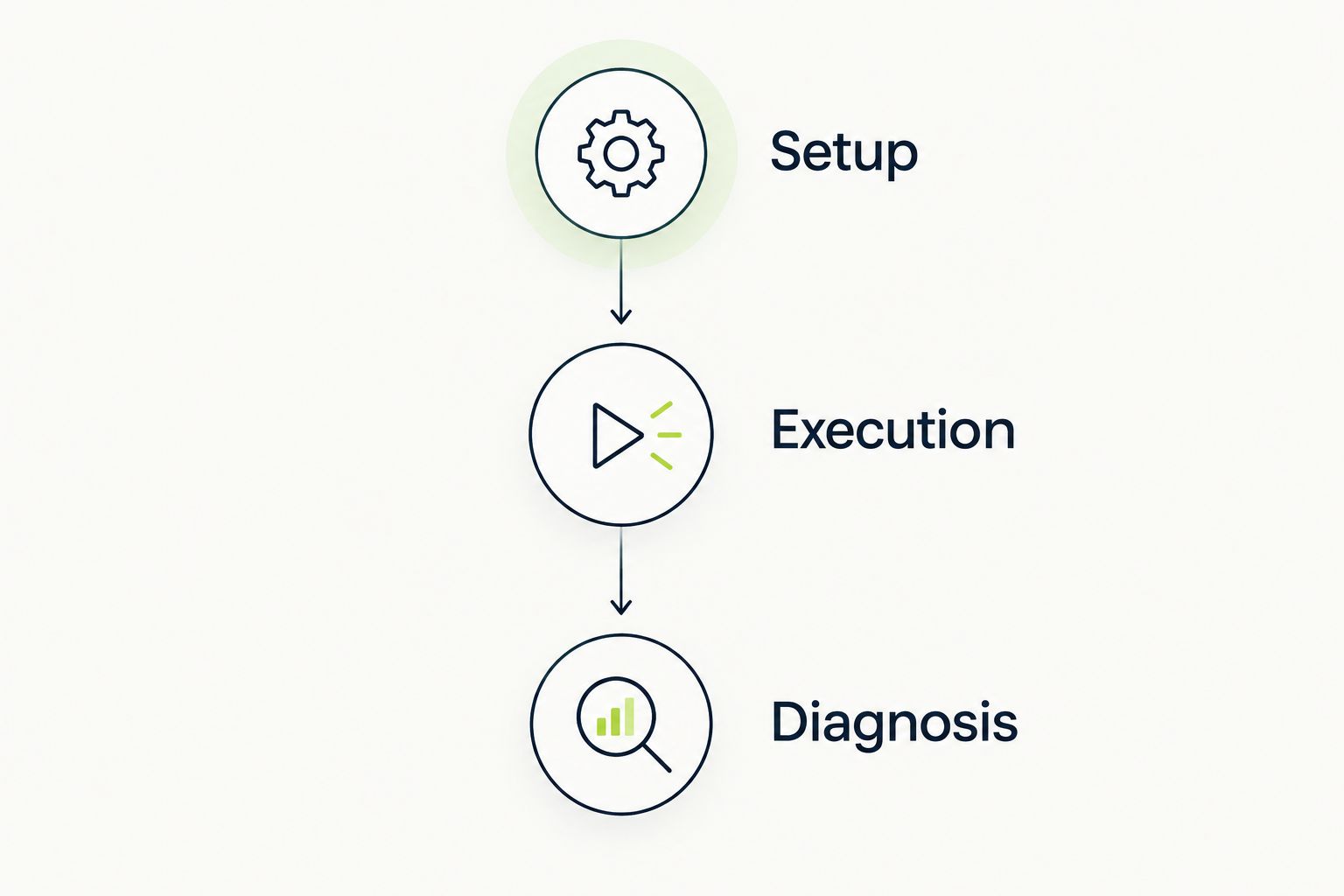
Compare candidates on the same workflow before migrating a test suite.
Use this trial to choose your 2026 testing workflow, not to manufacture a universal ranking. The result should identify who maintains coverage, what the test proves, and how a failed run becomes an actionable engineering task.
Stay with TestRigor when plain-English test authoring is the requirement and your current workflow meets your acceptance criteria. Changing tools without a defined coverage or ownership problem creates migration work without a clear decision standard.
Before switching, separate a tool limitation from a test-design problem. Unclear expected outcomes, unstable test data, and missing failure ownership need attention regardless of the runner. Require a replacement to demonstrate a specific improvement on your own workflow.
What’s the best TestRigor alternative in 2026?
TestDriver is the best fit for GitHub teams that need pull requests executed in a real desktop sandbox to catch UI regressions. Playwright is the better fit when the requirement is browser automation maintained in code.
Is Playwright better than TestRigor?
Playwright is the better fit when engineers want programmable browser tests with explicit fixtures and assertions. TestRigor fits teams that prioritize plain-English scenario authoring; the choice depends on ownership and execution requirements.
Is Cypress a replacement for TestRigor?
Cypress is a replacement candidate for web application testing when your team accepts JavaScript or TypeScript test ownership. Evaluate its end-to-end and component workflows against your actual application scenarios.
Which alternative fits GitHub pull-request testing?
TestDriver fits GitHub pull-request testing that requires execution in a real desktop sandbox. Its stated scope combines end-to-end testing and code review to catch UI regressions.
Should we migrate an existing Selenium suite?
Keep an existing Selenium suite when its WebDriver infrastructure and maintained coverage meet your requirements. Migrate only after a replacement demonstrates a specific benefit on the same workflow.
Can browser tests replace native desktop tests?
Browser tests do not establish native desktop coverage. Match the tool’s interaction scope to the actual workflow rather than treating all end-to-end testing tools as interchangeable.
How should we compare TestRigor alternatives before switching?
Evaluate each candidate on the same application change, expected outcome, and deliberate regression. Compare setup, execution, and diagnosis, then assign responsibility for maintaining the chosen approach.
A test that passes the working version is only half an evaluation. Before choosing a replacement, confirm that the same test fails when you deliberately break the expected behavior. Otherwise, you have demonstrated execution without demonstrating regression detection.
Compare ACCELQ alternatives: TestDriver for GitHub pull-request UI checks, Playwright for code-owned browser tests. See trade-offs and migration steps.
Compare Virtuoso QA alternatives: TestDriver for GitHub pull-request UI testing, Playwright for code-owned tests. See trade-offs and evaluation steps.
Test automation tools pricing comparison for 2026: choose by workflow fit, then compare CI execution, maintenance, and failure investigation work.
Compare TestMu alternatives for pull-request testing, browser automation, and device coverage. Choose TestDriver for GitHub UI regression checks.
TestDriver runs every pull request in a real desktop sandbox, finds bugs, and builds regression tests - right from your repo.