ACCELQ alternatives in 2026
Compare ACCELQ alternatives: TestDriver for GitHub pull-request UI checks, Playwright for code-owned browser tests. See trade-offs and migration steps.
Compare Virtuoso QA alternatives: TestDriver for GitHub pull-request UI testing, Playwright for code-owned tests. See trade-offs and evaluation steps.
Automate and scale manual testing with AI ->
Virtuoso QA’s strength is natural-language test authoring for teams that want browser automation without writing every interaction as code. That approach stops being enough when your selection criteria shift from test authoring to pull-request execution, repository ownership, or direct control over browser automation. The best Virtuoso QA alternative in 2026 is TestDriver if you need GitHub pull requests tested in a real desktop sandbox; Playwright if you need code-owned browser tests.
TL;DR
Replacing a testing platform changes more than test syntax. It changes who maintains coverage, how failures reach developers, and what evidence supports a merge decision.
For your 2026 shortlist, separate test authoring from test execution. Natural-language authoring addresses how you describe a workflow; pull-request testing addresses when you check a change. Neither, by itself, proves that your assertions cover the behavior that matters.
| Tool | Best for | Standout capability | Difference from Virtuoso QA |
|---|---|---|---|
| Virtuoso QA | Teams prioritizing natural-language browser tests | Natural-language test authoring | Baseline: keep it when its authoring model meets your needs |
| TestDriver | GitHub teams checking UI changes in pull requests | Automatically runs pull requests in a real desktop sandbox | Centers the workflow on pull-request execution and automated code review |
| Playwright | Engineers maintaining browser tests as code | Browser automation with an integrated test runner | Makes test implementation and assertions explicit in code |
| Cypress | Developers using interactive browser tests | Interactive runner with command-level debugging | Uses a developer-authored JavaScript or TypeScript testing workflow |
| Selenium | Teams retaining WebDriver infrastructure | Browser automation through language bindings | Gives you a browser automation foundation rather than a natural-language authoring layer |
This is a workflow comparison, not a performance ranking. Choose the operating model first, then validate it against your application. A capable framework still needs useful assertions, reliable test data, and someone responsible for failures.
TestDriver is an end-to-end testing and code review platform that automatically runs pull requests in a real desktop sandbox to catch UI regressions. Its strongest fit is an engineering team that wants UI execution connected to the change under review.
That differs from choosing primarily on how tests are written. Start with the question your reviewer needs answered: does this pull request break a user workflow? Then inspect whether the resulting failure evidence supports a clear fix.
Best for: GitHub engineering teams selecting end-to-end testing around UI regression checks during code review.
In your evaluation, use a pull request with a known UI defect and inspect the outcome. Require evidence of the failed behavior, not just a successful application launch. Keep your existing checks until the replacement demonstrates the coverage you need.
Verdict: Buy for the stated pull-request workflow after validating it against your application.
Playwright gives engineers browser automation and a test runner for maintaining end-to-end checks as code. It supports Chromium, Firefox, and WebKit, making browser-engine coverage an explicit part of your test configuration.
Choose it when your team wants to review selectors, fixtures, assertions, and test changes alongside application code. The trade-off is direct ownership: your engineers maintain the suite rather than relying on a natural-language authoring layer.
Best for: Engineering teams that want browser tests expressed as reviewable code.
For a useful head-to-head with Virtuoso QA, implement the same workflow in both tools. Include a changed UI element and a failed business outcome. Compare the work needed to update the test and explain the failure, rather than comparing the length of the initial test script.
Playwright is a strong 2026 shortlist choice when test code ownership is a requirement. It is a less direct choice when your main goal is enabling contributors who do not write test code.
Verdict: Buy when engineers will own the browser suite.
Cypress is a browser-testing framework with an interactive runner and support for end-to-end and component testing. It fits developers who want to build tests while inspecting commands and application behavior locally.
Compared with Virtuoso QA, the central change is the authoring model. Developers write JavaScript or TypeScript tests and maintain them with the application.
Best for: Frontend teams prioritizing local feedback and interactive browser-test debugging.
Evaluate Cypress using a failure that requires inspection, not just a happy-path demonstration. Ask the engineer to identify the failing step, distinguish application behavior from test setup, and explain the assertion. That exercise tests the workflow you will use when CI fails.
Verdict: Buy for developer-led browser testing and interactive debugging.
Selenium provides browser automation through WebDriver and supports multiple programming-language bindings. Selenium Grid supports remote browser execution across machines.
Its strongest case is continuity. If your team already maintains WebDriver tests, supporting libraries, and browser infrastructure, preserving that investment is a concrete selection criterion.
Best for: Organizations retaining established WebDriver suites and browser infrastructure.
Do not choose Selenium solely because it is familiar. Choose it when existing assets and your team’s implementation skills justify the maintenance model.
Verdict: Hold if WebDriver already serves your team; buy only when that architecture is deliberate.
A defensible switch starts with a requirement, not a complaint about the incumbent. These are selection reasons tied to the alternatives above, not claims about customer churn, outages, or contract changes.
A switch is harder to justify when the only requirement is to reproduce your existing tests elsewhere. Define the missing capability first. Otherwise, migration creates work without a clear acceptance condition.
Use the same application build and expected outcomes for every candidate. Different test data or different assertions make the comparison meaningless.
Run a bounded evaluation with 3 workflows, 2 branches, and 1 known regression. These are suggested evaluation boundaries, not product benchmarks or claims about test coverage.
Choose a primary user task, a permissions-sensitive task, and a failure path. Write down the expected visible outcome for each before configuring any tool. A test that only reaches the final page does not establish that the underlying task succeeded.
Run the workflows against a working branch and a branch containing a deliberate UI regression. Confirm that the working behavior passes and the broken behavior fails for the intended reason. An environment error is not evidence that the tool detected your regression.
Inspect what the developer receives after failure. Can the developer locate the failed action, see the relevant application state, and reproduce the behavior? Judge the usefulness of the evidence, not the amount of output.
Change a UI element without changing the intended outcome. Record what needs updating and who performs that work. Keep assertion quality separate from locator maintenance: a test that keeps running but checks the wrong outcome is still inadequate.
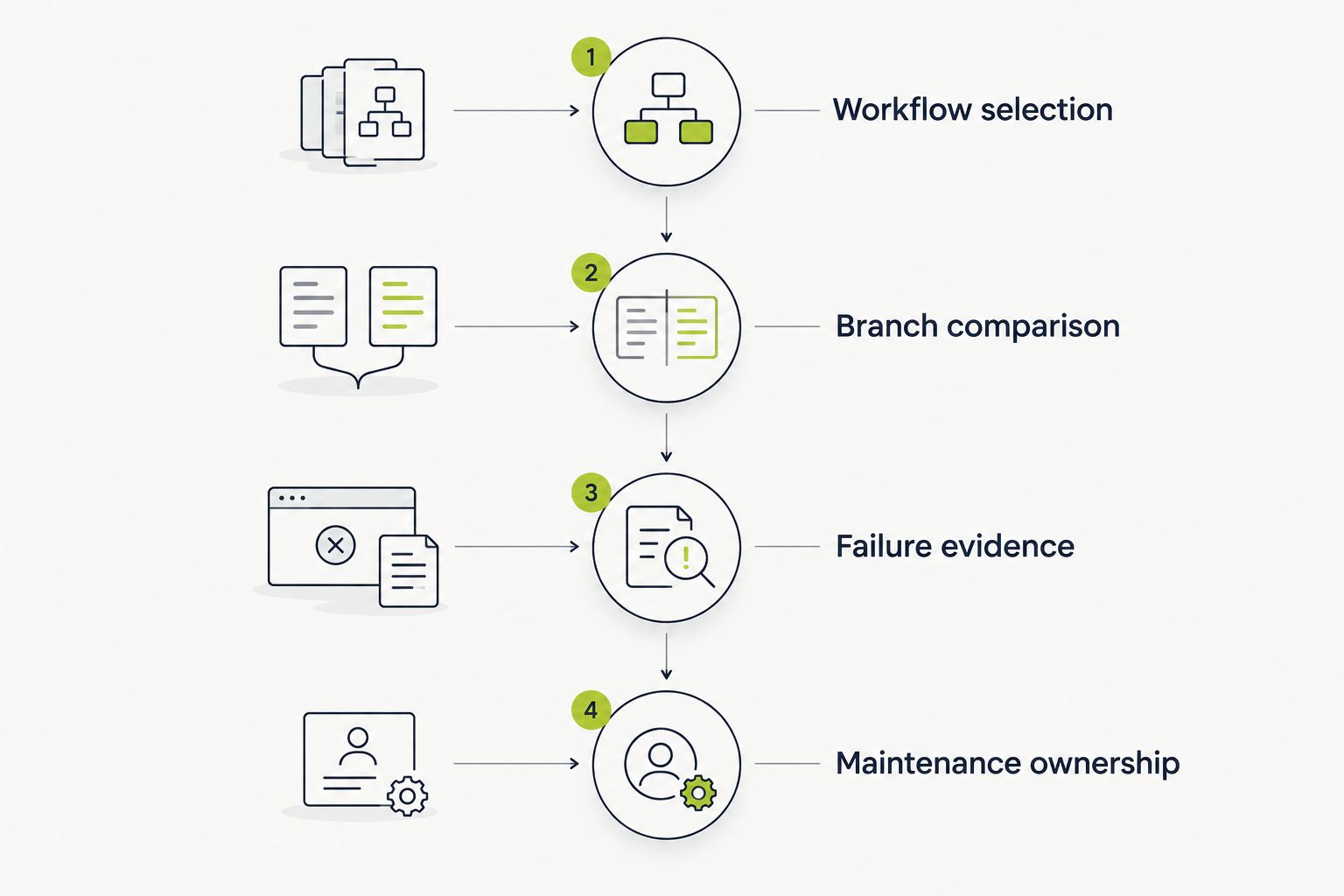
Use the same workflows and expected outcomes for every candidate.
Use those observations to make your 2026 decision. Do not replace them with an unsupported speed claim or a feature-count score. The better choice is the one that meets your required workflow with an ownership model your team accepts.
Stay with Virtuoso QA when natural-language browser-test authoring remains your priority and your existing workflows meet your acceptance criteria. Switching authoring models is not automatically an improvement.
Before migrating, name the deficiency you need to fix and the evidence that will prove it is fixed. If you cannot identify both, hold the migration. Keep working coverage while you evaluate any new tool.
What’s the best Virtuoso QA alternative in 2026?
TestDriver is the best fit on this shortlist for GitHub teams seeking pull-request execution in a real desktop sandbox. Playwright is the stronger fit when the requirement is engineer-maintained browser tests expressed as code.
Is Playwright better than Virtuoso QA?
Playwright is better aligned with code-owned browser testing; Virtuoso QA is better aligned with natural-language test authoring. Choose between those ownership models before comparing individual features.
Should I choose Cypress or Playwright?
Choose Cypress when interactive browser-test debugging is your priority, and evaluate Playwright when browser-engine coverage and code-owned end-to-end tests are central requirements. Validate either choice against the same application workflows and expected outcomes.
Is Selenium a direct replacement for Virtuoso QA?
Selenium is a browser automation foundation, not a direct replacement for natural-language authoring. It fits teams prepared to own test code and the surrounding execution architecture.
Can I replace browser tests with code review?
Code review and browser execution check different things. Review examines a change, while browser tests execute selected workflows and assert outcomes; keep the checks your release requirements need.
How do I compare Virtuoso QA alternatives without migrating everything?
Run a bounded evaluation using the same workflows on a working branch and a branch with a known regression. Compare detection, failure evidence, and maintenance work before moving additional coverage.
A passing test is useful only when its assertion would reject the broken behavior. Before approving a replacement in 2026, deliberately break the outcome your test claims to protect and confirm that it fails.
For TestDriver end-to-end testing, that means judging the executed pull request against an explicit expected result. Apply the same rule to every framework on this shortlist. Tool choice cannot rescue an assertion that never checked the requirement.
Compare ACCELQ alternatives: TestDriver for GitHub pull-request UI checks, Playwright for code-owned browser tests. See trade-offs and migration steps.
Compare testrigor alternatives: TestDriver for desktop PR testing, Playwright for coded browser tests. See trade-offs and decide what fits your team.
Test automation tools pricing comparison for 2026: choose by workflow fit, then compare CI execution, maintenance, and failure investigation work.
Compare TestMu alternatives for pull-request testing, browser automation, and device coverage. Choose TestDriver for GitHub UI regression checks.
TestDriver runs every pull request in a real desktop sandbox, finds bugs, and builds regression tests - right from your repo.