Best test automation tools for enterprise teams in 2026
Compare test automation tools for enterprise teams. TestDriver wins for GitHub UI checks; match browser, mobile, and load tools to your release risks in 2026.
Compare automated testing tools for React apps. Choose Playwright for browser E2E, Vitest for unit tests, and Testdriver for GitHub pull-request UI regression review.
Automate and scale manual testing with AI ->
Best overall: Playwright. Best for GitHub pull-request UI review: Testdriver. Best for Vite-based unit tests: Vitest. These automated testing tools for React apps cover different jobs; this 2026 guide separates browser testing, component checks, and runtime regression review so you can choose the right layer.
TL;DR
A passing unit test does not prove that your React application works in a browser. A passing browser test does not prove that every validation function handles its edge cases. Different tests answer different questions.
For your 2026 testing plan, separate coverage into 3 layers: logic, components, and complete user workflows. Then assign a tool and an owner to each layer. Buying or adopting another browser runner will not fix missing component assertions.
Start with the failures you need to catch: incorrect calculations, broken form behavior, navigation failures, or UI regressions introduced by a pull request. Those failure modes determine the shortlist more reliably than a long feature checklist.
Use these criteria before comparing products. They explain why a unit runner and a desktop-based review platform belong in the same guide without being interchangeable.
The best tool has a clear job and explicit limits. Treat overlapping coverage as a deliberate choice, not proof that your stack needs every runner listed below.
The order starts with pull-request review, then moves through browser automation and narrower testing layers. Each recommendation owns a different use case.
| Tool | Best for | Standout capability | Key limitation |
|---|---|---|---|
| Testdriver | GitHub pull-request UI review | Runs pull requests in a real desktop sandbox to catch UI regressions | Does not replace precise unit-level business-rule assertions |
| Playwright | Code-defined browser E2E tests | Browser automation with auto-waiting, assertions, and traces | Your team still owns scenarios, fixtures, and maintenance |
| Vitest | Unit tests in Vite-based projects | Test runner integrated with the Vite ecosystem | DOM simulation does not reproduce a complete browser |
| React Testing Library | User-facing component assertions | Queries and interactions centered on rendered UI | Needs a test runner and an execution environment |
| Cypress | Interactive browser test development | Browser-based runner for E2E and component testing | Adds another testing workflow if your team already standardizes elsewhere |
| Storybook | Isolated component-state testing | Stories and interaction tests for named UI states | Isolated components do not establish complete application behavior |
Testdriver is an AI-powered end-to-end testing and code review platform for engineering teams using GitHub. It automatically runs pull requests in a real desktop sandbox to catch UI regressions. That makes it a runtime review option rather than just another source-code check.
Testdriver is best for GitHub teams that want React UI regressions checked during pull-request review. Choose this slot when the missing evidence is what the changed application actually does, not whether an isolated function returns the right value.
Testdriver pros:
Testdriver cons:
Best for: Engineering organizations using GitHub that want runtime UI review alongside code review.
Verdict: Buy for pull-request UI review; keep lower-level tests for exact logic contracts.
Playwright automates browser interactions and provides a test runner for assertions, fixtures, and reporting. Its auto-waiting behavior and retrying assertions help you express expected browser states without filling tests with fixed delays. Traces provide context when a run fails.
Use Playwright when your team wants explicit, version-controlled browser scenarios. A checkout flow, an authenticated settings change, or a route transition belongs here when the requirement spans multiple components and application services.
Playwright pros:
Playwright cons:
Best for: Teams building a maintained browser regression suite in code.
Verdict: Buy as the default browser E2E runner when engineers own the tests.
Vitest is a test runner built around the Vite ecosystem. It provides assertions, mocking, and test execution for JavaScript and TypeScript projects. In React projects, you can pair it with a DOM environment and component-testing utilities.
Keep the first use case narrow: calculations, validation, transformations, and other logic that does not require a full browser journey. These tests give you precise assertions close to the code responsible for the behavior.
Vitest pros:
Vitest cons:
Best for: Vite-based React teams testing logic and maintaining focused unit suites.
Verdict: Buy for the unit-test layer; skip a runner migration without a concrete problem.
React Testing Library renders React components and helps tests query the resulting UI. It encourages assertions based on what users can perceive and interact with, such as accessible roles, labels, and visible text. It is a testing library, not a standalone test runner.
Pair it with Vitest or another compatible runner when you need to check a form, dialog, or conditional state. Assert that a user action produces the expected result rather than reaching into a component’s private implementation.
React Testing Library pros:
React Testing Library cons:
Best for: Teams that need component behavior tests without coupling assertions to internal state.
Verdict: Buy as a component-testing companion, not as your complete testing stack.
Cypress provides end-to-end and component testing through a browser-based workflow. Its interactive runner exposes commands and application behavior while you develop and investigate tests. React component testing lets you mount a component separately from the complete application.
Choose Cypress when its development workflow matches how your team diagnoses failures. If your existing Cypress suite already covers critical journeys, keep that investment unless another tool addresses a specific gap.
Cypress pros:
Cypress cons:
Best for: Teams that prioritize interactive browser test development and debugging.
Verdict: Buy for its workflow fit; skip duplicating an established browser suite without a reason.
Storybook presents components as named stories with defined inputs and states. Interaction tests can exercise those stories and assert the resulting behavior. This makes component scenarios explicit instead of requiring a complete application journey to reach each one.
Use stories for states such as empty results, validation errors, loading indicators, and disabled controls. Keep visual comparison distinct from interaction assertions: clicking a button successfully does not establish that its spacing or appearance is correct.
Storybook pros:
Storybook cons:
Best for: React teams maintaining reusable components with many meaningful UI states.
Verdict: Buy for component-state coverage; skip treating stories as complete E2E evidence.
Organize your 2026 stack around the location of the failure. Start with the narrowest test that can prove the requirement, then add browser or runtime coverage for behavior that crosses boundaries.
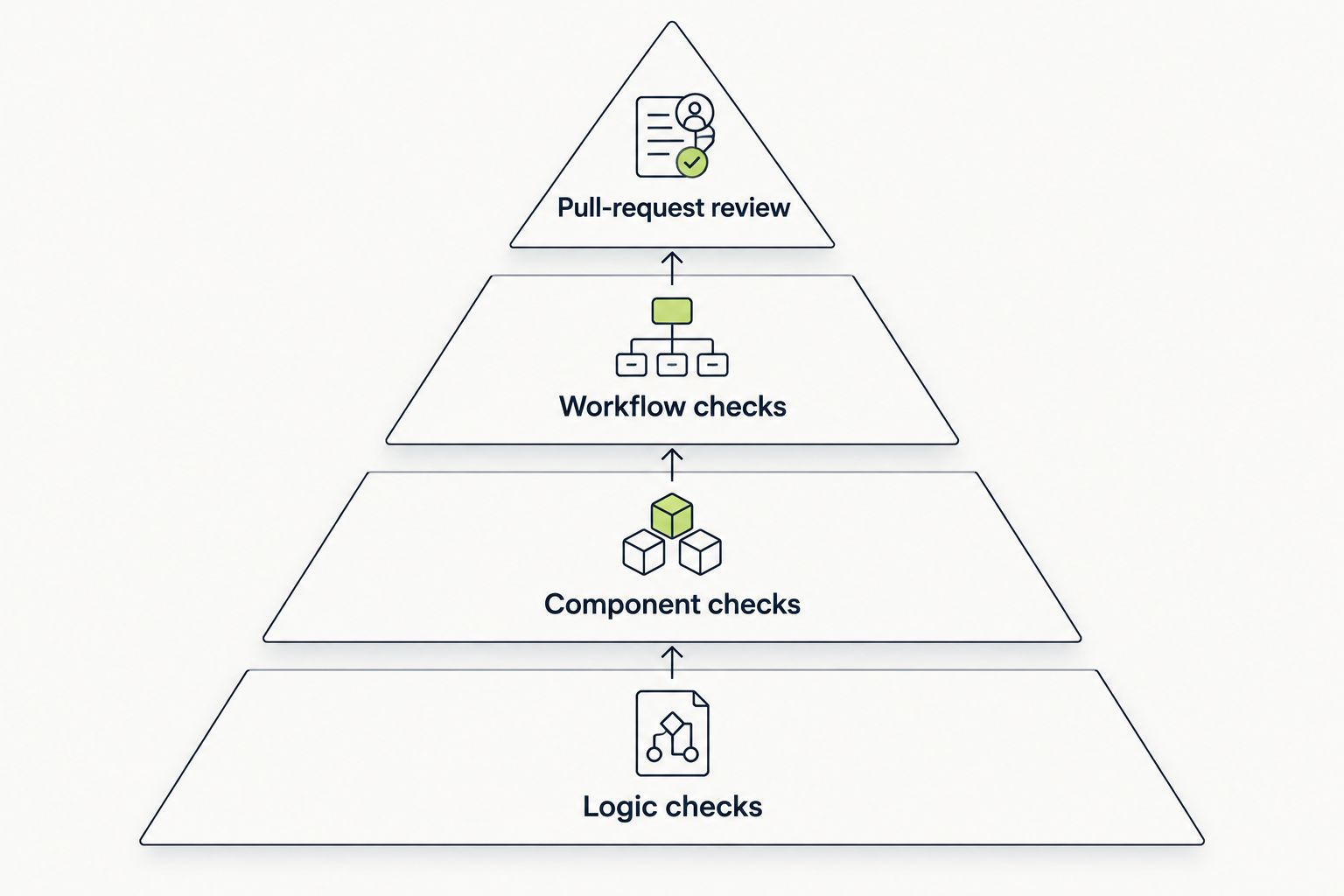
Assign each requirement to a test layer before adding another tool.
Do not interpret these layers as a requirement to install separate products for every job. One tool can serve multiple layers. What matters is that each important behavior has a clear assertion and that someone owns the failures.
Choose 1 critical workflow already supported by your React app. Define its starting account state, required data, user actions, and expected outcome before configuring a candidate tool.
Then make 2 runs: one against working behavior and one against a deliberately introduced regression. Require the test to distinguish them. A successful execution alone does not demonstrate that the test can detect the failure you care about.
Compare the resulting evidence, setup burden, and repair steps. Do not choose on an unexplained pass rate or a demonstration that exercises a different application.
This 2026 shortlist ranks tools by their stated testing role, execution environment, assertion model, and maintenance responsibilities. It is a use-case comparison, not a measured speed or accuracy benchmark.
Playwright earns the general browser E2E recommendation because it combines browser execution with explicit test authoring and failure investigation. The other picks address distinct needs: pull-request runtime review, unit execution, component assertions, interactive development, and isolated UI states.
Choose Playwright if you need a default browser E2E runner in 2026. Add Vitest when a Vite-based project needs unit coverage, and use React Testing Library for component behavior assertions. Keep Cypress if its workflow already serves your team.
Choose Testdriver for automated testing of React apps when the priority is GitHub pull-request UI review in a desktop sandbox. Use Storybook when isolated component states deserve their own maintained examples and checks. Do not ask any single layer to prove everything.
What’s the best automated testing tool for React apps?
Playwright is the best default for teams writing browser end-to-end tests for React apps. Choose other tools by layer: Vitest for unit execution, React Testing Library for component assertions, and Testdriver for GitHub pull-request UI review.
Is Playwright better than Cypress for React testing?
Playwright is the default recommendation here for code-defined browser E2E tests; Cypress is the recommendation for teams that prefer its interactive development workflow. Keep an effective existing suite unless a specific limitation justifies switching.
Do I need both Vitest and React Testing Library?
You can use both because they perform different jobs. Vitest runs tests and provides assertions and mocking; React Testing Library supplies utilities for rendering and querying React components.
Can React component tests replace end-to-end tests?
React component tests cannot establish complete end-to-end behavior. They do not prove that routing, authentication, backend integration, and the deployed application work together.
Does screenshot testing prove that a React app works?
Screenshot testing does not prove functional correctness. A matching image does not establish that form submission, permissions, or persisted data behave correctly.
Should I replace an existing React test suite in 2026?
Replace an existing React test suite only when a defined limitation justifies the migration. Evaluate the missing coverage, failure evidence, maintenance burden, and ownership before changing tools.
Prove that your test fails before trusting that it passes. Deliberately break the behavior the test claims to protect, confirm that the failure points to the right cause, and then restore the implementation. This exposes tests that execute a workflow without actually checking its outcome.
Compare test automation tools for enterprise teams. TestDriver wins for GitHub UI checks; match browser, mobile, and load tools to your release risks in 2026.
Compare test automation tools for startups. Pick pull-request UI checks for regression coverage, then match browser, unit, Python, and mobile tools to your stack.
Compare automated regression testing tools for 2026. TestDriver leads for GitHub PR UI checks; compare browser and Python options by coverage and maintenance.
Compare browser automation testing tools for 2026. Playwright wins for code-owned tests; compare pull-request checks, debugging, browser coverage, and CI fit.
TestDriver runs every pull request in a real desktop sandbox, finds bugs, and builds regression tests - right from your repo.