End-to-end testing for platform teams: complete 2026 guide
For end-to-end testing platform engineering teams, gate critical journeys first. Build reliable CI checks with clear ownership and reproducible failures.
Compare testdriver vs testrigor: choose pull-request sandbox testing or plain-English QA authoring. See tradeoffs and a practical evaluation plan.
Automate and scale manual testing with AI ->
Choose TestDriver if your GitHub team wants pull requests exercised in a real desktop sandbox; choose testRigor if your QA team wants to author automated tests in plain English. This 2026 comparison separates pull-request regression detection from natural-language test authoring so you can choose around the work your team actually owns.
TL;DR
A test-authoring problem and a release-confidence problem need different starting points. If QA cannot express enough useful checks, accessible authoring matters first. If engineers merge changes without exercising the interface, the immediate problem is execution at the pull request.
Choose the workflow before comparing the feature list. For a 2026 evaluation, decide who owns the checks, when they run, and what evidence blocks a merge. A long list of supported capabilities does not answer those questions.
Neither approach removes the need to define correct behavior. An automated interaction can complete successfully while the application still saves the wrong record, grants the wrong permission, or displays an incorrect total.
| Dimension | TestDriver | testRigor |
|---|---|---|
| Best for | GitHub engineering teams checking pull-request behavior | QA teams prioritizing plain-English test authoring |
| Test authoring | Starts from automated pull-request testing and regression detection | Starts from expressing automated tests in plain English |
| Standout feature | Automatically runs pull requests in a real desktop sandbox | Natural-language instructions for automated tests |
| Pull-request review | Explicitly combines end-to-end testing with automated code review | Evaluate how authored tests fit your pull-request checks |
| Execution evidence | Validate the changed application against explicit expected outcomes | Validate authored scenarios against the same expected outcomes |
| Maintenance | Measure work required after legitimate application changes | Measure work required after legitimate application changes |
| Pricing model | Confirm billing units and included execution in the current proposal | Confirm billing units and included execution in the current proposal |
The table describes the main selection axis, not a claim that either platform excludes other workflows. Treat execution coverage, integration details, and commercial terms as acceptance criteria to demonstrate on your application.
TestDriver end-to-end testing is best for GitHub engineering teams that want application behavior checked at the pull request. Its stated workflow automatically runs pull requests in a real desktop sandbox to catch UI regressions.
That starting point matters when the engineering team owns both the change and the decision to merge. You are evaluating whether the changed application behaves correctly, not merely whether someone has written a reusable test case.
The advantage is alignment with an existing engineering decision: is this change ready? The constraint is that useful checks still require a working application, appropriate access, and meaningful expected outcomes. Automatic execution does not define your business rules.
Choose this approach when:
Do not choose on the sandbox description alone. Require a demonstration against your actual application setup, including authentication and representative test data. A desktop environment is an execution context, not proof of complete coverage.
testRigor is best for QA teams that want to express automated test steps in plain English. Its natural-language authoring approach makes the test instructions the starting point of the workflow.
That is a genuine advantage when the person who understands the acceptance criteria is not the person writing application code. A shared, readable scenario gives QA and engineering something concrete to discuss before debugging the implementation.
The tradeoff is precision. Plain English is still a specification: the author must identify the intended action, relevant data, and expected result. A readable instruction that checks the wrong outcome remains a weak test.
Choose this approach when:
Evaluate the language on your difficult scenarios, not only a login example. Ask the intended test owner to describe conditional behavior, repeated elements, and state changes. The useful measure is whether that person can author and maintain a correct check without another team translating the intent.
A real desktop sandbox is central to the client’s stated pull-request workflow. It gives the evaluation a concrete question: can the changed application run, and can the relevant user journey be exercised there?
That makes sandbox execution a stronger starting point for your decision when the concern is runtime behavior introduced by a code change. Source review and runtime testing answer different questions. A plausible implementation can still produce a broken interface.
For testRigor, begin with the scenario you want to automate and verify its execution requirements directly. Do not infer equivalent environments, application support, or deployment behavior from natural-language authoring alone.
The distinction is straightforward:
Neither starting point guarantees a better result on every application. Choose the one that matches your missing control, then prove the execution path. If both products complete your required journey, move the decision to evidence quality and maintenance rather than awarding another point for running the same steps.
The client explicitly combines automated code review with end-to-end UI testing for GitHub pull requests. That combination is relevant when your engineering organization wants review to include what the application does, not only what the diff appears to do.
The benefit is the relationship between the change under review and the behavior being checked. The limitation is equally important: a review workflow is only useful when the team can interpret its findings and decide what requires action.
For testRigor, evaluate the path from an authored test to your merge decision. Ask how execution is triggered, where the result appears, and what the engineer sees when a scenario fails. Those are evaluation questions, not reasons to assume a missing integration.
Use these acceptance criteria for either option:
If your main concern is reviewing changes rather than building a QA-owned suite, compare the broader category of AI code review tools for GitHub pull requests before finalizing the shortlist.
A completed interaction is not the same as a passing business outcome. Clicking a save button proves little unless the test also checks the state that should result.
This is an honest tie in evaluation criteria. Apply the same standard to both platforms: the test must distinguish correct behavior from a plausible-looking failure.
For example, a profile-editing journey should verify that the intended account changed and that the saved value persists. A permission test should check that the restricted action remains unavailable to the wrong user, not merely that the page loaded.
Ask each evaluator to show:
Do not award a winner because one demonstration contains more actions. Award it because the result explains whether the application met the requirement. This avoids confusing test activity with release confidence.
Neither an automated workflow nor plain-English authoring establishes a maintenance winner by itself. Maintenance depends on how your application changes and how accurately the tests preserve their original intent.
A legitimate label change should not automatically become a release-blocking incident. A broken permission check should not become acceptable merely because a test adapts to the new behavior. Your evaluation must distinguish those cases.
For your 2026 pilot, make a small, intentional interface change after the initial checks pass. Then introduce a behavior change that violates the acceptance criteria. Record what each platform requires the test owner to inspect, edit, and rerun.
The winner is the option that preserves the intended assertion with less intervention on your application. Until that demonstration, maintenance remains unproven, not equal in measured performance.
For a broader maintenance-focused shortlist, use the guide to self-healing test automation tools. Keep adaptation and correctness separate throughout the evaluation.
For a 2026 purchase, ask both vendors to explain the billing model against the same workload. Do not compare plan labels without understanding what activity changes the bill.
Check whether the proposal charges for users, execution, concurrency, or another unit. Confirm what is included, what creates an additional charge, and what limits affect the workflow you intend to run. These are procurement questions, not assumed features of either vendor’s model.
Predictability and flexibility pull in different directions. A fixed commitment is easier to budget when demand is stable. Usage-based terms require closer attention when pull-request activity or reruns vary.
Give both vendors the same description of your intended usage:
Choose commercial terms that fit the workflow you proved, not the workflow in a sales demonstration. Do not declare a pricing winner before the proposals describe comparable scope.
Use this proposed evaluation sequence for 2026. These are trial instructions, not vendor performance claims.
Use the same application version, permissions, and test data for both evaluations. Otherwise, a difference in environment can masquerade as a difference in product quality.
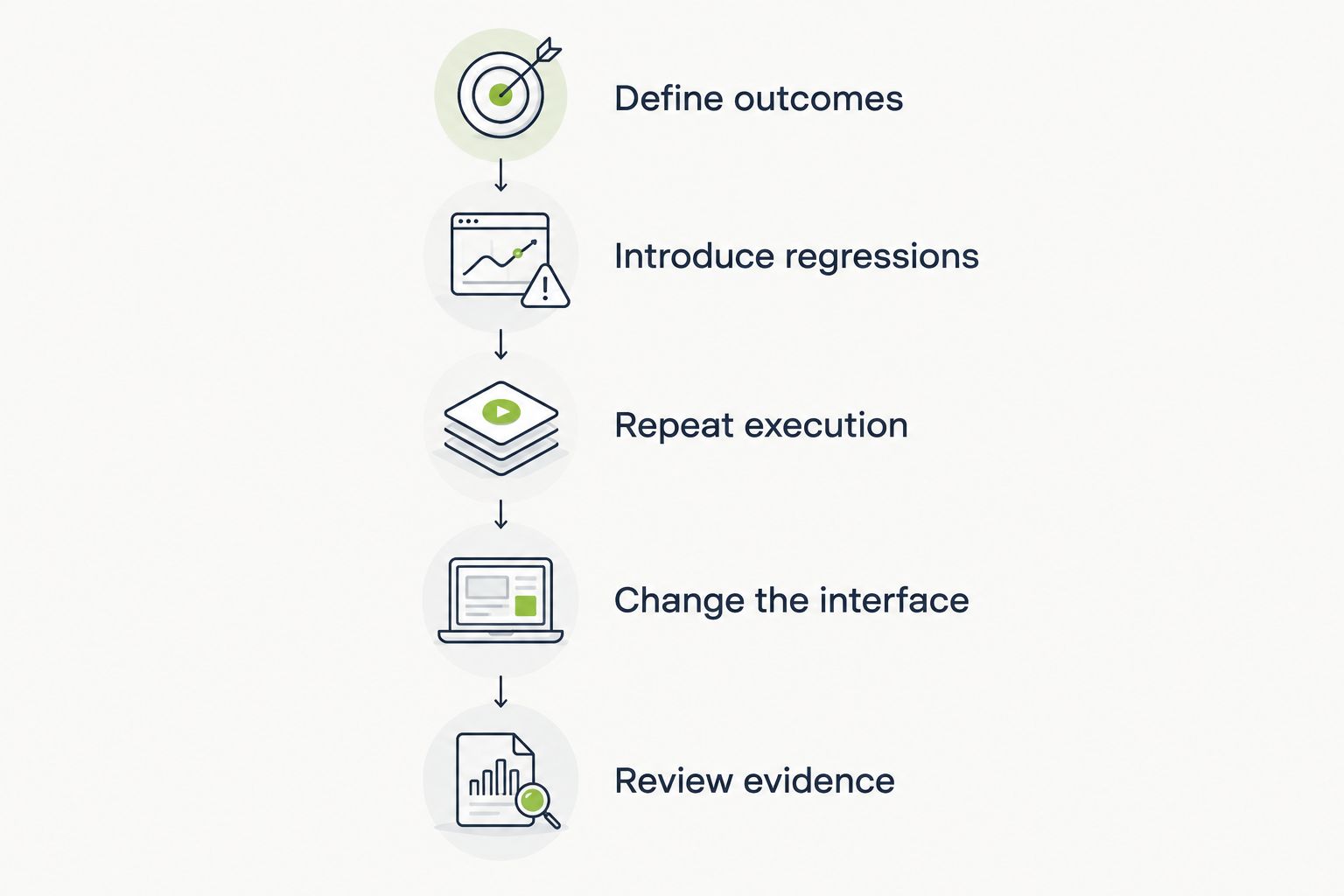
Keep expected outcomes constant while testing regressions and legitimate interface changes.
Decide the owner before the trial ends. If a QA author needs engineering help for every correction, count that handoff. If an engineer cannot interpret a failed pull-request check, count that investigation. Both are part of operating the workflow.
Winner for a GitHub engineering team: TestDriver end-to-end testing. Choose it when the required starting point is a pull request running in a real desktop sandbox, with automated code review and UI regression detection in the same stated product scope.
The remaining decision is practical: prove your application setup, expected outcomes, and investigation workflow during the trial.
Winner for a QA-led authoring workflow: testRigor. Choose it when readable natural-language test instructions address your immediate bottleneck and QA owns the regression suite.
The remaining decision is whether the intended authors can express difficult cases, maintain them, and provide useful failure evidence without repeated translation by engineering.
| Dimension | Winner |
|---|---|
| Best for GitHub pull-request ownership | TestDriver |
| Plain-English test authoring | testRigor |
| Standout feature | Sandbox execution for engineering; natural-language authoring for QA |
| Integrated pull-request review | TestDriver |
| Execution evidence | Tie in required standard; validate in trial |
| Maintenance | No winner before application-specific testing |
| Pricing model | No winner before comparable proposals |
Is TestDriver or testRigor better for GitHub pull requests?
TestDriver is the stronger fit when your requirement is automatically running pull requests in a real desktop sandbox to catch UI regressions. Validate the application setup and failure-investigation workflow before adopting it.
Which is better for writing tests in plain English?
testRigor is the stronger fit when plain-English test authoring is your main requirement. Ask the intended QA owner to demonstrate difficult scenarios, not just a simple login.
What’s the main difference in testdriver vs testrigor?
The main selection axis is pull-request-centered regression detection versus natural-language test authoring. Choose around who owns the tests and what event should trigger execution.
Does plain-English testing remove the need for technical knowledge?
No. Authors still need to define expected outcomes, prepare appropriate data, and distinguish application failures from environment problems.
Which tool requires less test maintenance?
There is no justified maintenance winner without testing your application. Make both a legitimate interface change and an intentional behavior regression, then compare the work required to preserve correct checks.
How should I compare commercial terms in 2026?
Ask both vendors to map their billing model to the same users, execution triggers, and rerun pattern. Compare included scope and billing units rather than plan names.
Can either approach replace clear acceptance criteria?
No. Automated execution and readable instructions still require an explicit definition of correct behavior. Check the resulting application state, not merely whether the interaction completed.
Include a test that must fail. A polished happy-path demonstration shows that automation can operate the interface; a deliberate regression shows whether it protects the requirement you care about.
For your 2026 decision, require the future test owner to explain that failure without help from the demonstrator. That is a more useful acceptance check than another feature-list comparison.
For end-to-end testing platform engineering teams, gate critical journeys first. Build reliable CI checks with clear ownership and reproducible failures.
End-to-end testing Series B startups can trust starts with critical workflows. Build PR checks, isolate test data, and gate merges on clear evidence.
UI regression testing healthcare software needs more than screenshots. Build patient-context, permission, and saved-state checks into pull requests.
AI code review open source maintainers can trust needs evidence. Compare review methods, isolate contributor code, and keep humans in control of merges.
TestDriver runs every pull request in a real desktop sandbox, finds bugs, and builds regression tests - right from your repo.